

Tool Tip Tuesday for Adobe Premiere Pro: Go Back for faster bin navigation
Welcome to Tool Tip Tuesday for Adobe Premiere Pro on ProVideo Coalition. Every week, we will share a new...

Tool Tip Tuesday for Adobe Premiere Pro: Export Markers as an HTML file
Welcome to Tool Tip Tuesday for Adobe Premiere Pro on ProVideo Coalition. Every week, we will share a new...

Tool Tip Tuesday for Adobe Premiere Pro: Map the Production panel shortcut
Welcome to Tool Tip Tuesday for Adobe Premiere Pro on ProVideo Coalition. Adobe Premiere Pro has very useful keyboard...

Tool Tip Tuesday for Adobe Premiere Pro: Zoom To Frame and Zoom to Sequence
Welcome to Tool Tip Tuesday for Adobe Premiere Pro on ProVideo Coalition. Every week, we will share a new tooltip...

Tool Tip Tuesday for Adobe Premiere Pro: Set to Frame Size preference
Welcome to Tool Tip Tuesday for Adobe Premiere Pro on ProVideo Coalition. Every week, we will share a new...

How to Edit Smarter in Premiere Pro
Adobe Premiere Pro is a deep program with numerous features that give it an editing edge. But if you...
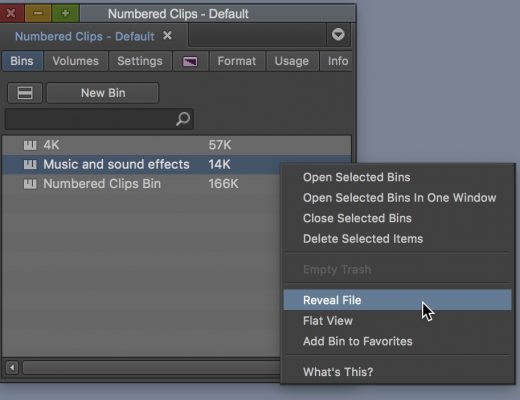
Day 24 #28daysofQuickTips 2018 – Reveal File in Avid Media Composer
Avid Media Composer has a coupe of places there right+clicking on a object will provide the option to Reveal...

Day 23 #28daysofQuickTips 2018 – Drag in media for a quick import into your NLE
While all the three major NLEs have a tool made for importing media into a project both Final Cut Pro...
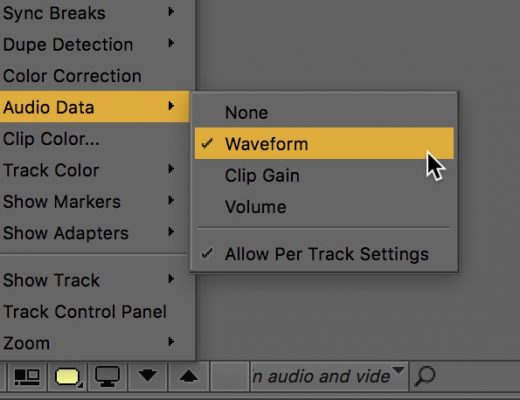
Day 19 #28daysofQuickTips 2018 – Map audio waveforms and keyframes in Avid Media Composer
A number of versions ago Avid added the very handy per track toggle option for audio waveforms where you...

Day 7 #28daysofQuickTips 2018 – Apply and Toggle audio fades in Final Cut Pro X
I’m still quite perplexed that nearly 7 years after its release Final Cut Pro X still doesn’t have an audio-only...






