
Skip to content
ProVideo Coalition
  • Latest
  • News
  • Production
  • Post Production
  • Podcasts
  • Reviews
  • Experts
  • More
    • About Us
      About Us MM Image
    • Meet the Experts
      Meet the Experts MM Image
    • Advertise
      Advertise MM Image
    • Contact Us
      Contact Us MM Image
  • Subscribe
  • Search
    • Search MM Image
      • FOLLOW US
      • TOP LINKS
      • TIPS
      • TOPICS
      • WEBINARS
Post Production

A new extension finally makes iXML metadata useful in Adobe Premiere Pro

A new extension finally makes iXML metadata useful in Adobe Premiere Pro 1
  • twitter
  • facebook
  • pinterest
Support ProVideo Coalition
Shop with Filmtools Logo

Filmtools

Filmmakers go-to destination for pre-production, production & post production equipment!

Shop Now

iXML Renamer for Premiere Pro is a name your own price panel that might be one of the more useful additions to Premiere

Profile Picture
Scott Simmons
March 13, 2024
Comment

Many years ago I said publically in a blog post here on PVC: Adobe and Avid need to support iXML metadata for audio channels in the timeline.

Avid finally somewhat supports this with the ability to Display Source Track Name in Timeline in the recent release, but Adobe is still MIA with better iXML metadata support in Premiere Pro.

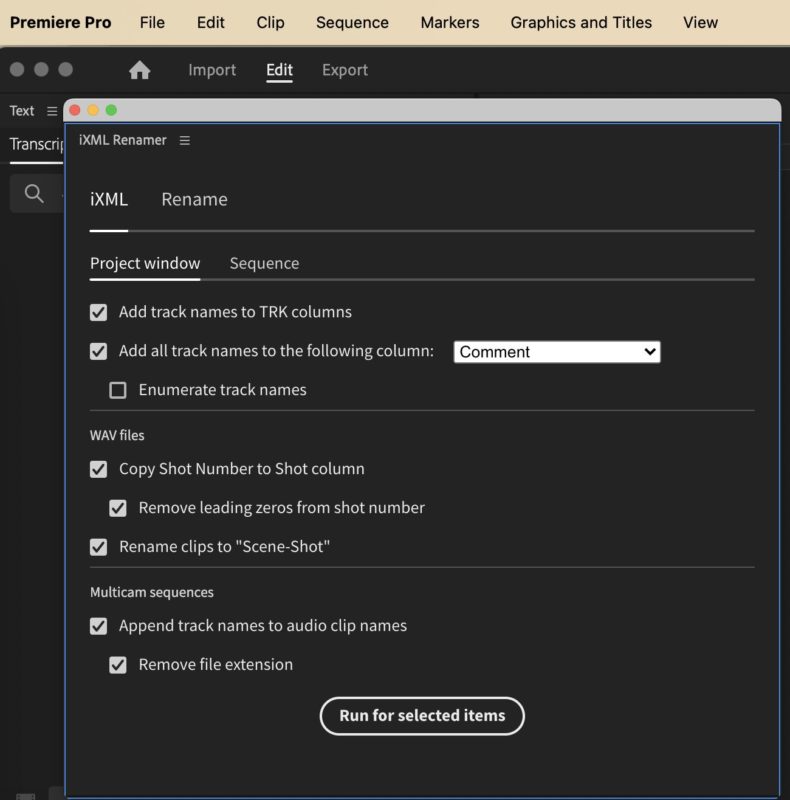
That’s where a new third-party extension called iXML Renamer for Premiere Pro comes to the rescue. You can name a fair price, download and then install iXML Renamer for Premiere Pro and you get a new panel that can do a lot of different things with the iXML metadata that your audio recordist was nice enough to setup during the shoot.
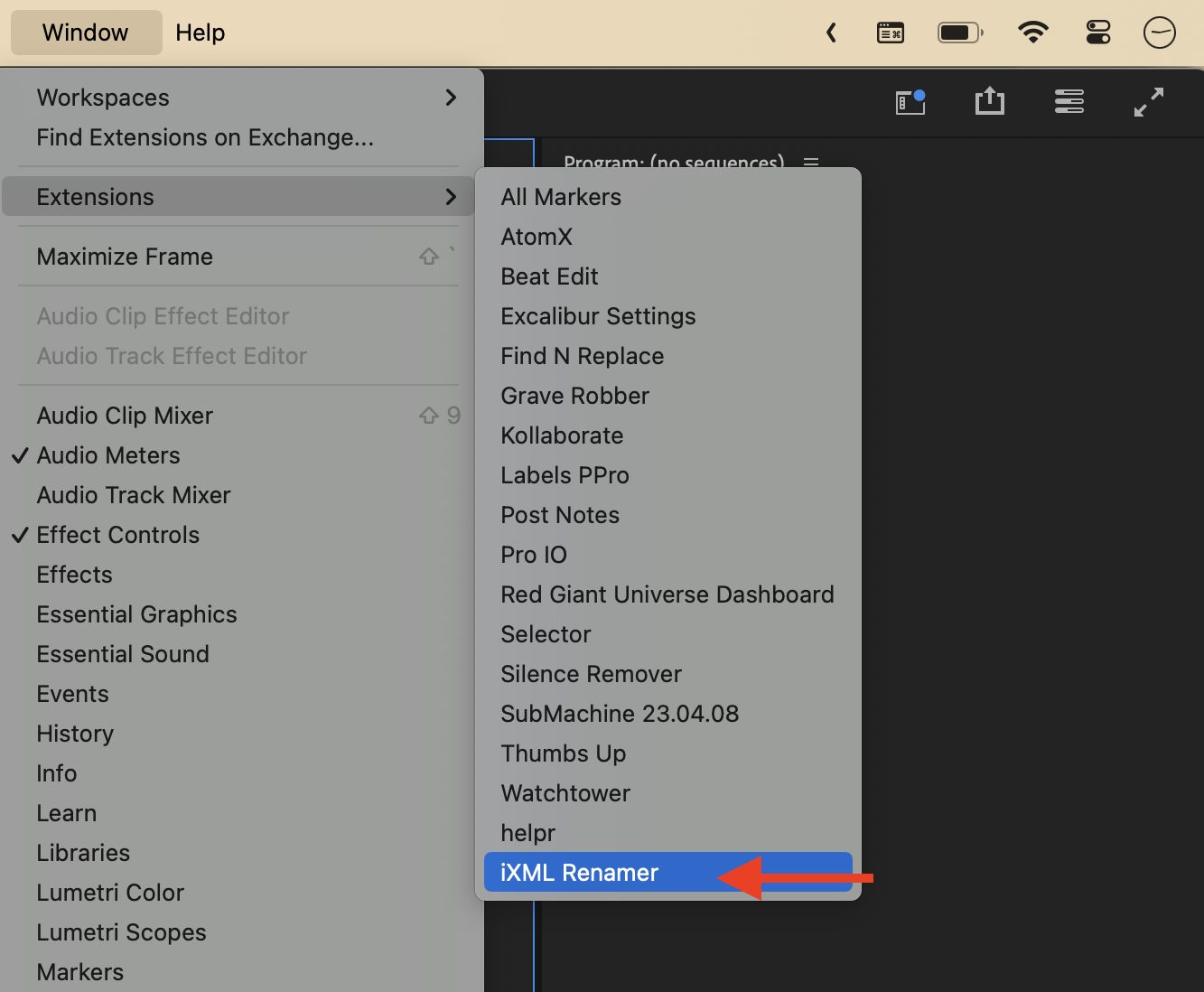
A new extension finally makes iXML metadata useful in Adobe Premiere Pro 2
The Adobe Premiere Pro plug-in architecture again comes in handy (though with limitations) to further reflect my most loved thing about Premiere.

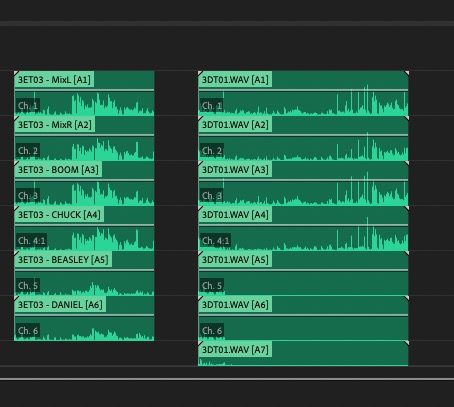
iXML is very useful audio metadata that can be tagged in broadcast wave audio files recorded on-set that can quite literally name each channel of audio in a .WAV file with data, such as the name of the subject speaking. You can see how handy that is if you’re working on a show with several different characters who each have their own mic being recorded into a poly WAV.

Up until now, the only real way to make use of this iXML metadata in Adobe Premiere Pro was to dig into the Metadata panel. And only then you had to twirl down a bunch of arrows. Where this metadata would be most useful, is in the timeline.
A new extension finally makes iXML metadata useful in Adobe Premiere Pro 3
⬆️ Which of these WAV files looks more useful to you?

I can’t think of any creative editing scenario where seeing the individual audio channel / mic names on the audio or multicam clips themselves would not be useful while editing.
A new extension finally makes iXML metadata useful in Adobe Premiere Pro 4
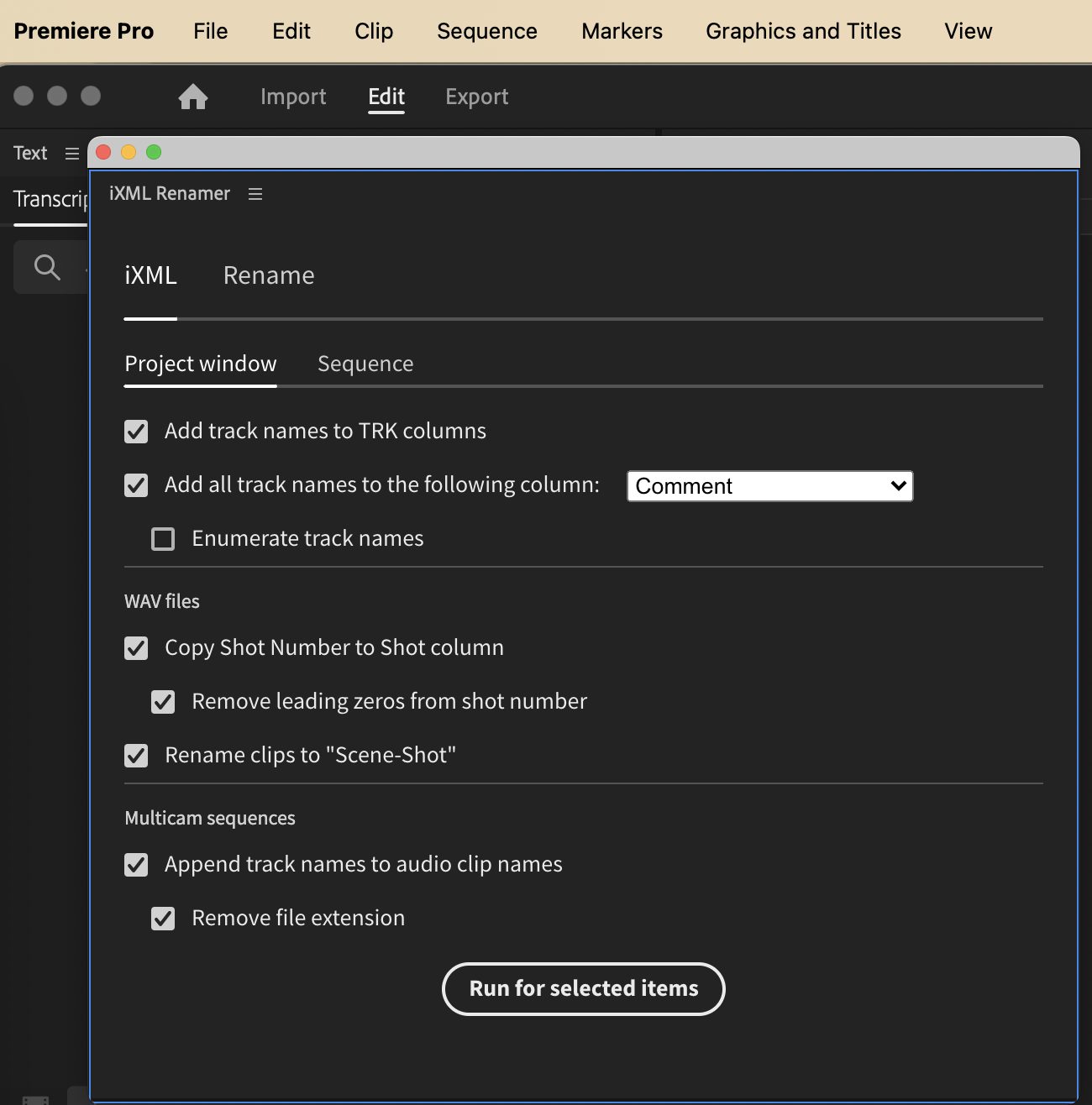
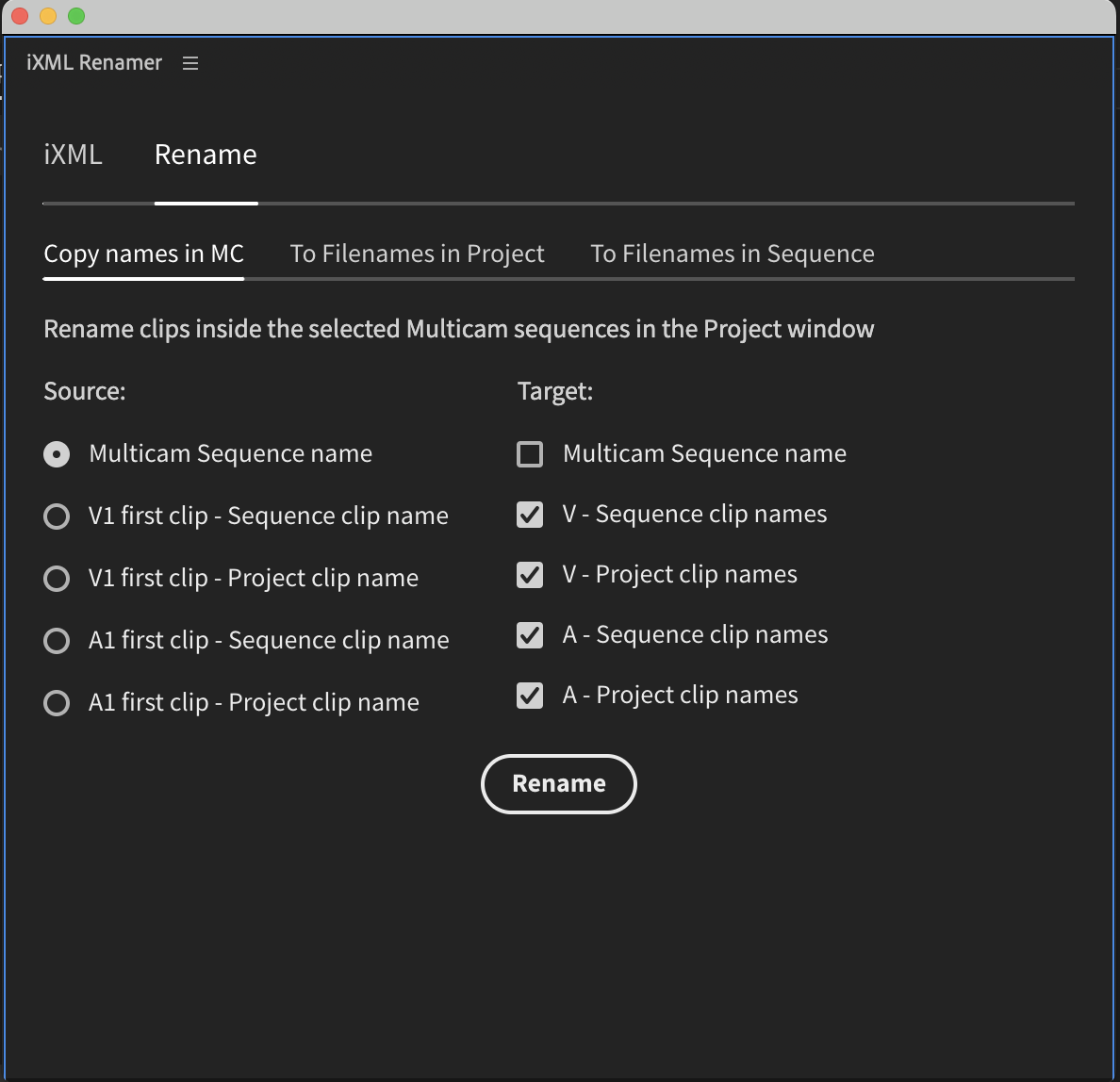
You can rename both the wav file channels as well as channel in your Multicam Source Sequences, so there is a lot of flexibility in how to use this iXML Metadata. So encourage your audio recordist to add this metadata during the shoot!

The panel has a number of different options for how to use that metadata and get it to the clips and Multicam Source Sequences in Premiere Pro. It might take a bit of experimentation to figure out exactly what is most useful for your task. I’ve been working with the early alphas for a while, and it’s worth taking the time to learn what will be most useful. More than anything, it’s a revelation to finally be able to get this data which has long existed in broadcast wave audio files, into the timeline in a useful way.

There are some limitations that I would encourage you to review in the extension’s documentation. The biggest two I’ve found is this:

  • Clips have to be selected in the Project window and not an open bin. Apparently that’s a limitation of Premeire. I’ll often go into list view in the Project panel and twirl down the arrow on my bin and select the clips there instead of opening a bin in its own tab.
  • You must turn off Show Source Clip Name and Label in the timeline wrench menu. So no seeing both your custom clip label colors as the audio metadata at the same time. That’s a big limitation that you’ll have to explore for yourself. I’ll toggle this setting on and off during the edit so I can use both. This can be assigned to a keyboard shorcut.

Despite these limitations, this can still be a very useful extension.
A new extension finally makes iXML metadata useful in Adobe Premiere Pro 5
You’ve also got a lot of renaming options in the extension as well.

iXML Renamer for Premiere Pro is available on Gumroad from an independent developer so I would encourage you to try it for a fair price and see how it can help you. I expect some new tools might be added to this extension in the future or perhaps completely new tools as the developer continues to make new things.

But the real question is: Why hasn’t Adobe built this functionality into Premiere Pro on its own?



Adobe Premere Pro ixml iXML metadata iXML Renamer for Premiere Pro premiere pro

What Do You Think? Let Us Know.

Subscribe
Login
Notify of
guest
guest
0 Comments
Oldest
Newest Most Voted

PVC Favorites

1 month ago

Adobe Premiere is adding a Generative Media Tool

Adobe Premiere is adding a Generative Media Tool 6
Review: Insta360 Luna Ultra 7
Production

Review: Insta360 Luna Ultra

KSUN ZL35
Business

Review: KSUN ZL35 network walkie talkie radio with wifi/4G & Zello

Pentacon lens with zebra-striped barrel on a desk next to a drinking glass.
Production

Finding more classic stills lenses

Latest

31 minutes ago

Tool Tip Tuesday for Adobe Premiere: Sync adjacent clips in the timeline

Tool Tip Tuesday for Adobe Premiere: Sync adjacent clips in the timeline 8
Review: The Saramonic K9 Wireless Mic System 9
Production

Review: The Saramonic K9 Wireless Mic System

Art of the Frame Podcast: Editors on Editing with “Beef” Editor Laura Zempel 10
Art of the Frame

Art of the Frame Podcast: Editors on Editing with “Beef” Editor Laura Zempel

Fire Alive horror film shot with Blackmagic Camera app
Post Production

Fire Alive horror film shot with Blackmagic Camera app

You Might Also Like

Tool Tip Tuesday for Adobe Premiere Pro: Perfect Sequence Templates (With Track Names That Actually Stick) 11

Tool Tip Tuesday for Adobe Premiere Pro: Perfect Sequence Templates (With Track Names That Actually Stick)

Written by Jeff Greenberg
May 26, 2026
Welcome to Tool Tip Tuesday for Adobe Premiere on ProVideo Coalition One of the signs of an experienced editor: specific...
Tool Tip Tuesday for Adobe Premiere Pro: Fastest Exports Ever 20

Tool Tip Tuesday for Adobe Premiere Pro: Fastest Exports Ever

Written by Jeff Greenberg
May 5, 2026
Welcome to Tool Tip Tuesday for Adobe Premiere on ProVideo Coalition I both love and dread export. The emotional depression...
Tip title: Time to update your Default Transition.

Tool Tip Tuesday for Adobe Premiere Pro: Fix your Cross Dissolves 2026 – You have the LEGACY as your default.

Written by Jeff Greenberg
March 17, 2026
Welcome to Tool Tip Tuesday for Adobe Premiere Pro on ProVideo Coalition When I moved to Premiere 2026, I...
Tool Tip Tuesday for Adobe Premiere Pro: See Track Names at Minimized Track Height 35

Tool Tip Tuesday for Adobe Premiere Pro: See Track Names at Minimized Track Height

Written by Scott Simmons
March 10, 2026
Welcome to Tool Tip Tuesday for Adobe Premiere Pro on ProVideo Coalition. Every week, we will share a new...
ProVideo Coalition

Contact

  • +1-747-444-1870
  • [email protected]

Useful Links

  • Advertise With Us
  • Mobile App
  • Topics
  • Meet the Experts
  • Webinars
  • Contact Us

Our Websites

  • Filmtools
  • PacRad
  • Tour Supply
  • Moviola.com
  • Moviola Digital

Sign up for the ProVideo Coalition weekly e-newsletter and get the most popular articles, blogs, and reviews right to your inbox.

By entering your email, you agree to our Terms & Conditions and Privacy Policy

© 2026 ProVideo Coalition, a Filmtools Company. All Rights Reserved.
Terms of Service Privacy Policy Cookie Policy Sitemap
Manage Cookie Consent
We use cookies to optimize our website and our service.
Functional Always active
The technical storage or access is strictly necessary for the legitimate purpose of enabling the use of a specific service explicitly requested by the subscriber or user, or for the sole purpose of carrying out the transmission of a communication over an electronic communications network.
Preferences
The technical storage or access is necessary for the legitimate purpose of storing preferences that are not requested by the subscriber or user.
Statistics
The technical storage or access that is used exclusively for statistical purposes. The technical storage or access that is used exclusively for anonymous statistical purposes. Without a subpoena, voluntary compliance on the part of your Internet Service Provider, or additional records from a third party, information stored or retrieved for this purpose alone cannot usually be used to identify you.
Marketing
The technical storage or access is required to create user profiles to send advertising, or to track the user on a website or across several websites for similar marketing purposes.
Manage options Manage services Manage vendors Read more about these purposes
View Preferences
{title} {title} {title}
Manage Cookie Consent
We use cookies to optimize our website and our service.
Functional Always active
The technical storage or access is strictly necessary for the legitimate purpose of enabling the use of a specific service explicitly requested by the subscriber or user, or for the sole purpose of carrying out the transmission of a communication over an electronic communications network.
Preferences
The technical storage or access is necessary for the legitimate purpose of storing preferences that are not requested by the subscriber or user.
Statistics
The technical storage or access that is used exclusively for statistical purposes. The technical storage or access that is used exclusively for anonymous statistical purposes. Without a subpoena, voluntary compliance on the part of your Internet Service Provider, or additional records from a third party, information stored or retrieved for this purpose alone cannot usually be used to identify you.
Marketing
The technical storage or access is required to create user profiles to send advertising, or to track the user on a website or across several websites for similar marketing purposes.
Manage options Manage services Manage vendors Read more about these purposes
View Preferences
{title} {title} {title}

Newsletter Sign Up

Sign up for the ProVideo Coalition weekly e-newsletter and get the most popular articles, blogs, and reviews right to your inbox.

×
wpDiscuz