Filmtools
Filmmakers go-to destination for pre-production, production & post production equipment!
Shop NowBeyond its up to 75 dB of gain, the Wave XLR from Elgato offers several amazing realtime features for macOS and Windows users.


Here is my review of Elgato’s Wave XLR with Wave Link and Voice Focus. Although the creators of the Elgato Wave XLR audio interface (≈US$170) mainly target online video gamers, in this review article, I’ll demonstrate how valuable and powerful the Wave XLR (and its accompanying software) can also be ideal for other industries, like high-quality videoconferencing, live broadcast television remote guests, podcast production, live online radio, commercial voiceover, audiobook production and tutorials. These markets are covered and reviewed by a different set of KOLs (Key Opinion Leaders) than the ones who cover online video gaming. Those other KOLs are those of us who collaborate with respected platforms like Escuchalibros.com (in Castilian/castellano) and ProVideoCoalition.com (in English), and are (so-far) ignored by Corsair’s marketing team. (Corsair is the current owner of the Elgato brand). Naturally, the technical jargon for features vary among the mentioned markets. Despite their ignoring us, I am not ignoring them or its products for these (so far) ignored markets. Ahead I’ll include several audio test recordings made with three very different microphones (both condenser and dynamic) from RØDE and Shure to demonstrate the quality of the Wave XLR, as well as clarifying many of its compelling features and covering more about the company, brand and history as a creator of TV tuners for computers.
In this article
- About the Elgato brand and history
- The importance of realtime functions and effects in an XLR audio interface in 2025
- Why I picked these three diverse microphones for my tests
- OS compatibility for the Elgato Wave XLR
- Elgato Wave XLR inputs and outputs
- Wave XLR lacks output for powered speakers: How I resolved it
- Wave XLR sampling frequencies
- Clipguard, to prevent clipping automatically and flawlessly
- Capacitive mute button on the top of the Wave XLR
- Front panel knob and LED indicators
- Voice Focus from AI|coustics technology (with test recordings)
- Is the up to 75 dB of gain enough to be clean? (The SM7B challenge + test recordings)
- Free and paid add-on realtime effects
- Adjustment of LED colors on the Wave XLR panel
- Physical colors of the Wave XLR (only via the direct Elgato website)
- How to use the Wave XLR with a headset mic that is not XLR
- Using pre-recorded audio carts with Wave Link
- Using Wave Link with remote guests and phone callers with proper mix-minus
- When the Wave XLR with Wave Link are an ideal fit (and when not)
- When multiple Wave XLR units without Wave Link are a good fit (although with fewer features)
- Caveat
- Ratings
- Suggestions to the manufacturer and developers
- Conclusions
About the Elgato brand and history
Although Elgato is now a brand of Corsair GmbH (a German company which also has offices in California, United States), it was born as Elgato Systems in 2010 in Munich, Germany. While Elgato was under its original ownership, I was independently involved with integrating Elgato TV tuners in computers in a company in Florida, together with its companion DVR (digital video recorder) software similar to TiVo, to set days and times to record certain TV shows from certain TV channels. In this case, it was for clients to be able to perform TV airchecks to confirm and prove the successful broadcast of certain commercials. The Elgato tuners I used at that time were PCI cards to be installed inside shoebox style computers, but there were also external boxes too. Per my research, Elgato Systems stopped selling its TV tuners in 2015 and later sold the EyeTV brand and product line to Geniatech Europe in 2016. In 2018, the Elgato brand was purchased by Corsair Gaming, without any TV tuners. In addition to my prior use of the Elgato TV tuners and very recent coverage of Elgato’s audio devices and software, I have happily used the Elgato Green Screen XL since 2023 and a Stream Deck since 2024, with the following associated articles: Using a Stream Deck for «guillemets» (angle quotation marks) and in Stream Deck now controls RØDECaster Video mixer/switcher.
Corsair GmbH is a German entity, but it is a subsidiary of the larger, U.S.-based Corsair Gaming, Inc.
Corsair GmbH was formed in Germany after Corsair acquired the German company Elgato Systems in 2018, keeping the Elgato brand under the Corsair umbrella.
The name «Elgato» comes from the Castilian/castellano term el gato, which refers to a male cat or feline, where the feminine version is la gata, of which two different gatas (female cats) are covered in my books La conspiración del castellano and in the English adaptation, The Castilian Conspiracy). Elgato is not the only German brand I have known which uses a Castilian word as a brand name. Other German brands which have a Castilian brand name include FotoMágico (a slideshow software editor for macOS and iPadOS, developed by Boinx Software International GmbH of Germering, Bavaria, Germany) and Mercedes (now Mercedes-Benz) which is based in Stuttgart, Baden-Württemberg, Germany. The Mercedes brand comes from the homonym Castilian feminine first name, which translates to English as Mercy.
The importance of realtime effects in an XLR audio interface in 2025
In the past, the only important details of XLR audio interfaces were to have a high quality amplifier and A-to-D (analog to digital) converter. That has changed, which is why the Wave XLR offers much more than a great preamp and A-to-D, as I’ll demonstrate ahead. In addition to those traditional requirements, the Wave XLR and its accompanying software offer realtime muting, realtime Clipguard, realtime noise reduction (without gating), realtime reverb reduction, realtime dynamic compression, realtime equalization and more. Even though in the past, many productions were designed to handle many of these functions in post-production, about half of the applications I mention in the introductory paragraph (videoconferencing, live broadcast television guests, live online radio) often don’t have any post-production, so they need pristine audio now, not later! Even the other fields I mentioned which do involve post-production (podcasting, audiobook production, commercial voiceover and tutorials) can be alleviated by having a pristine audio signal in advance, so the remaining steps in post-production are fewer and more content-related, which streamlines the process. Ahead, I’ll be testing the preamps and A-to-D, as well as the other features which make the Wave XLR more compelling compared with other audio interfaces which lack many or all of those features.
Why I picked these three diverse microphones for my tests
I picked these very different microphones to test the Elgato Wave XLR since they are well known yet very different, both in specs and in sound:
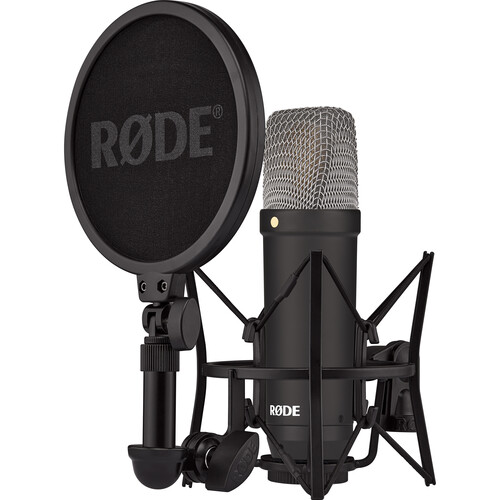
The RØDE NT1 is known to be among the cleanest condenser microphone on the market, with an extremely low self noise of only 4 dBA (A-weighted) and a very high sensitivity of -32dB.
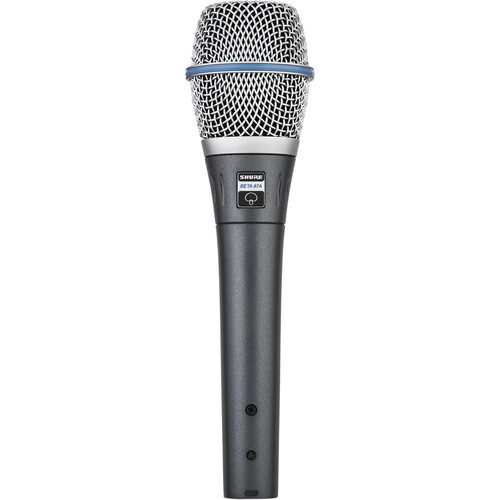
The Shure Beta 87A is known to be among the dirtiest condenser microphone, with an extremely high self noise of 23.5 dB (A-weighted), as well as among the least sensitive (for a condenser) of -52.5 dBV/Pa at 1 kHz. Many people have stated that the Beta 87A should be relegated to concert use only, since its noise is lost with the music bed under it. Let’s see if one of Elgato’s most compelling feature (Voice Focus) can tame the high self noise of the Beta 87A. Spoiler Alert: It can!
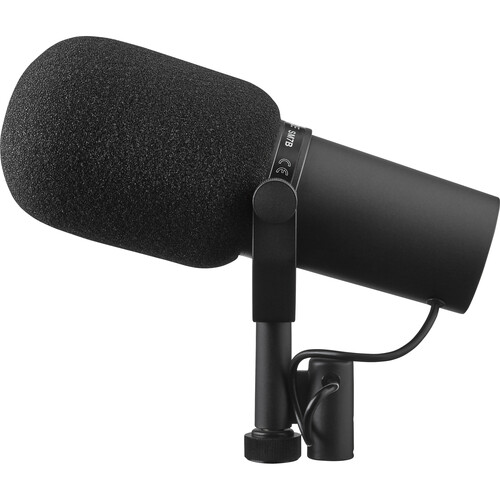
The Shure SM7B is among the most gain-hungry dynamic microphones on the market, with a very low sensitivity of -59 dB. Let’s see whether the native preamp of the Wave XLR is clean enough at that high required amplification or whether it works better with an external pre-preamp. Spoiler Alert: It sounds indistinguishable after Elgato’s realtime processing to my ears! No need for a pre-preamp!
OS compatibility for the Elgato Wave XLR
Officially, the Elgato Wave XLR works with macOS (10.15 or later) and Windows 10 or 11, since its companion software (Elgato Wave Link) is currently available for these two operating systems. However, after setting several adjustments with Elgato Wave Link, the companion software offers to save some of them to the Wave XLR hardware, which means that after setting it satisfactorily, it will likely work with other operating systems, albeit with greatly reduced functionality. I have not tested that with any other operating system. My testing for this review has been with macOS 15.6.1.
Elgato Wave XLR inputs and outputs
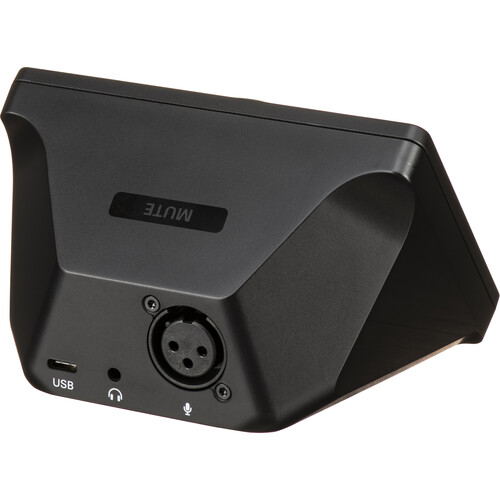
The only analog audio input on the Elgato Wave XLR is the female XLR input. The XLR input is truly balanced and offers optional 48-volt phantom power. This XLR input works with any XLR microphone of any manufacturer, not only ones offered by Elgato. The upcoming tests are with XLR mics are from RØDE and Shure. The Wave XLR can also be used perfectly with non-XLR mics, as explained later in this article.
The only analog audio output on the Elgato Wave XLR is a female 3.5 mm TRS, which in my testing drove my RØDE NTH-100 (32 ohms) with more than enough volume. Other reviewers have confirmed that the 3.5 mm output also works fine with high-impedance headphones (which I don’t have), by selecting the optional high-impedance mode and clcking to save the settings to the hardware.
The only digital connection is a USB-C which is bidirectional with the host, which means you can hear yourself (sidetone) for quality control, audio from the host computer or a variable mixture of the two.
Wave XLR lacks output for powered speakers: How I resolved it
For a long time, I had been rejecting the Wave XLR since it does not have any analog output dedicated to powered speakers. I did not want to use the headphone output of my computer to feed the powered speakers and my prior audio interfaces have had a dedicated output for that. I solved this weakness in the Wave XLR with the following inexpensive but high-quality DAC (Digital to Analog Converter) connected to my computer via USB:
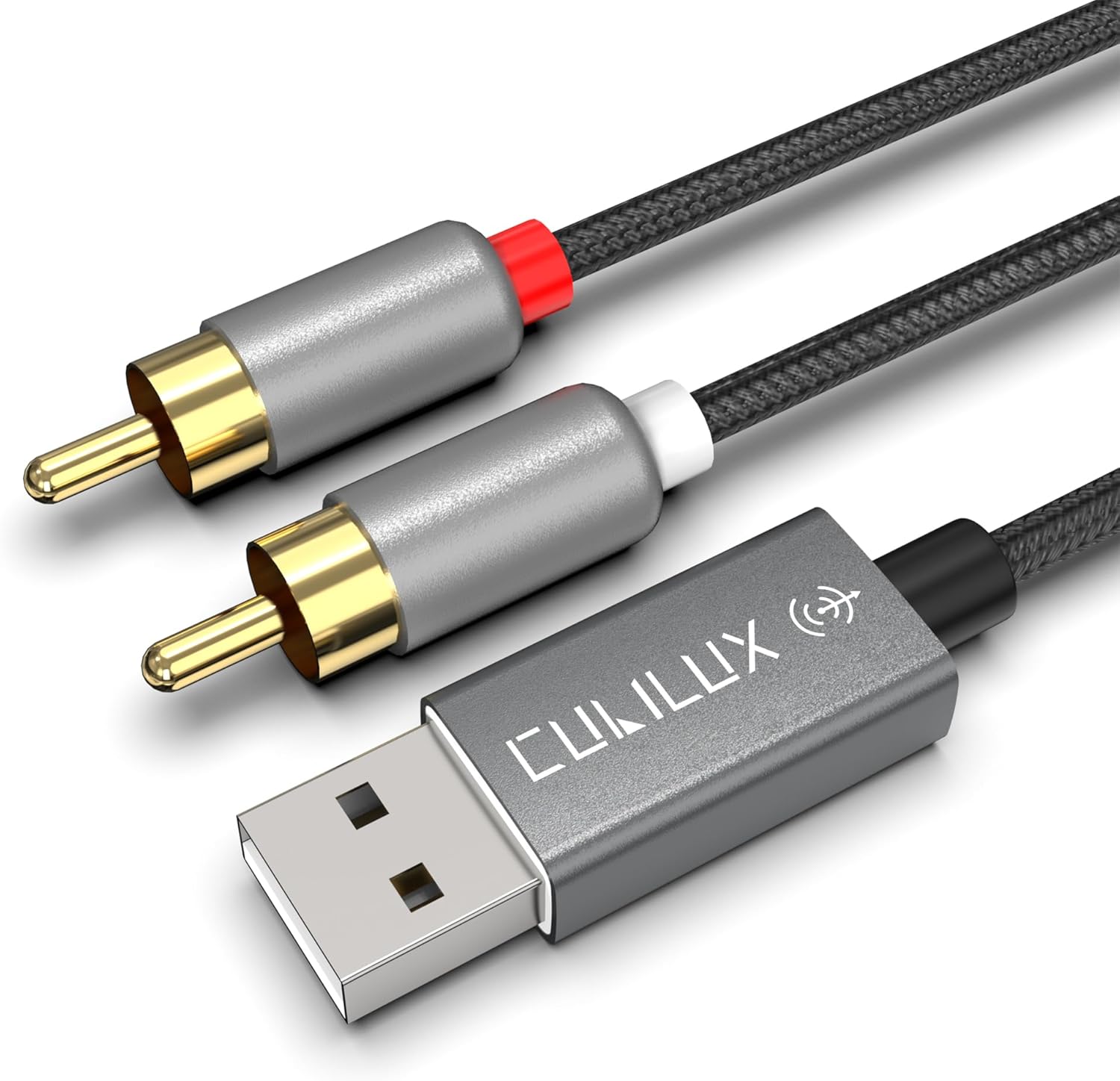
Above is the Cubilux USB to RCA audio cable with 384 kHz/24-bit DAC, USB-A Male to 2 male RCA stereo which costs under US$22. Even though it supports up to 384 kHz, I changed it to 48 kHz using the Audio MIDI Setup on macOS.
Wave XLR sampling frequencies
The Wave XLR offers two audio sampling frequencies, 48 kHz and 96 kHz. I am very grateful that the Wave XLR designers omitted 44.1 kHz for all of the reasons I covered in this article. I set it to 48 kHz for input and output using the Audio MIDI Setup on macOS, although 96 kHz is also available in case it’s ever needed or desired for some situation.
Clipguard, to prevent clipping automatically and flawlessly

Elgato’s Clipguard technology (developed in cooperation with Lewitt GmbH of Vienna, Austria) reminds me of the brand name Right Guard, which is a US brand of deodorant/antiperspirant. Right Guard is currently the second largest brand in the male deodorant category in the United States and may have indirectly inspired the ingenious Clipguard name. The brand name Right Guard was created way back in 1960 (way before I was born) and before the greater popularity of compound words in used brand names. Just as Right Guard offers to prevent odor and perspiration, Clipguard offers to prevent audio clipping during live broadcast or recording.
In the era of 32-bit float recording, you might assume that Clipguard from Elgato might use that technique, but you’d be wrong with that assumption. The Wave XLR uses 24-bit resolution, which is ideal and more practical for live or live-to-drive productions, as well as being much more universally compatible than 32-bit float.
At first, you might think that Clipguard is a standard hardware limiter, but Clipguard is executed a safer way than that. A better explanation would be to say that Clipguard employs audio bracketing, but with automatic, instantaneous implementation. Even though (from the user’s perspective) the Wave XLR only has a single mono audio channel, it actually has two, in order to have a secondary «safety track» at a lower level. However, we (the users) don’t have direct access to that «safety track». Instead, the Wave XLR seamlessly changes to the lower level version on the fly if and when required, to prevent clipping.
In more detail, Clipguard works this way:
- Real-time analysis: The technology analyzes incoming audio in real time.
- Dynamic rerouting: When it detects that audio levels are about to peak (become too loud), it instantaneously and seamlessly shifts the signal to a different, lower-volume path.
- Prevention of distortion: This process effectively prevents clipping, a common type of audio distortion, from occurring in the final output.
Clipguard operates automatically in the Wave XLR hardware, eliminating the need for users to constantly monitor and adjust their input levels. However, it is still advisable to set our levels properly for best results, i.e. signal-to-noise ratio. Clipguard is so good and so transparent, that I recommend having active all the time, after setting levels, since there are no downsides. Clipguard can alleviate unexpected peaks when someone raises her/his voice, laughs, coughs or sneezes. However, the last two (coughing and sneezing) are often covered by the next option explained ahead: muting.
I am not a user of Right Guard, but I am a happy user of Clipguard!
Capacitive mute button on the top of the Wave XLR
On the top of the Wave XLR is a capacitive mute button which works great, as long as you have a good unit. The first Wave XLR unit I received had a defect (confirmed by Elgato tech support after our conversation) where it would strangely allow me to unmute, but not to mute. With that first unit, I had to mute using the virtual mute button in the Wave Link software, although I could later unmute with the capacitive mute button. This problem persisted even with the latest available software 2.0.6 (3780) and latest firmware 1.3.5 as of publication of this article. Fortunately, the second unit I received allows the capacitive mute button to function fully, both to mute and to unmute.
Although I know (after testing and reviewing so many USB mics) that many have a built-in mute button, I much prefer to be able to mute externally of the microphone, for both practical and aesthetic reasons.
- It takes longer to raise your hand to the microphone than to move it slightly on the desk to the mute button on the interface.
- It is much less noticeable (if you are on video/television) to covertly do this muting without it being obvious, in addition to not causing mechanical noise on the microphone or boom in the hasty moment of trying to press the mute button when you are about to cough or sneeze.
When tapping the capacitive mute button on the Wave XLR, it silently mutes or unmutes. Instantly, the colors of the front panel change (by default) from white (unmuted) to red (muted), although they can be changed as described in the upcoming section Adjustment of LED colors on the Wave XLR panel.
Finally, the mute from the Wave XLR is more like a quick fade up and fade down, so no clicks are heard.
Above, listen to a test of the mute button.
Front panel knob and LED indicators
The Wave XLR’s front panel includes LED indicators and a large pot (potentiometer) knob, which is also clickable. A single click on the knob navigates between three modes:
- Microphone gain (twist clockwise to increase or counterclockwise to decrease)
- Headphone volume (twist clockwise to increase or counterclockwise to decrease)
- Monitor mix balance between direct monitoring of the connected XLR microphone and the host computer’s output.
Each single click on the knop changes the mode, which is indicated by the corresponding LED on the lower left, which indicates either Microphone, Headphone or Mix.
A two-second depression on the knob activates or deactivates the 48-volt phantom power on the XLR port. This is indicated by the LED located in the lower right corner of the front panel.
Voice Focus from AI|coustics technology comes included
Voice Focus may be the main reason why certain people choose to purchase a Wave XLR! Voice Focus is a realtime audio enhancement feature created in partnership with AI|coustics GmbH of Berlin, Germany, integrated into the Elgato Wave Link software to provide studio-quality audio by reducing or removing background noise, reverb and echo. According to the creators, Voice Focus is an AI model which reconstructs the original voice signal for better clarity and realism. Voice Focus is a software-based solution that processes audio locally, in real time, on your own system (which means no privacy issues and no Internet required) and is accessible through Elgato hardware (like the Wave XLR being reviewed here… or certain Elgato USB microphones not covered in this article) and Wave Link software.
The most important thing to understand is that Voice Focus is not a gate, so we are not vulnerable to having certain syllables of words being cut off, which sometimes happens with audio gates.
Below are the initial test recordings using a few very different sounding microphones: the RØDE NT1 Signature Series condenser microphone and the Shure BETA 87A supercardioid electret condenser microphone. (Don’t worry, we are leaving the Shure SM7B until the next section.)
RØDE NT1 Signature Series cardioid condenser microphone:
00:00 Raw, without effects, includes room noise and reverb
00:24 The loud air conditioner is activated, which continues throughout the recording.
00:30 I activated the Voice Focus (reverb and noise reduction) at 50%. Very little room noise or air conditioning is heard. The voice still sounds natural.
00:55 I increased the Voice Focus to 75%. No room noise or air conditioning is heard. The voice sounds nearly perfect.
01:17 I increased the Voice Focus to 95%. The voice sounds a bit more artificial.
01:40 I increased the Voice Focus to 100%. The voice sound similar to at 100%.
Shure BETA 87A supercardioid electret condenser microphone:
00:00 Raw, without effects, includes high self noise, room noise and reverb
00:50 I activated the Voice Focus at 75%. The self noise, room noise and reverb are gone.
1:20 I activated the loud air conditioner, but we can’t hear it thanks to the Voice Focus at 75%.
1:29 I increased the Voice Focus to 100%.
Are up to 75 dB of gain enough to be clean? (SM7B challenge)
One of the most gain-demanding dynamic microphones on the market is known to be the Shure SM7B, which officially has a low sensitivity of -59 dB. The SM7B used in this test has been lent courtesy of EliteMusicStudios.com. Obviously, 59 is much less than 75, but the question is not whether it has 59 dB (or more) but whether at approximately 59 dB of gain, does the Wave XLR offers enough clean gain, or whether it should be used with a pre-preamp to reduce any potential preamp hiss at those levels. Below, are two recordings of the SM7B via the Wave XLR, one without a pre-preamp and one with. Let’s see if you can hear any difference.
Below, you’ll hear the SM7B connected directly to the Wave XLR (without any pre-preamp), first without any processing (other than normalization) and later at xx:xx with the Voice Focus at 50%, 75% and 100%. (Voice Focus is defined in the prior section.)
SM7B connected directly:
00:00 Raw, without effects, includes room noise and reverb.
00:22 I activated the loud air conditioner.
00:26 I activated Voice Focus at 50%. Very little room noise or air conditioning is heard. The voice still sounds natural.
00:49 I increased the Voice Focus to 75%. No room noise or air conditioning is heard. The voice sounds nearly perfect.
01:12 I increased the Voice Focus t0 95%. The voice sounds a bit more artificial.
SM7B connected via a pre-preamp:
00:00 Raw, without effects, includes room noise and reverb.
00:39 I activated the loud air conditioner.
00:43 I activated Voice Focus at 50%. Very little room noise or air conditioning is heard. The voice still sounds natural.
1:09 I increased the Voice Focus to 75%. No room noise or air conditioning is heard. The voice sounds nearly perfect.
1:34 I increased the Voice Focus t0 95%. The voice sounds a bit more artificial.
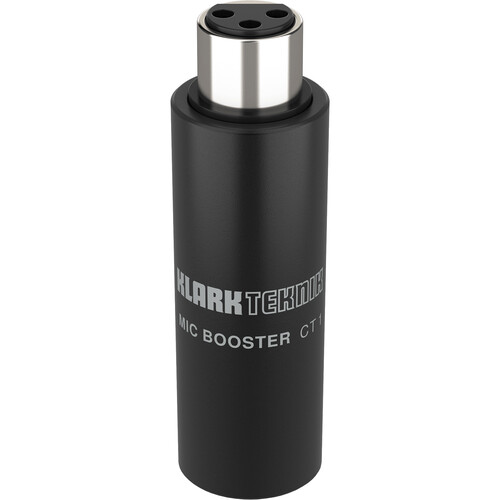
Above, you’ll hear the SM7B connected directly to the Wave XLR via the Klark Teknik MIC BOOSTER CT 1 (which receives 48-volt phantom power from the Wave XLR and boosts the SM7B weak signal +25 dB, so the Wave XLR has smaller amplification task), first without any processing (other than normalization) and later at xx:xx with the Voice Focus at 50%, 75% and 100%. (Voice Focus is defined in the prior section.)
After listening to the two recordings, I do not hear any benefit for using the pre-preamp between the SM7B and the Wave XLR. Connecting the SM7B directly to the Wave XLR provides very clean gain at the desired level, especially with Voice Focus.
Free and paid add-on realtime effects
As of publication time of this review article, there are several free and paid add-on realtime effects than can run with the Wave Link software. This is in addition to any realtime-capable VST you may already own or acquire, which can also be added to Wave Link. The free ones currently offered for macOS include:
- Black Ops 6 Voice Modifier by Elgato
- De-Esser by Elgato
- Compressor (macOS) by Elgato (Note: This a dynamic compressor, not a file compressor.)
- Equalizer (macOS) by Elgato
- Pip-Boy Voice FX by Elgato (another voice changer)
Those free options plus two paid ones are visible here. In addition to being free for use with Wave XLR and Wave Link, many can be used with your favorite audio editing program which can accept VSTs. These VSTs are both beginner-friendly and feature-rich via advanced settings. Many of these effects can be toggled on or off with a single click if you have a Stream Deck, another product from Elgato. I tested the Compressor by Elgato below with the SM7B, using a popular dynamic compressor setting of 2:1, 10 ms attack and 50 ms, but you can set them to anything you want.
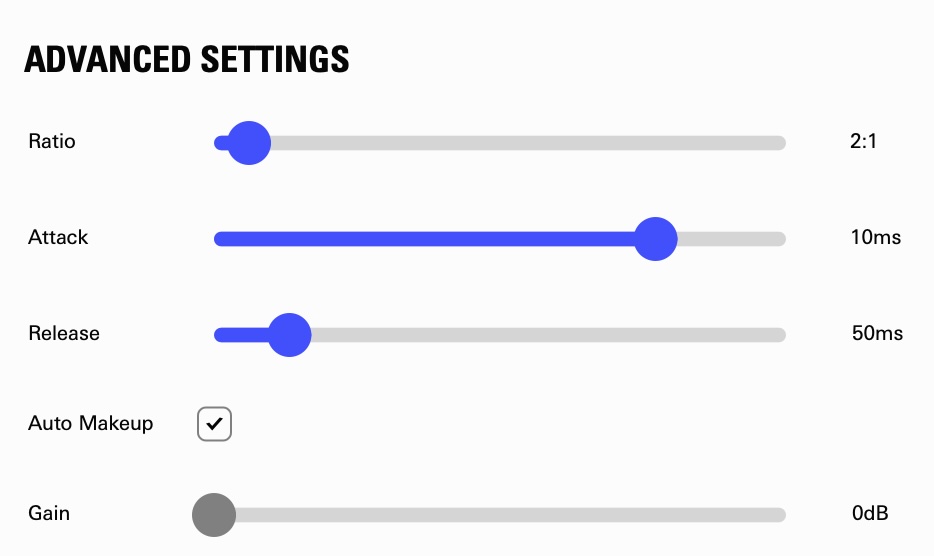
Above, listen to a test of the Shure SM7B with Elgato’s dynamic compressor using these settings.
I may test and demonstrate some of the other VSTs in future articles or tutorials.
Adjustment of LED colors on the Wave XLR panel
If desired, the colors of the LEDs on the Wave XLR panel are adjustable via the Wave Link software. This can be for personal taste or in case of CVD (color vision deficiency), aka color blindness, color anomaly, color deficiency, or impaired color vision, i.e. the decreased ability to see color, differences in color, or to distinguish shades of color.
Physical colors of the Wave XLR (only via the direct Elgato website)
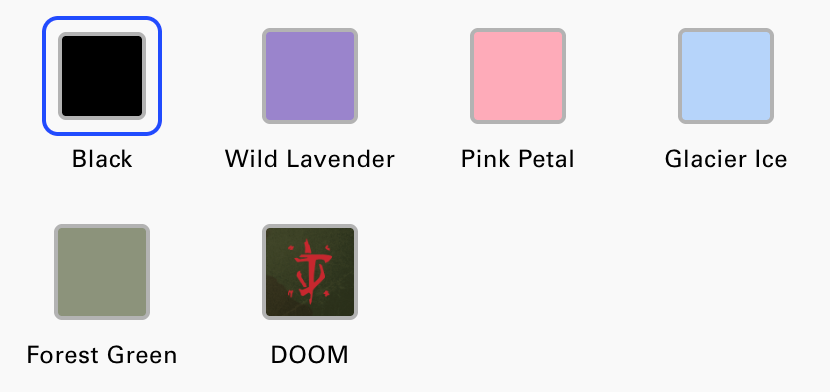
As far as I can tell, resellers of the Elgato Wave XLR only sell it in black, which is the one I purchased. However, directly via the Elgato website, it is available in the above colors. In addition, if you ever get tired of the black version, they offer user-replaceable faceplates of those same colors for under US$20 per color.
How to use the Wave XLR with a headset mic that is not XLR
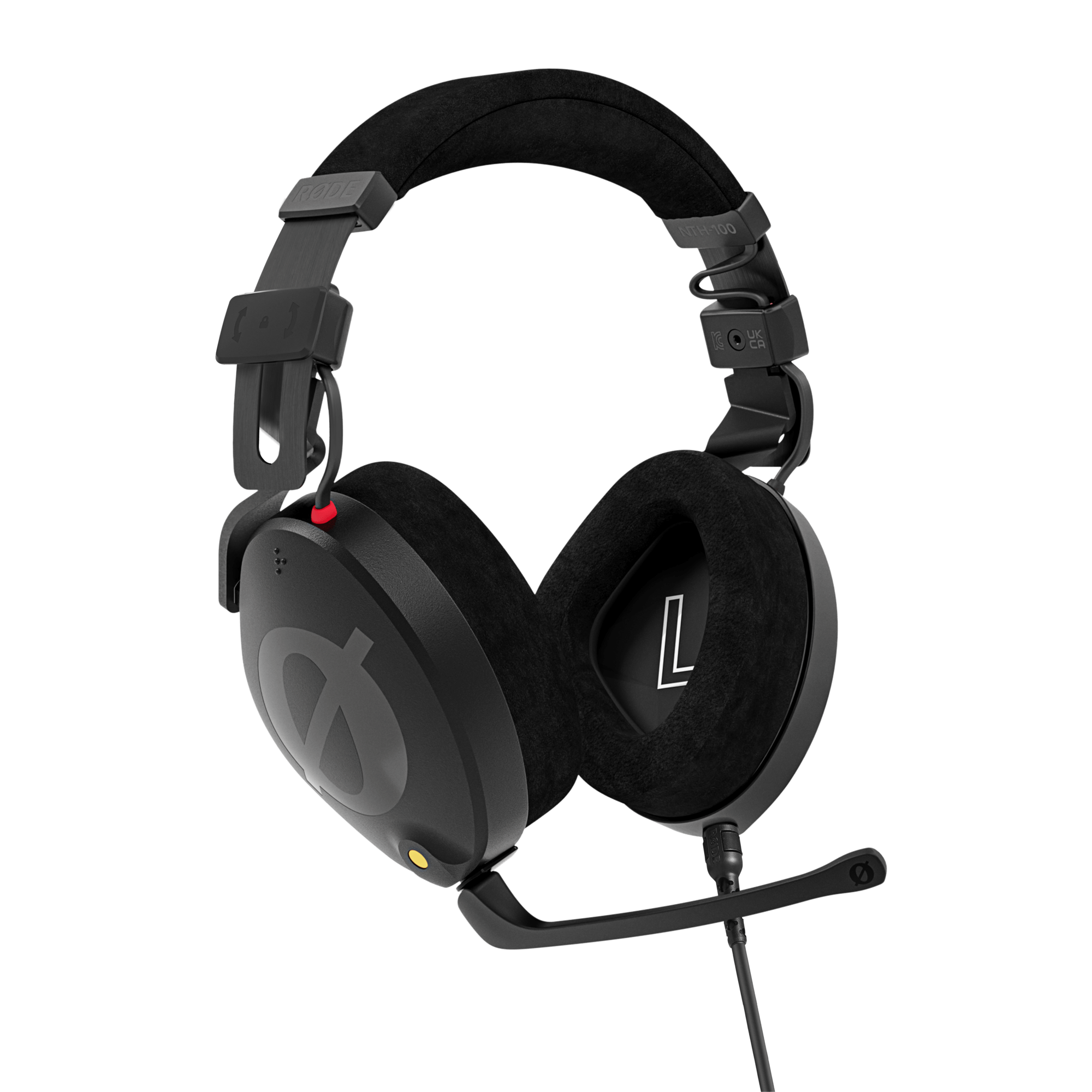
If you want to use a non-XLR like microphone the RØDE NTH-100M (shown above, reviewed here), you can accomplish this with either the:
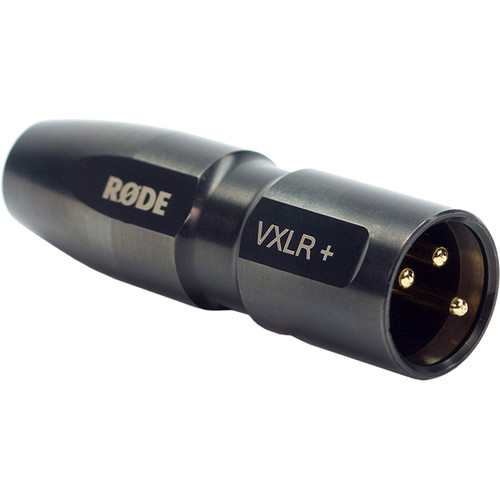
RØDE VXLR+ (shown above, US$29)
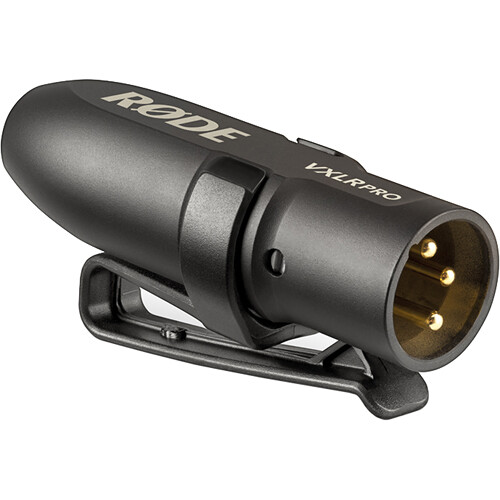
or with the RØDE VLXR Pro (shown above, US$49).
Both of them will properly convert 3.5 mm TRS to XLR male, matching the impedance and lowering the 48-volt phantom power from the Wave XLR to 3-5 volts bias voltage, aka «plugin power». The main difference between the two is the the VXLR Pro has a transformer, which makes it more resistant to hum, EMI (electromagnetic interference) and RFI (radio frequency interference). The VXLR+ is more prone to picking up that undesired interference.
The 3.5 mic plug from the headset should be plugged into the VXLR Pro or VXLR+ and it into the Wave XLR. The stereo 3.5 mm headphone plug from the headset should be plugged directly into the Wave XLR’s headphone output.
Using pre-recorded audio carts with Wave Link
If you own any version of the Stream Deck device (which also bears the Elgato brand name), you can assign different pre-recorded audio carts to each button on the Stream Deck and have the Stream Deck be a source in Wave Link. In my opinion, this is a wonderful way of incorporating audio carts into your system. They can be music, openings, stingers or soundbites to get a reaction from an interviewee or co-host.
If you plan to take advantage of the next section (Using Wave Link with remote guests and phone callers with mix-minus), then you should use this specific set of steps to set up the Stream Deck as the source for the audio carts to assure that those remote guests or callers can hear the audio carts:
- When adding the new channel to Wave Link, select SFX (not Music or anything else). This is essential, in order to have the option to the second part of step 2 below.
- Click on the + symbol to select the Stream Deck app. Before closing the window, select Route to MicrophoneFX. That way, the output of your carts will be audible to the remote guests or callers you will be configuring in the next section.
- If desired, rename this channel as Carts as I did, as you’ll see in the screenshot below:

Use Wave Link with remote guests and phone callers with proper mix-minus
Even though I haven’t found it documented anywhere for this specific purpose, I have successfully found a way to have Wave Link create a mix-minus for a single service at a time, be it:
- Viber (including Viber Out, as documented in my recent article Viber Out as a great replacement for Skype Out after its recent death
or:
- Cleanfeed, as I recently covered in How to create a Cleanfeed standalone web app (from Chrome) and reap its benefits)
or any other bidirectional audio conversation service.

Here are the steps that worked for me:
- In the remote service app, you should select Wave Link MicrophoneFX as the microphone source (as indicated in the screenshot below): That way, the remote guest or caller will get to hear your processed voice, plus the sound of any of the audio carts you play for reaction.
- In the remote service app, you should select any normal computer output (i.e. the computer’s speaker output or any other speaker output) since the Wave Link software will hijack the audio output of this selected app (Viber or Cleanfeed) in step 3, and it will no longer be audible through the speaker.
- Create a new input in Wave Link program, selecting the Voice Chat option, since it sends the mix-minus bus only to the communications service, meaning that the connected party will hear your processed voice from the microphone connected the Wave XLR in addition to any audio cart you may want to play to the connected party. Fortunately, that communication source will not receive itself back in an echo, which would occur without the valuable mix-minus included (albeit hidden) in Wave Link.
- Click on the + symbol to select either the Viber app or the Cleanfeed app.
- If desired, rename this channel as Viber or Cleanfeed.


I am very glad that Wave Link allows this mix-minus with a single service at a time. Perhaps in the future, it will be able to do it with two different ones simultaneously as other software mixers I have reviewed can do.
When the Wave XLR with Wave Link are an ideal fit (and when not)
The Elgato Wave XLR fits perfectly when a single XLR microphone (dynamic or condenser) is to be used locally, with or without remote co-hosts connected to Wave Link via Cleanfeed, remote callers via CallInStudio.com and/or Viber Out, for spontaneous outgoing calls to an airline, consulate, embassy or company’s standard phone number for comment.
The Elgato Wave XLR has a single XLR input.
As of publication date of this article, the Wave Link software for macOS or Windows will not accept multiple Wave XLR units properly according to the official website:
«At this time, adding additional Wave:1, Wave:3, or Wave XLR devices to Wave Link when one of these devices is already in use is not supported, and can cause various issues.»
This might change in the future with software/firmware updates, but there have been no promises.
Although it is indeed possible to connect an audio mixer upstream of the Wave XLR (as long as the audio mixer offers a microphone-level balanced output, or one with balanced line-level output with a balanced attenuator to reduce balanced line level to balanced microphone level). that configuration is outside the scope of this review article, but may be covered in a future article if there is sufficient demand for it.
When multiple Wave XLR units without Wave Link can a good fit (although with fewer features)
If you want to use multiple Wave XLR units with a single computer, you can, as long as you are not using Wave Link. The Wave XLR still offers a great value without Wave Link software. However, you would lose many of the valuable features you get when combining the Wave XLR with Wave Link, including the ultra-powerful Voice Focus and the other realtime effects.
If you really need to connect multiple local microphones in the same room connected to the same computer, you might consider using an audio mixer instead, with sufficient inputs for all of the local microphones and enough headphone outputs for all of them.
Caveat
After you delete any add-on VST plugin with Wave Link to deactivate it, you must quit the Wave Link application and relaunch it, as of version 2.0.6 (3780) for macOS. If you do not do quit and reopen the Wave Link application, you will lose access to the Voice Focus settings. They fortunately return after quitting and relaunching the application, although sometimes, they return with the Voice Vocus reset to 100%, so it is good to verify the Voice Focus setting at the beginning of each session.
Ratings

General audio quality via the USB-C output
Quality of physical connections
Physical quality of the knob/potentiometer/click

Quality of the headphone output
Empowerment of Voice Focus

Reliability of Voice Focus to remember its setting between sessions
Empowerment of the freely provided realtime VSTs and third-party ones which qualify
Suggestions to the manufacturer/developer
- Update the Wave Link and Voice Focus to make it consistently recall the Voice Focus setting between sessions, instead of defaulting to 100% as it often does. (This problem exists with the macOS version, with the versions indicated above. I don’t know if this problem exists with the Windows version.) In the meantime, we can and must remember to reset that at the beginning of each session.
- Consider adding a second Voice Chat channel (i.e. Voice Chat 2) to Wave Link, maintaining the same great mix-minus you already have with the existing Voice Chat and adding the secondary one for Voice Chat 2. That way, we’ll be able to use one for remote guests at full studio qualtiy and another via CallInStudio.com or ViberOut for telephone quality, both simultaneously. (Currently, if we use two platforms on the same channel, the remote guests from one platform won’t hear the other, quite logically, according to the definition of mix-minus.)
- Consider moving the headphone jack to the side of the unit instead of the rear.
Conclusions
Especially if you plan to connect a single local microphone, I highly recommend the Elgato Wave XLR, for general audio quality and its included Wave Link and Voice Focus software. That single local analog microphone can be your favorite XLR microphone of any brand, be it dynamic or condenser. It can also be a non-XLR headset microphone, if you follow the instructions included in the article, together with one of the recommended converters from 48-volt phantom power to the much lower bias voltage («plugin power»). The wonderful Voice Focus from Elgato eliminates the need for an acoustically-treated room, even for live situations. Elgato and Corsair should update the Wave Link and Voice Focus to make it recall the Voice Focus setting reliably between sessions, instead of defaulting to 100% Voice Focus as it often does. In the meantime, we can (and must) remember to reset that at the beginning of each session.
Lee este artículo en buen castellano
(Re-)Subscribe for upcoming articles, reviews, radio shows, books and seminars/webinars
Stand by for upcoming articles, reviews, books and courses by subscribing to my bulletins.
In English:
- Email bulletins, bulletins.AllanTepper.com
- In Telegram, t.me/TecnoTurBulletins
- Twitter (bilingual), AllanLTepper
En castellano:
- Boletines por correo electrónico, boletines.AllanTepper.com
- En Telegram, t.me/boletinesdeAllan
- Twitter (bilingüe), AllanLTepper
Most of my current books are at books.AllanTepper.com, and also visit AllanTepper.com and radio.AllanTepper.com.
FTC disclosure
None of the listed individuals or companies mentioned above has paid for this article. Allan Tépper purchased the Elgato Wave XLR using his own funds, as well as the Klark Teknik MIC BOOSTER CT 1 and the use of Viber. RØDE and Shure regularly send devices to Allan Tépper to facilitate testing and reviews. Cleanfeed has given Allan Tépper access to services for the purposes of evaluations and reviews. Some of the manufacturers listed above have contracted Tépper and/or TecnoTur LLC to carry out consulting and/or translations/localizations/transcreations. So far, none of the manufacturers listed above is/are sponsors of the TecnoTur, BeyondPodcasting, CapicúaFM or TuSaludSecreta programs, although they are welcome to do so, and some are, may be (or may have been) sponsors of ProVideo Coalition magazine. Some links to third parties listed in this article and/or on this web page may indirectly benefit TecnoTur LLC via affiliate programs. Allan Tépper’s opinions are his own. Allan Tépper is not liable for misuse or misunderstanding of information he shares.