Filmtools
Filmmakers go-to destination for pre-production, production & post production equipment!
Shop NowIt’s essential to understand the differences before choosing either the new MV88 USB-C or the pre-existing (and still available) MV88+.


Just a few milliseconds after the lifting of the embargo, I’m ecstatic to share information about the new MV88 USB-C from Shure, including initial test recordings made by me. This new model, just-announced at CES’s Unveiled Media Event, does not replace the existing MV88+ (which comes in different bundles), but complements it in the lineup. This is because the new MV88 USB-C adds certain features and benefits while removing another. It’s essential to understand the differences before choosing either the new MV88 USB-C or the pre-existing (and still available) MV88+.
Features and benefits of the new MV88 USB-C mic, with explanations
- Directly dockable to your USB-C capable smartphone (even with most thick cases, without having to remove them), tablet or computer directly to the USB-C connector, be it Android, iPhone or iPad. (Look Mom, no wire!)
- Extremely portable, while being protected inside the included pocket-sized hard case, allowing for unexpected and impromptu recordings wherever you may be. Just pull it out, snap it onto your host device and start recording.
- Four selectable polar patterns: stereo, mono cardioid, mono bi-directional (aka figure 8, ideal for interviews) or raw mid-side. (The raw mid-side pattern requires post-processing.)
- Select between the Auto Level Mode or set your level manually using one of the two MOTIV apps covered below.
- You are free to activate the Real-time Denoiser or do that in post. The Real-time Denoiser is in the hardware of the MV88 USB-C, so even if you activate the Denoiser with the MOTIV app, the Denoiser still works even if you choose to record with a different app, as explained below.
- Optional high pass filter (aka low-cut filter), limiter, dynamic compressor, 5 band EQ (aka equalizer), plus 5 different presets.
- Can be configured (and optionally record with) the free Shure MOTIV Video or MOTIV Audio apps for Android, iOS and iPadOS before you hit record.
- After initial setup using one of the above-mentioned MOTIV apps, the MV88 USB-C is also compatible with other advanced video mobile apps including Blackmagic Camera, FiLMIC Pro and RØDE Capture when access to both video cameras simultaneously is desired. Having access to both cameras simultaneously is ideal for interviews to achieve a two camera shoot with a single smartphone or tablet. I hope Shure will add this capability to the MOTIV Video app soon. In the meantime, adjust the MV88 USB-C as desired with the MOTIV Audio app, quit out of it and then open the RØDE Capture app… or do the same with the Blackmagic Camera app or the FiLMiC Pro app.
The only key feature that is missing from the MV88 USB-C model and its implications
Unlike the pre-existing (and still available) MV88+, the new MV88 USB-C model lacks a headphone output. Although the new MV88 USB-C is great for live broadcasting or pre-recorded interviews, monologs, audiobooks, standups or stereo sound effect recordings, since the new MV88 USB-C lacks any headphone output, it does not have audible confidence capability during a live broadcast or recording (only visible confidence from the VU meter in the app). For the same reason, the MV88 USB-C will not work for the following situations when used with a smartphone or tablet*:
- Being a remote panelist, where live 2-way communication is required.
- Being a remote interviewee or interviewer, where live 2-way communication is required.
For any of the above situations, the pre-existing (and still available) MV88+ (in any of its available bundles) is still the better choice since the original MV88+ indeed has a 3.5 mm headphone jack.
*The reason why I qualified the above statement with «when used with a smartphone or tablet» is because if you use the new MV88 USB-C model with a computer running Linux, macOS or Windows, you could set your settings in your professional conferencing app (i.e. Cleanfeed, Ecamm Live, SquadCast by Descript or StreamYard) or consumer conferencing app or web service to monitor the remote participant(s) independently of the MV88 USB-C as the mic source.
Sample test recordings I made with the new MV88 USB-C
I made the following sample recordings with the new MV88 USB-C docked directly onto my Murena Fairphone 6 running /e/OS. Both recordings are done in cardioid mono at 48 kHz with the voice profile set. SPOILER: Number 2 sounds the best.
1-Above, without any other DSP feature other than the voice profile setting. The only post-processing is normalization.
2-Above, the same recording as above but with post-processing from Descript’s Studio Sound, including post-noise reduction and post dynamic compression, as well as normalization.
3-Above, the second recording and the MV88 USB-C realtime denoiser in the Shure MV88 USB-C (no post-denoiser).
4.Above, the second recording with additional post processing from Descript’s Studio Sound, including post-noise reduction, post dynamic compression and normalization.
Of the above recordings, number 2 sounds the best to me, where the noise reduction was inactive in the MV88 USB-C and added in post, together with other enhancements as indicated above.
What comes in the box?

Above you will see what comes included.
Regarding the included windscreen
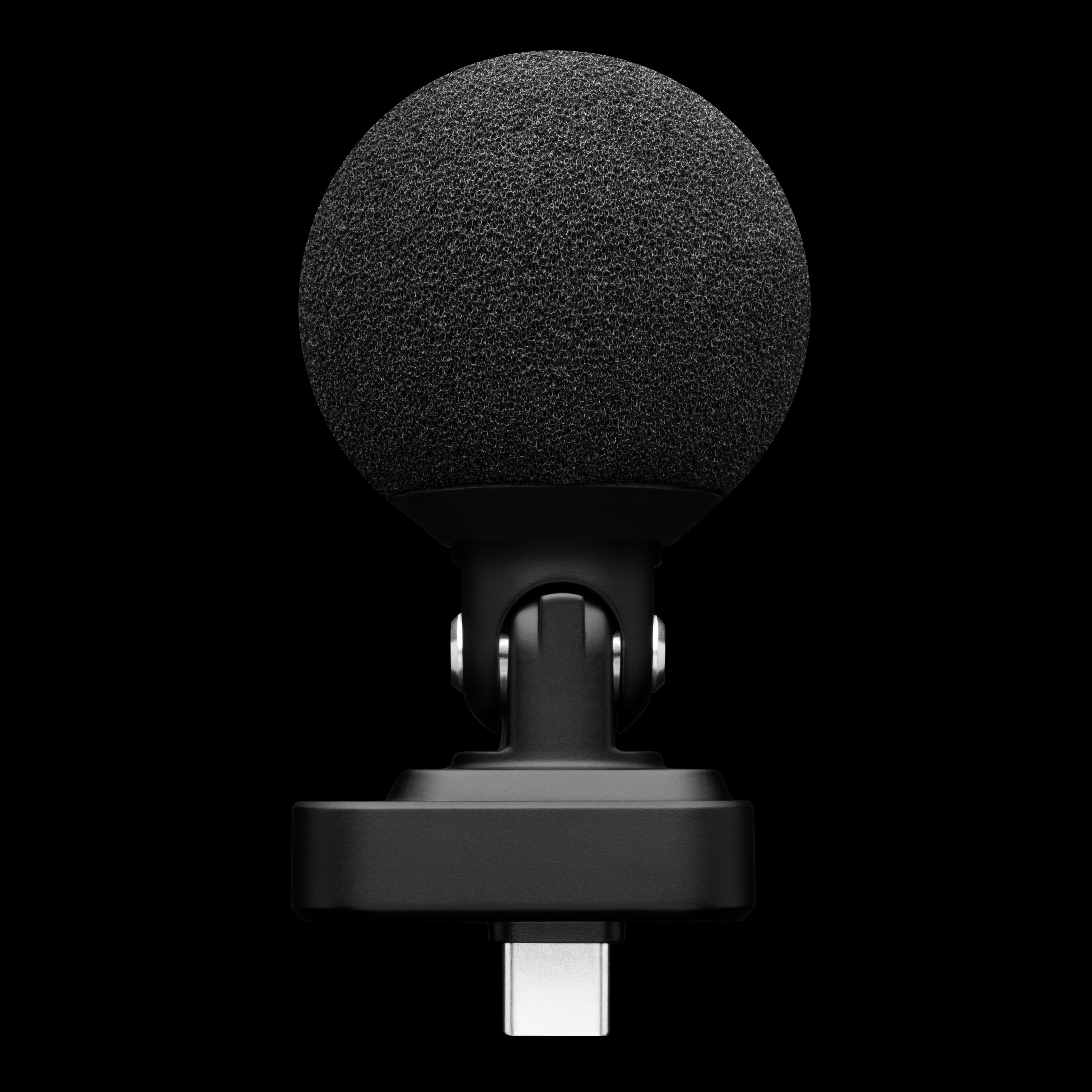
During my meeting last week with Shure, the product manager confirmed that the included foam windscreen which comes with the MV88 USB-C is the same one that comes with the wireless MoveMic 88+ (which I first reviewed here), which means that the new MV88 USB-C (with its included windscreen) will also work/fit with the coveted Shure A81WS presidential windscreen (not included) as I covered in the following video:
as part of Shure A81WS supercharges MoveMic 88+ for close speaking, making it impoppable! (illustrated above).
Pricing and Availability
Shure is showcasing the MV88 USB-C for the first time at CES Unveiled in Las Vegas. The MV88 USB-C Stereo Microphone is available now for US$159, €169 RRP and £145 RRP. It includes a foam windscreen, protective carry case, quick-start guide, and product safety documentation.
For additional information, please visit the Shure web page here.
Image credits
All images in this article are courtesy of Shure.
(Re-)Subscribe for upcoming articles, reviews, radio shows, books and seminars/webinars
Stand by for upcoming articles, reviews, books and courses by subscribing to my bulletins.
In English:
- Email bulletins, bulletins.AllanTepper.com
- In Telegram, t.me/TecnoTurBulletins
- Twitter (bilingual), AllanLTepper
En castellano:
- Boletines por correo electrónico, boletines.AllanTepper.com
- En Telegram, t.me/boletinesdeAllan
- Twitter (bilingüe), AllanLTepper
Most of my current books are at books.AllanTepper.com, and also visit AllanTepper.com and radio.AllanTepper.com.
FTC disclosure
None of the listed individuals or companies mentioned above has paid for this article. Shure has provided review units to Allan Tépper. Some of the manufacturers listed above have contracted Tépper and/or TecnoTur LLC to carry out consulting and/or translations/localizations/transcreations. So far, none of the manufacturers listed above is/are sponsors of the TecnoTur, BeyondPodcasting, CapicúaFM or TuSaludSecreta programs, although they are welcome to do so, and some are, may be (or may have been) sponsors of ProVideo Coalition magazine. Some links to third parties listed in this article and/or on this web page may indirectly benefit TecnoTur LLC via affiliate programs. Allan Tépper’s opinions are his own. Allan Tépper is not liable for misuse or misunderstanding of information he shares.