

Filmtools
Filmmakers go-to destination for pre-production, production & post production equipment!
Shop Now**TL;DR:** Premiere 26.5’s Paper Edit solves the transcript issue of one selection at a time. Paper Edit lets you select the best moments from a transcript all at once, and builds them into a new sequence. It’s ideal for creating a quick source timeline, or cutting down from a finished transcript-based timeline.

Premiere 26.5 (September) added Paper Edit to the Text panel.
I never want to edit again without a transcript. I was first introduced to transcript editorial on a different tool something like 20 years ago. The last 3 plus years of inexpensive transcript-based editing is something I’d never want to give up.
The existing Text transcript tools are good. Paper Edit is an addition with a tiny icon you may have missed.

The value of this new Paper Edit function? You can take a transcript of an interview or a finished piece, select multiple moments (not just one), and have Premiere create that as a new standalone sequence for you. A paper edit of those moments, put together.
I think of this as the opposite of throwing a transcribed interview in a sequence and deleting material. These are quick selections to a new timeline.
How to make a Paper Edit
Open the Text panel or Text-Based Editing workspace.
By the way – tthis works on anything with a transcript. Raw clips and existing sequences.
In the Transcript tab, click the Paper Edit icon.
Select the sentences you want. Partial sentences work, and they can come from anywhere in the transcript.
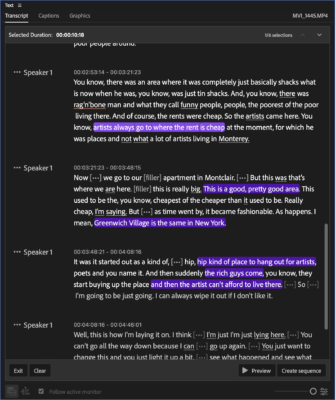
The bar across the top keeps a running Selected Duration.
- Click a selection again to drop a selection
- Clear to drop them all.
- Optionally, hit Preview.
Finally, press Create new sequence.

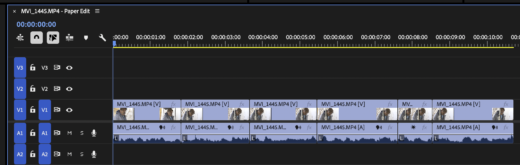
It opens as a new timeline, named after your clip with “- Paper Edit” on the end.
Two footnotes
If you did this from finished work, it will carry over the extra tracks.
The selection is constructed from the linear order of the source, not the order you selected things.
Paper Edits as source sequences
That new sequence can be a brand-new source clip for other edits. This is crazy powerful. Load the results of this (or any sequence) in the Source Monitor and cut from it. See THIS article on using sequences in the Source Monitor. The whole idea of cutting from existing sequences (not copy/pasting) is in itself a great tip.
Final thoughts
I’ve really begun to play with this around social edits, where you’re just trying to grab 5 or 6 sound bites from something finished. Paper Edit is perfect for this.
Same thing if you had finished work from an event, like a conference or a sports event. I hoped that somewhere they’re working on the rearrange sections, but I’m sure there’s been discussion about that, if not development.
Paper Edits are a flexible way to work with your material; I think I like it better than just using the standard transcript mode.
This series is courtesy of Adobe.