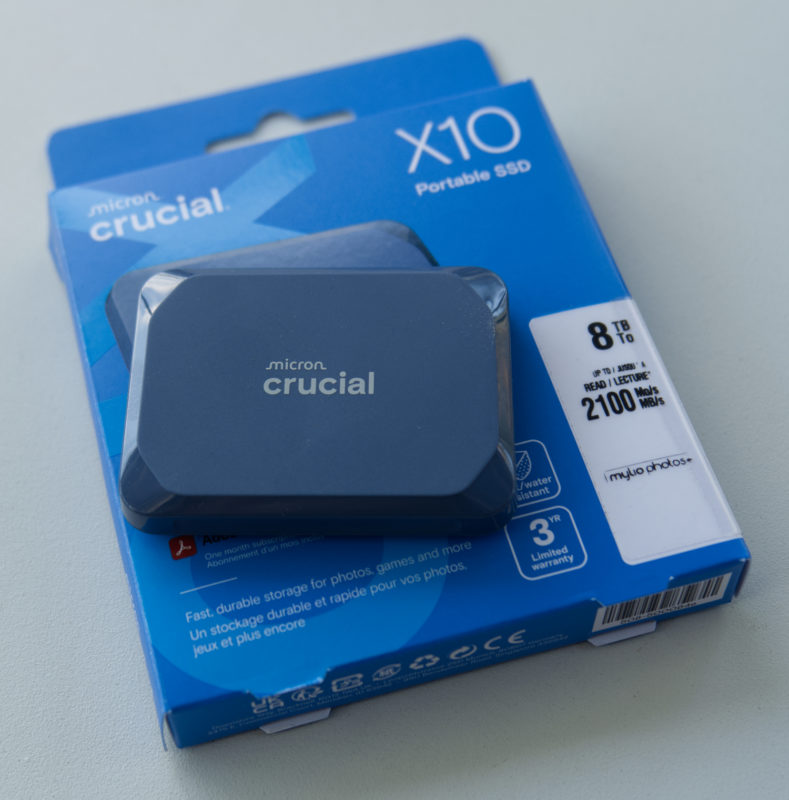



While I ordered this 8TB SSD in full knowledge that it wouldn’t be perfect for video workflows, I didn’t expect it to be discontinued so quickly. Unfortunately, the manufacturer, Crucial, is about to cease to exist, along with all their SSDs and RAM sticks.

Crucial’s owner, Micron, has decided to exit the consumer space entirely, and will continue to make RAM and SSDs for the higher-margin, higher-reliability enterprise space, where AI-driven growth created a huge demand. The Crucial brand has been around for nearly 29 years, but in February 2026, it will come to an end.
Read more about Crucial’s demise at Ars Technica.
While it’s not too late, let’s take a look at the drive to see if it’s worth trying to pick one up while you still can. It’s a drive with a few compromises, but could still be useful.
Basic specs
This is a huge SSD, with 8TB of storage, but also the smallest and lightest SSD I own, at just 42g. While size wasn’t really a consideration for me when I bought this, a travelling videographer could pack a few of these in the space of a single traditional portable drive.

The Crucial X10 uses a USB 3.2 Gen2x2 connection over USB-C. While this protocol supports 20Gbps connections on supported machines, most people will never see that kind of speed. No Macs and few PCs support Gen2x2, so this drive (and many others like it) will fall back to 10Gbps on most machines they’re connected to.
Though the more modern USB4 standard offers a much higher potential speed of 40Gbps, very few prebuilt SSDs support USB4, and those that do are more expensive. The interface chips are more expensive, and the NAND inside would need to be of a higher spec to support that kind of speed too.
I can only presume that Gen2x2 is a lot cheaper to support than USB4, but unless you’ve built a PC to support that standard, it’ll be wasted. If Gen2x2 comes at little or no cost, it doesn’t hurt, but in an ideal world, you’d choose USB4 or Thunderbolt for speed, or USB3.2 Gen 2 for cheaper drives where maximum speed isn’t critical.
Remember: a copy is only as fast as the slowest drive in the chain, so 40Gbps drives only see their maximum potential when copying from other very fast drives, like the internal SSD in a Mac, or another USB4 or Thunderbolt external. If you’re copying video files from a media card, you won’t see much difference.
For me, this drive connects at 10Gbps, and BlackMagic Disk Test gives about 960MB/s write and 907MB/s read.

Remember though: BlackMagic Disk Test doesn’t give you all the information you need. The quoted speeds of most drives don’t translate to real world copy speeds, as many faster SSDs can’t sustain that speed for very long at all. This drive does better than many others, but it does have its limits.
Sustained write is an issue for video professionals
Higher-end video jobs create a lot of data, and during a break in shooting or at the end of the day, that data’s got to be transferred and backed up. If you’re frequently dumping hundreds of GB of data onto an SSD, you need to pay careful attention to the capabilities of the SSDs you buy. I’ve written about this before, so check out this article if you’re not across it, but the quick summary:
Many consumer-focused drives can only sustain a fast transfer for a short period of time, and it’s not usually a heat issue. Many drives have a smaller area of high-speed cache that’s written to first. When it fills up, the transfer slows down (sometimes drastically) as data is written to the slower main storage area.
A review of a 4TB X10 posted by Tom’s Hardware showed that 800GB of data could be transferred at high speed before it slowed down, so that could be the point at which speeds become a little more variable. (That review used a PC with USB 3.2 Gen2x2 ports, double the speed on my Mac, and it was a 4TB SSD, so these numbers are a little fluffy.)
To test how bad the throttling could be, I connected the Crucial X10 (directly) to my MacBook Pro with M3 Max. I also connected a fast 4TB Thunderbolt 4 SSD, an Lexar NM790 in an Acasis enclosure, via an OWC dock. (Please note that these were not lab tests! Run your own tests with your own media to be sure.)
In the Finder, I started a copy of a folder full of video files, nearly 566GB, from the 4TB Thunderbolt 4 drive to the 8TB X10. A time of 13 minutes was predicted, and that’s about how long it took. Here’s a recording at 100x normal speed, with the time visible above.

After a short break to let the drive recover, I tried a much larger 1.52TB copy which turned out to be less predictable. It started strongly, then slowed down, sped up again, slowed down, and finally completed in 1hr 18min. Here’s a recording at 500x normal speed, again including the time above.

So, if you’re dumping many large files frequently, the unpredictable speed of those larger transfers may give you pause; it’s probably not the drive you’d choose to copy to after a big day shooting RAW. But for a long-term project which you add to a little bit a time, or for smaller shoots, you wouldn’t notice any compromises here.
This drive can still read quickly, holds a heap of data, and for many video workflows, could be a good deal.
Price, value and the competition
While it’s becoming more common, the 8TB capacity is not yet mainstream, and you can expect to pay at least:
- US$550 for a USB 3.2 Gen 1 (5Gbps) drive like the Samsung T5 EVO
- US$650 for a USB 3.2 Gen 2 (10Gbps) drive like the SanDisk Extreme Portable
- US$1100 for a USB4 (40Gbps) drive like the OWC Express 1M2
Today, the Crucial X10 8TB is listed at US$724, but looks like it’s going down again. It’s been as low as US$385 (when I bought mine) and is frequently sold under US$450. At those kinds of prices, if your projects won’t be affected by slow writes on larger transfers it may be worth considering.

For a slow-growing personal media collection, you should be fine, and that’s the use I’ll be putting this drive to. 8TB of silent, low-power instant-access data at a reasonable price? Living the dream. But this is not a general purpose drive for on-set DIT work with impatient clients.
Conclusion
Since Crucial has only a couple of months left as a company, there’s a decent chance that this drive might see another price cut, and if its speed profile doesn’t completely knock it out of contention for you, it’s worth a look.
The perfect drive doesn’t exist, and while normally you can count on getting at least two of “fast, cheap and good” the industry is being squeezed, and you might have to make do with what you can get. In the short to medium term, the price of SSDs and RAM is likely to go up as the industry’s output is sucked up into data centres, and video professionals may have fewer choices than usual.
If you’ll need a new drive in the next year or so, think about buying something sooner rather than later. If an 8TB SSD appeals and you don’t want to spend US$1000, consider the X10 before it disappears for good.