

Filmtools
Filmmakers go-to destination for pre-production, production & post production equipment!
Shop NowWhether it be Chromebook, Linux, Mac or Windows, there is a way to achieve 100% seamless interchange, without any conversion.


Many third-party office apps promise the option to import or export Microsoft formats like .docx (from Microsoft Word), .xlsx (from Microsoft Excel) and .pptx (from Microsoft PowerPoint). However, to my knowledge, experience and research, only one of them can create and handle all of those formats natively, without any conversion to or from a proprietary format: OnlyOffice (open-source, free or paid for Linux, Mac and Windows). Sadly, this cannot be said regarding LibreOffice or Apple Pages/Numbers/Keynote. When you import any of those Microsoft formats, an internal conversion sadly occurs, which is kryptonite if you need seamless interchange. Even Google Docs—which does have a mode to retain imported .docx files as native—cannot create it natively, and has other limitations after importing it. This potentially gives OnlyOffice a unique advantage for those cases when absolute seamless Microsoft Office interchange is required. However, to achieve absolute seamless interchange with your colleagues or clients who are still addicted to Microsoft Office (despite the continuing worldwide Microsoft Windows/Microsoft Office exodus due to espionage and cost, which greatly began in Germany and France), an extra dependency should be added to your operating system, be it Linux, Mac or Windows. (The same applies with Chromebooks since 2018, since they have the free Linux option included.) That extra dependency are the extra Microsoft fonts, which thankfully can indeed be installed into Linux, Mac and Windows. If you do that after you already had OnlyOffice running you must restart OnlyOffice so it can have access to the Microsoft fonts. Basic instructions to install fonts onto different operating systems are here. Other details about how to acquire and install Microsoft fonts on different particular operating systems change frequently, and are a Google-search away. If you previously had Microsoft Word or Microsoft Office installed on Mac or Windows, even after uninstalling those apps, the Microsoft fonts usually remain installed and available for use in any other application (including OnlyOffice), so in that case, you are probably all set. When installing OnlyOffice on Linux, extra steps can be eliminated if you install OnlyOffice by avoiding the Flatpak version. The Flatpak containerization restricts access to system directories, making it more difficult for OnlyOffice installed via Flatpak to have access to system fonts installed outside of its sandbox, without extra steps. Everything stated so far covers the desktop version of OnlyOffice, not the web version. See ahead about the web version.
Web version of OnlyOffice and its fonts capabilities
The web version of OnlyOffice can exist either on the OnlyOffice server or self-hosted inside of Nextcloud or ownCloud. In web version of OnlyOfffice on its own server does not have the Microsoft fonts installed. The self-hosted version of Only Office (inside of Nextcloud or ownCloud) on your own server can indeed allow installing the Microsoft fonts. Keep this in mind for those projects that require absolute seamless Microsoft Office interchange including Microsoft fonts.
How OnlyOffice compares with the original Microsoft Office
Now that we have achieved absolute seamless Microsoft Office interchange, let’s talk about how the desktop OnlyOffice program feels and behaves. In a nutshell, I would say that the desktop OnlyOffice program feels and behaves the way Microsoft Office felt and behaved a few years ago, before it became so bloated and before it had so much advertising and built-in espionage.
In 2026, users frequently report that OnlyOffice launches faster and feels snappier than today’s Microsoft Office, which can be resource-heavy. OnlyOffice is noted for being fast, particularly in launching and handling basic to moderate document editing. It has a smaller footprint compared to the full Microsoft Office suite.

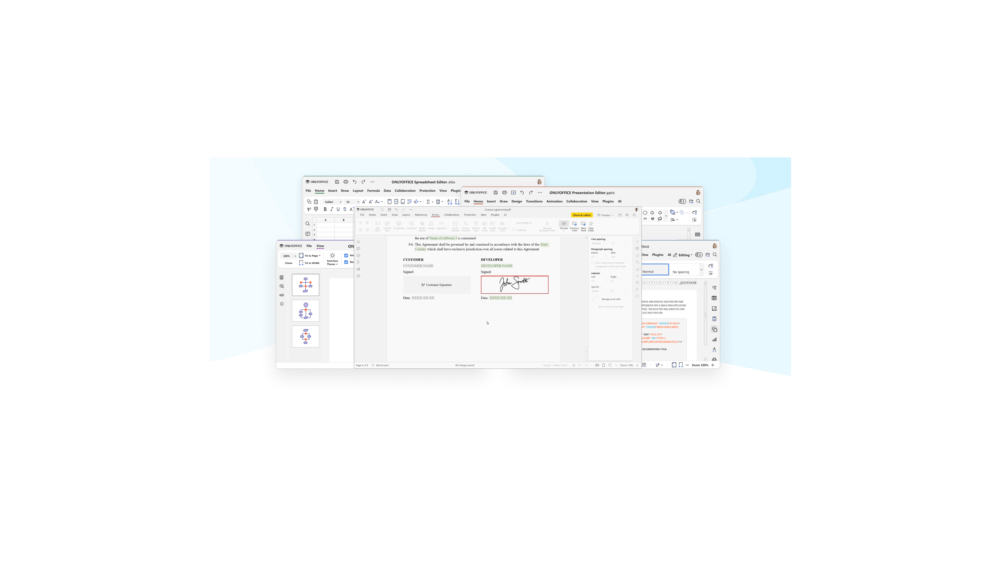
Despite that, OnlyOffice is feature-rich with tools for multiple signature insertion, fillable PDF form creation, and even options for HTML, Markdown, EPUB and diagrams.

OnlyOffice key users + a few migration stories

How Kinderhaus Berlin shares and collaborates on sensitive files with OnlyOffice DocSpace

The Kinderhaus Berlin installed OnlyOffice DocSpace Server to save their time with organizing the document workflow. Timo Petersohn, IT Helpdesk employee, described about their experience. Kinderhaus Berlin – Mark Brandenburg e.V. (the Berlin Children’s Home) is a public organization in the Berlin region, Germany, with around 45 location-independent projects. The range of sub-projects includes such working areas as day groups, outpatient care, independence groups, residential educational groups, family integration groups, etc. Children and young people between the ages of 0 and 18 live there and the organization’s employees accompany them on their way into life.
In order to have more time for care and spend less time documenting case files, the Kinderhaus was looking for an easy-to-use office suite. Mr. Petersohn reported that they collected particularly sensitive data. That’s why they needed a self-hosted solution. Nevertheless, the Kinderhaus wanted to keep up with the times and provide employees of the youth welfare office with the opportunity to work on digital files. This is possible via rooms and flexible permissions in OnlyOffice DocSpace (whereby it would be optimal for a more structured organization to be able to authorize individual users only to certain folders).
This is a pilot project in which not quite as many employees are participating, and it should be easy to administer. During the test phase, it became clear that OnlyOffice DocSpace Server is a good candidate for an all-in-one package.
OnlyOffice Desktop Editors on Guará Linux: the default office suite for 22,000 employees of the Military Police of Minas Gerais, Brazil

Guará Linux is a new Ubuntu-based distribution developed for the needs of the Military Police of Minas Gerais, one of the largest states of Brazil. One of the peculiarities of the new OS is that it features OnlyOffice desktop editors as the default office suite. More info Guará Linux and the Military Police of Minas Gerais, here…
How Czech TV replaced Google Docs and MS Office with OnlyOffice and ownCloud

Czech TV is a public television broadcaster in the Czech Republic since 1992. Czech TV comprises seven channels intended for various age and interest groups. Among the programs are news, documentaries, family-oriented shows, cartoons for kids, Czech and foreign movies, sports content, etc. Czech TV was looking for a solution to edit documents online on their ownCloud server. They tested Collabora at first, but found OnlyOffice more stable and user-friendly. For now, the OnlyOffice Docs instance is connected to ownCloud, which is used by more than 100 employees. More info here about Czech TV’s use of OnlyOffice…
OnlyOffice in the City of Hopewell, Virginia, United States

During the lockdown, Hopewell, Virginia, United States adopted OnlyOfffice Workspace Enterprise to enable remote work for 500 government employees, including police, municipal workers, government officials, and others. Dr. Concetta Manker, the IT Director in charge for the City of Hopewell, defined the requirements:
- secure remote access
- sharing and co-editing documents in real-time
- on-premise installation
- familiar user interface
- absolute seamless interchange with Word, Excel and PowerPoint file types
- good customer support
Their first obvious solution was to migrate to Office365 Cloud as Microsoft’s extension to its MS Office or to use cloud storage like Dropbox or Box. However, all online storages required migrating all local documents to the public cloud which was not the best choice for governmental documentation, due to privacy concerns. Dr. Manker searched for alternatives and came across OnlyOffice Workspace Enterprise that seemed to have most of the features she was looking for along with good reviews. More info on Hopewell’s implementation of OnlyOffice here…
Optional AI in OnlyOffice
Even though I currently wouldn’t want to do it, OnlyOffice allows you to connect with any AI model, including a local one. You can choose a pre-installed provider from OnlyOffice’s list (OpenAI, Together AI, Mistral, Groq, GPT4All, Anthropic, Gemini, DeepSeek, Ollama, Stability AI, LM Studio, Zhipu AI) or connect your own. They are all third-party services which are only connected if you choose to connect them voluntarily.
Conclusions
For projects which need absolute seamless Microsoft Office interchange using a non-Microsoft application, the winner is OnlyOffice, since it always uses the native formats (.docx (from Microsoft Word), .xlsx (from Microsoft Excel) and .pptx (from Microsoft PowerPoint)) and never converts to or from any proprietary format. Having the Microsoft fonts installed is also essential, and you should keep in mind that only the local (on your own computer) or self-hosted web version can have the Microsoft fonts. This issue doesn’t matter for projects that are in-house only, involve colleagues which don’t demand using Microsoft fonts, or when the final product will only be shared publicly as PDF.
Just download it free from OnlyOffice.com. Maybe you’ll like it, as I do, together with several other tools I use.
Lee este artículo en buen castellano
(Re-)Subscribe for upcoming articles, reviews, radio shows, books and seminars/webinars
Stand by for upcoming articles, reviews, books and courses by subscribing to my bulletins.
In English:
- Email bulletins, bulletins.AllanTepper.com
- In Telegram, t.me/TecnoTurBulletins
- Twitter (bilingual), AllanLTepper
En castellano:
- Boletines por correo electrónico, boletines.AllanTepper.com
- En Telegram, t.me/boletinesdeAllan
- Twitter (bilingüe), AllanLTepper
Most of my current books are at books.AllanTepper.com, and also visit AllanTepper.com and radio.AllanTepper.com.
FTC disclosure
None of the listed individuals or companies mentioned above has paid for this article. Some of the manufacturers listed above have contracted Tépper and/or TecnoTur LLC to carry out consulting and/or translations/localizations/transcreations. So far, none of the manufacturers listed above is/are sponsors of the TecnoTur, BeyondPodcasting, CapicúaFM or TuSaludSecreta programs, although they are welcome to do so, and some are, may be (or may have been) sponsors of ProVideo Coalition magazine. Some links to third parties listed in this article and/or on this web page may indirectly benefit TecnoTur LLC via affiliate programs. Allan Tépper’s opinions are his own. Allan Tépper is not liable for misuse or misunderstanding of information he shares.