Filmtools
Filmmakers go-to destination for pre-production, production & post production equipment!
Shop NowThe four missing yet essential characters now have easy access.


Recently, I published an introductory article called Spanish keyboard: Which of the three layouts? That article should be read before reading this one. The Spanish ISO layout for Mac and Windows is nearly perfect. However, it is missing four important characters recommended by the Royal Spanish Academy to facilitate ideal typing in Castilian, as well as being useful in many other languages too. I clarify that the four characters are missing on macOS and on Windows, since fortunately they are already working perfectly with ChromeOS (Chromebook) and Linux. Since the Academy recommends the use of these four characters (but sadly did not inform major software & hardware developers, like Apple and Microsoft), I had to solve it on their behalf (and your behalf too) even though the RAE (Real Academia Española) didn’t request it from me. This article is about solving it (via software) for macOS, the operating system that Apple uses on Mac computers. I may publish a different article about how to accomplish it on Windows, if requested. Just as when the European Community introduced the euro currency in 1999, the EC logically requested all major developers to add the € symbol to nearly all physical keyboards (and keyboard layouts), the Royal Academy should have done the same with these missing four characters on the Spanish keyboard, both ISO and ANSI. But since the Academy didn’t do it, I did it for them, by creating the keymap called: Español ISO mejorado. At the end of this article, I’ll tell you how you (and/or your friends who use a Mac) can get this new keymap free, if desired.
What are the four missing characters?
The first two are the opening and closing «angle quotation marks», also known in English as Guillimet. Guillemet is a diminutive of the French name Guillaume, apparently after the French printer and punchcutter Guillaume Le Bé (1525–1598), though he did not invent the symbols that now bear his name: They first appeared in a 1527 book printed by Josse Bade. That’s why my friend Antonio once said that in Castilian, we should call them Guillermitos. We could also call them Memitos, since Memo is also a diminutive for the same name (Guillermo).
According to the Royal Academy, we should be using «angle quotation marks» whenever writing in Castilian, rather than any other type of quotation marks. The majority of our author clients at TecnoTur Publishing and editorial TecnoTur have accepted and applauded the suggestion in their book publications, so far in Castilian, English and Italian. The «Guillemets» are also used in many other languages.
The second two missing characters are for the accented Ý and accented ý. This letter is sometimes used as a consonant and sometimes as a vowel in many languages. The Academy itself has stated that they must be accented in names like Ýñigo, Aýna (the name of a a small village and municipality in the southern region of the province of Albacete, in the Spanish autonomous community of Castile-La Mancha) and Laýna. To that short list from the Academy, I always add the names Edulý and Manolýn, of which I know two nice people personally: one from Venezuela and the other from Cuba.
Where I assigned the Ý and the ý on the keyboard?
I assigned them just as all other vowels using the Spanish ISO or Spanish ANSI layout: First by pressing and releasing the dead key ´ followed by the Y or y. This matches both logic and also how they already work with ChromeOS (Chromebook) and Linux.
Understanding the AltGr key, which has a different name in the Apple ecosystem

In nearly all non-US keyboard layouts, the AltGr key (visible above on a non-Apple keyboard to the right of the spacebar) is the one used to access any key with a secondary function. For example, the AltGr key is used with the Spanish ISO and Spanish ANSI keyboards to access the @ symbol on the 2 key or with the E key to access the € (euro) symbol.
Below, you will see that the AltGr key has a different name in the Apple ecosystem (Option to the right of the spacebar), but does the same thing:

Where I assigned the «angled quotation marks»?
I decided to match what has already been standardized on ChromeOS and Linux, to facilitate migration between macOS, ChromeOS and Linux with a transparent user experience. So to get the opening angled quotation mark, we hold down the AltGr key (which is the right-hand Option key in Apple’s nomenclature) together with the Z key. To get the closing one, we hold down the AltGr key (which is the right-hand Option key in Apple’s nomenclature) together with the X key. Of course, we still have access to the standard quotation marks too, on the same keyboard in the original location, so we are free to use either angle quotation marks or standard ones according to the situation.
Will this new keymap work with a Spanish ANSI keyboard?
As I indicated in my prior article Spanish keyboard: Which of the three layouts?, I really prefer the Spanish ISO over the Spanish ANSI keyboard. However, for owners of a recent MacBook Pro, it is no longer cost-effective to transplant a Spanish ISO keyboard instead of a previously installed US keyboard ever since Apple switched to the unibody design. The best deal is to buy any new MacBook customized at Apple.com with the Spanish keyboard (not the Latin American keyboard), for five (5) irrefutable reasons covered in that article. However, if you already have a MacBook with a US keyboard, you can use one of the two films demonstrated there to make it into a Spanish ANSI keyboard, which is almost as good. I have confirmed that the new Español ISO mejorado map I created fortunately works that way, albeit with the same limitations already mentioned in that article about the Spanish ANSI layout.
Two testimonials from early users
Other than myself, two friends have been using the new keymap and have made the following comments. The first one is Puerto Rican, now living in Switzerland. The second one is Venezuelan.
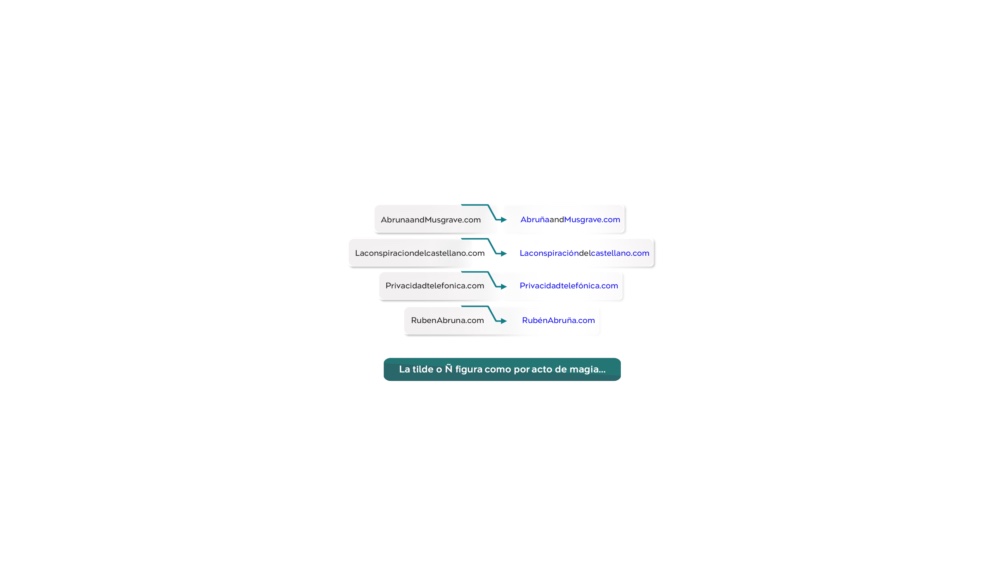
For decades, Allan Tépper has been a pioneer in the development, adoption and improvement of Spanish keyboard layouts, including a special one he once created to facilitate writing in the Guaraní language for a Paraguayan Apple dealer. His most recent one is Español ISO mejorado, which is now available for the general public. I use it daily since it gives me direct access to the coveted «angle quotation marks», which I prefer over all others. Thanks Allan for this improvement, especially for those of us who write in the language of Cervantes.
Rubén Abruña
Documentary Filmmaker

This new keymap, Español ISO mejorado, will certainly be an invaluable tool for all of us —like myself— who use «angle quotation marks» frequently. It’s very easy to use.
Saray De Andrade
Editor and Content Creator

How can you get this keymap free?
To get this keymap free, you must be subscribed to my free email bulletin, either in Castilian, in English or both. After you are subscribed to at least one of them (and have verified your email with the automatic message you received or will have received), you should fill out this form, and I’ll send you the keymap file installer for Español ISO mejorado free after verifying that you are on at least one of my mailing lists.
If you don’t want to be a subscriber of any of my free email bulletins, you can instead pay US$11 for it here (a single, one-time price).
For more information
For more information about Spanish keyboards and films, visit TuTeclado.com.
Clarification and disclaimer
The Español ISO mejorado keymap is for macOS only and should be used with a Spanish ISO (or Spanish ANSI) keyboard, not with the Latin American keyboard, US keyboard or any other physical keyboard (unless you are solely a touch typist and ignore what is painted or engraved on the keys). You should only request it and install it if you are experienced installing apps on the macOS platform. Otherwise, get help from a Mac-friend who is experienced before purchasing it and installing it. We are not responsible for mistakes you might make.
Lee este artículo en buen castellano
Creé un mapa superior para redactar en Mac: «Español ISO mejorado»
(Re-)Subscribe for upcoming articles, reviews, radio shows, books and seminars/webinars
Stand by for upcoming articles, reviews, books and courses by subscribing to my bulletins.
In English:
- Email bulletins, bulletins.AllanTepper.com
- In Telegram, t.me/TecnoTurBulletins
- Twitter (bilingual), AllanLTepper
En castellano:
- Boletines por correo electrónico, boletines.AllanTepper.com
- En Telegram, t.me/boletinesdeAllan
- Twitter (bilingüe), AllanLTepper
Most of my current books are at books.AllanTepper.com, and also visit AllanTepper.com and radio.AllanTepper.com.
FTC disclosure
None of the manufacturers listed has paid for this article. Some of the manufacturers listed above have contracted Tépper and/or TecnoTur.LLC to carry out consulting and/or translations/localizations/transcreations. So far, none of the manufacturers listed above is/are sponsors of the TecnoTur, BeyondPodcasting, CapicúaFM or TuSaludSecreta programs, although they are welcome to do so, and some are, may be (or may have been) sponsors of ProVideo Coalition magazine. Some links to third parties listed in this article and/or on this web page may indirectly benefit TecnoTur.LLC via affiliate programs. Allan Tépper’s opinions are his own. Allan Tépper is not liable for misuse or misunderstanding of information he shares.