

Filmtools
Filmmakers go-to destination for pre-production, production & post production equipment!
Shop NowThe Best is still the Best

If you have followed my articles on Boris FX, you will know what I say in every article I write about Continuum? The best is still the best. I’ve been using Continuum for years and I have to admit, I’m always excited when the next yearly update rolls around. I know the subscription model may put some people off, and I understand that not everyone likes paying for software year after year. But when I look at just how much you get in Continuum, and how much Boris FX continues to add and improve with every release, I honestly think it’s still one of the best values out there for post-production. Continuum is back with the 2027 update that includes new effects, improvements to existing favorites and plenty of useful additions that make it worth taking a closer look.
Particle Illusion gets a major performance and creative overhaul
One of the biggest updates in Continuum 2027 is to Particle Illusion, Boris FX’s tool for creating particle effects such as sparks, smoke, explosions and energy trails. This release focuses on making it easier to work with complex particle effects while giving artists more control over how they look and move.
One of the most useful additions is a new Sim Speed slider, which lets you speed up or slow down an entire particle animation from one control. You can even animate that setting over time, making it much easier to create effects that change speed without adjusting a bunch of individual settings. Performance has also been improved, with a new image-caching system and smoother previews that should make working with complicated projects less frustrating.
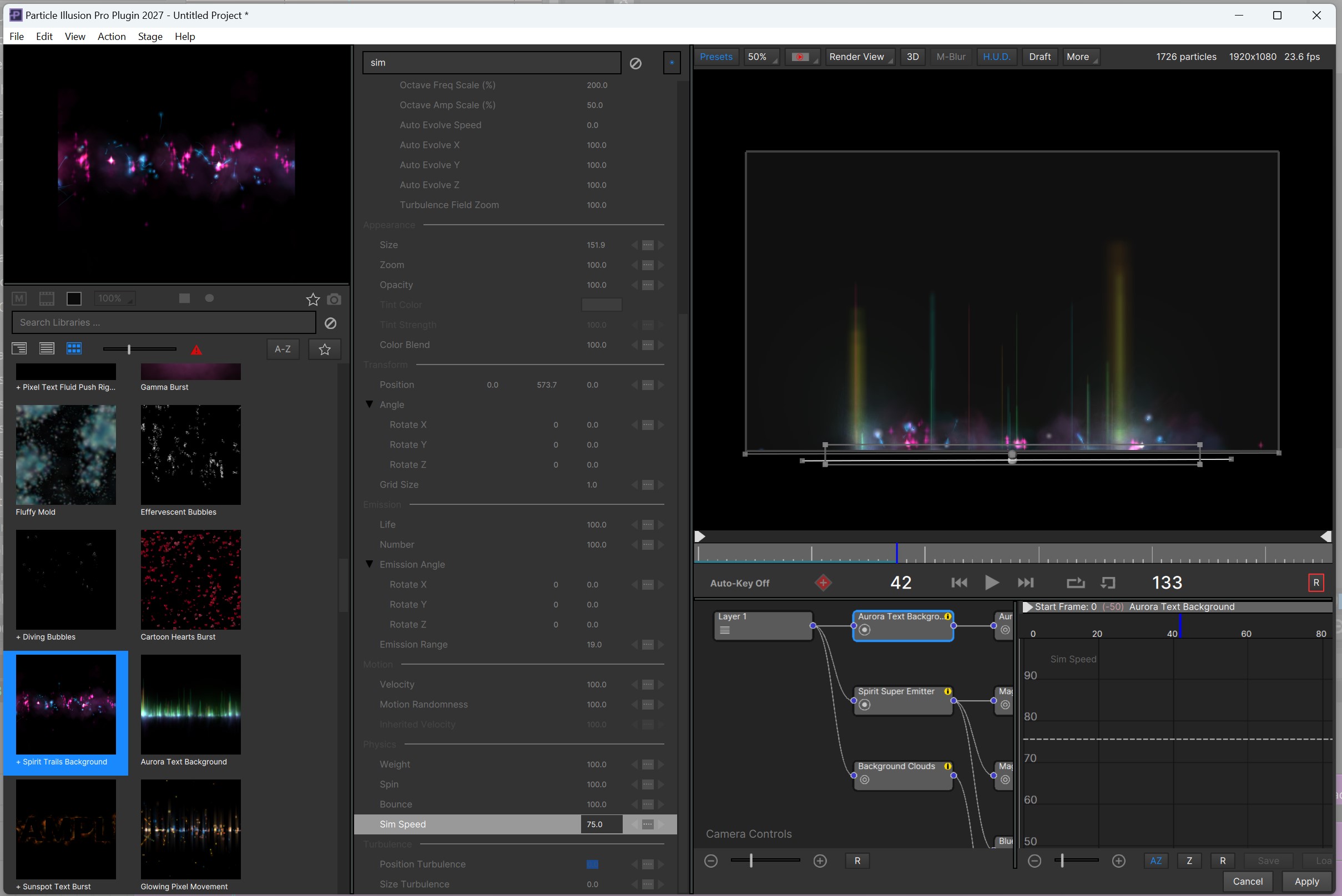
There are also several new creative tools. The updated camera blur effects include a redesigned Depth of Field effect, along with Tilt Shift and Vignette blurs. A new Darken with Distance option makes particles darker the farther they are from the camera, helping create a greater sense of depth. Artists can also arrange particles using a grid, while improvements to Connect Particles make it easier to create connected lines, networks and energy-style effects.
Other additions include support for importing STL 3D models, more color options for point emitters, improved emitter-library previews and new keyboard shortcuts. Alpha compositing has also been improved to help prevent unwanted dark edges when exporting particles with transparency. Combined with a new 2027 emitter library and various interface improvements, these changes make Particle Illusion faster to work with and give artists more ways to create and fine-tune their effects.
More AI-powered masking, face isolation and matte refinement
Artificial intelligence continues to improve several tools in Continuum 2027, especially those used to isolate people, clean up edges and create better masks. Rather than introducing an entirely new AI workflow, this update focuses on improving tools that are already available.
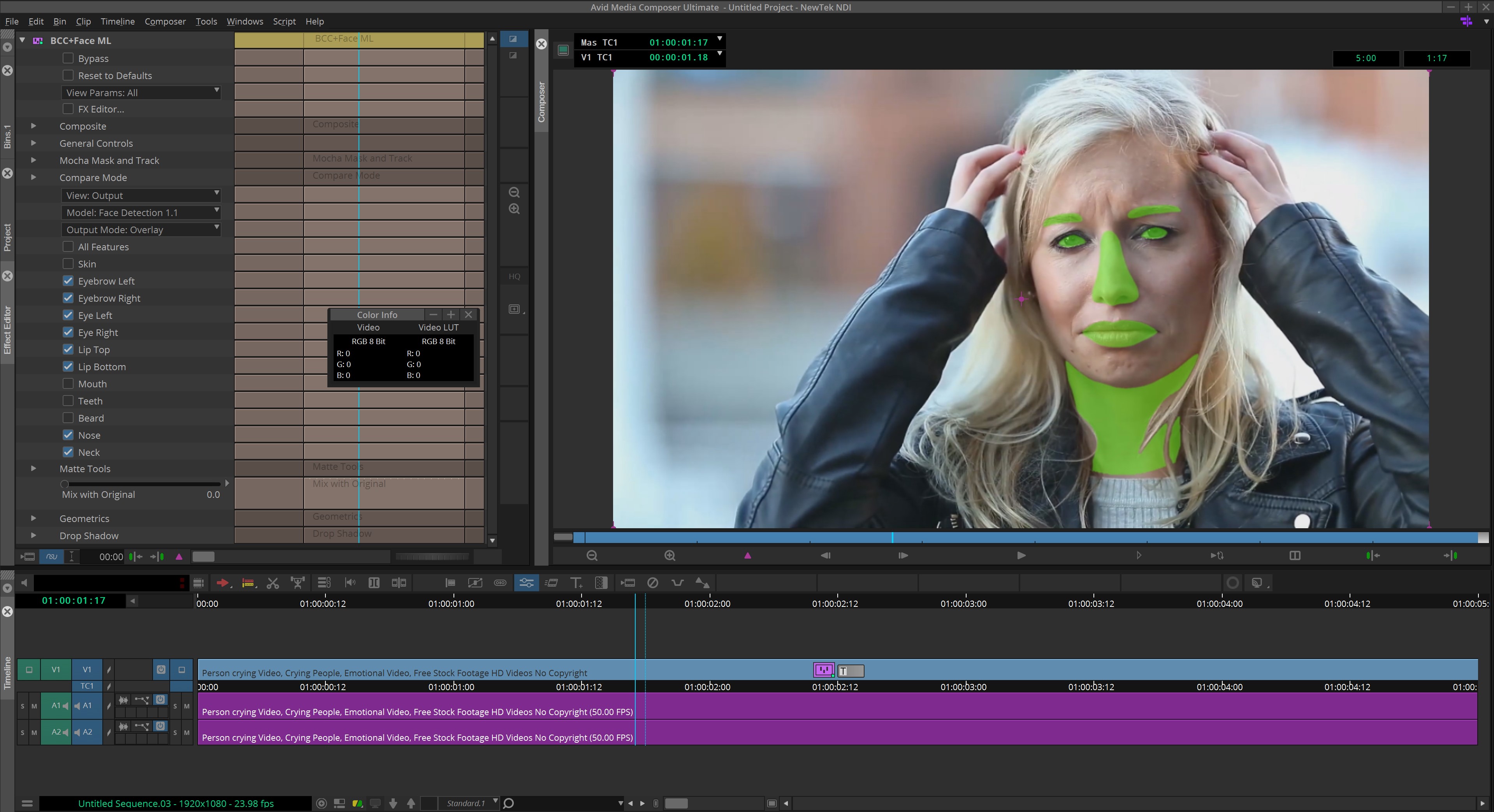
BCC+ Face ML adds three new model options. Model 1.2 lets artists control the mask around each ear separately, while models 1.3 and 1.4 work with the face as a whole. These models are also being added to BCC+ Witness Protection, which previously relied on oval masks to isolate faces. This gives artists a better way to follow the shape of someone’s face when blurring or concealing their identity.
BCC+ Matte Refine ML also gets an update in its Adobe version, with a new 2.1 model designed to produce cleaner edges that remain more consistent from frame to frame. This is important because a mask might look good on a single frame but flicker or change shape when the video plays. There’s also a new edge colour-correction option to help improve the final result. However, the feature has a technical requirement: it needs footage with a straight alpha, where the original colour information is preserved even in fully transparent areas. Boris FX suggests using the alpha output from Mocha Matte Assist ML through the standalone BCC+ Pixel Chooser filter in After Effects or Premiere Pro.
These updates should be useful for anyone working with tricky edges, hair, facial features or people partly hidden behind objects. They won’t remove the need for manual cleanup in every situation, but they give artists more options for creating clean, reliable masks that hold up better during playback.
Several Classic Effects Return as Modern BCC+ Tools
Boris Continuum 2027 brings several classic effects back to life in the modern BCC+ framework. Effects such as Vector Blur, Curl, Bulge, Wave and Time Displacement have been updated with GPU acceleration, faster performance, improved animation and creative controls, and new distortion options. These updates make familiar tools more flexible and efficient, while giving artists new ways to create and refine their visual effects.
- BCC+ Vector Blur: Now available as a standalone effect, not just a transition, with GPU acceleration and enhanced controls.
- BCC+ Vector Blur Dissolve: Fully GPU-accelerated and considerably faster than the classic version.
- BCC+ Curl: GPU-accelerated, with new Bulge and Spherize warp styles and improved animation controls.
- BCC+ Curl Dissolve: Updated with GPU acceleration, new warp styles and improved animation controls.
- BCC+ Bulge: GPU-accelerated, with new Spherize and lighting controls.
- BCC+ Wave: Supports three overlapping waves for more organic and varied distortions.
- BCC+ Waves Dissolve: Improved control over multiple wave shapes.
- BCC+ Time Displacement: Modernized version of the classic effect, featuring built-in displacement maps consistent with other recent BCC+ displacement filters.
Overall, these updates bring classic Continuum effects into the modern BCC+ framework, adding GPU acceleration, improved controls and new creative options.
New tools for textures, warping and graphic design
Continuum 2027 adds several new tools that give artists more ways to create textures, graphic effects and interesting looks.
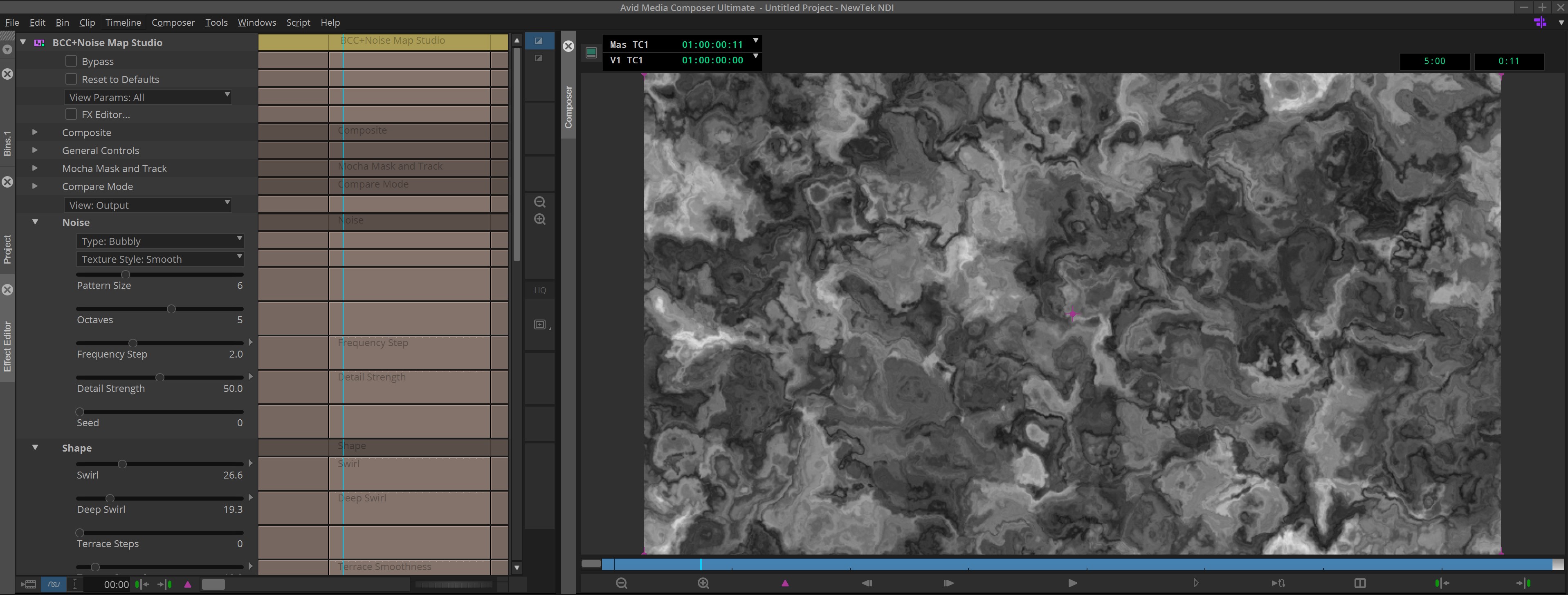
One of the main additions is BCC+ Noise Map Studio, which lets you create your own patterns and textures, from cloud-like shapes to abstract backgrounds. You can also add colour directly inside the effect, making it easier to create custom looks without having to bring in images from other sources.
The new BCC+ Grid filter can be used to create grid patterns as part of a design, or to help you see how an image is being distorted when working with warp effects. BCC+ Ripple also gets a new Chromatic Separation option, which adds colourful, rainbow-like or RGB-split effects around distorted areas. This is useful for more stylized looks in music videos, titles and transitions.
There’s also an improvement to the Pixel Chooser masking system. A new Drive Effect option in selected BCC+ filters lets the mask control where the effect works, making it easier to target specific parts of an image without setting up a separate masking process.
Overall, these additions give artists more flexibility to create custom textures, graphic looks and controlled distortions without having to leave Continuum 2027.
BCC Text brings a new approach to typography
YES, YES, YES!!!!! We finally have a worthy replacement for Avid Titler (for all you Media Composer editors out there). Not that Title Studio wasn’t a worthy replacement, but it was just overkill for many of the projects I work on. BCC Text is a new tool that makes creating and animating text much easier. It offers a wide range of styling and animation options without forcing editors to work through the more complicated controls found in Title Studio. Although it’s found in Continuum 2027’s 3D Objects group, BCC Text is designed primarily for 2D text, making it ideal for animated titles, lower thirds, title cards, callouts and other text treatments that editors use every day. If you’re a Media Composer editor, and have been waiting for an alternative to the the current Avid Titler, this is an excellent alternative for you!
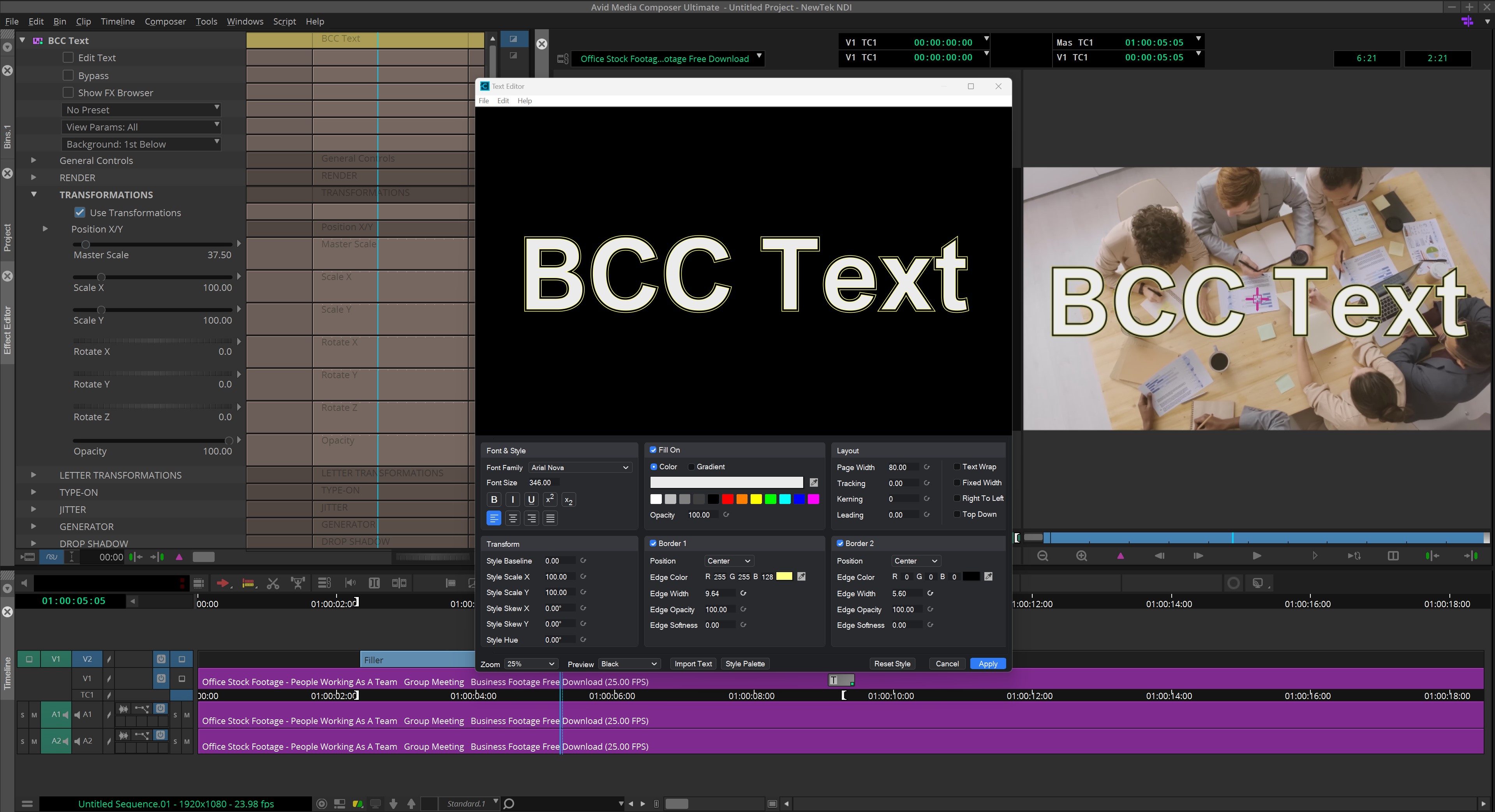
The filter includes animation options such as Type On and Jitter, along with a Generator option and a redesigned Text Edit window that makes working with text more straightforward. The real advantage is that you can create and animate text directly on your editing timeline without having to jump into a separate motion-graphics application. For editors working in applications such as Vegas and Avid, this is a particularly welcome addition. Not every title needs elaborate 3D effects, and having a dedicated tool that makes everyday text work faster and easier is a big plus.
BCC Title Studio, Boris FX’s flagship title-design tool, also receives some useful improvements. Text rendering is faster, and OpenType font support has been added for Windows, bringing it in line with the support already available on macOS. This is great news for anyone working with professional fonts, especially when a project depends on specific typefaces or advanced typographic features. Both BCC Text and Title Studio now support OpenType fonts on Windows as well as Mac.
Another welcome addition is SVG vector import. Title Studio and BCC Extruded EPS can now import SVG artwork directly, making it easier to bring logos, illustrations and other vector graphics into a project. The current implementation supports solid-colour shapes, while support for gradients, embedded text and other SVG features is still being developed.
Overall, these updates make Continuum 2027 a stronger option for anyone creating titles and graphics as part of their editing workflow. BCC Text is particularly exciting because it brings useful text animation tools into a simpler, more accessible package. Rather than making editors work harder to achieve everyday results, it helps them get professional-looking text on screen with less fuss.
Mocha Continuum improves masking and tracking workflows
Continuum 2027 includes updates from Mocha 2026.5, with improvements that make masking objects and cleaning up edges easier and more accurate.
The Object Brush now shows a preview (in yellow in the below image) when you hover over an area, so you can see what will be selected before you commit to it. This makes it easier to select the right object, especially in more complicated shots. It also automatically focuses on the most relevant part of the image, helping create cleaner masks. You can still set this area yourself when you need more control.
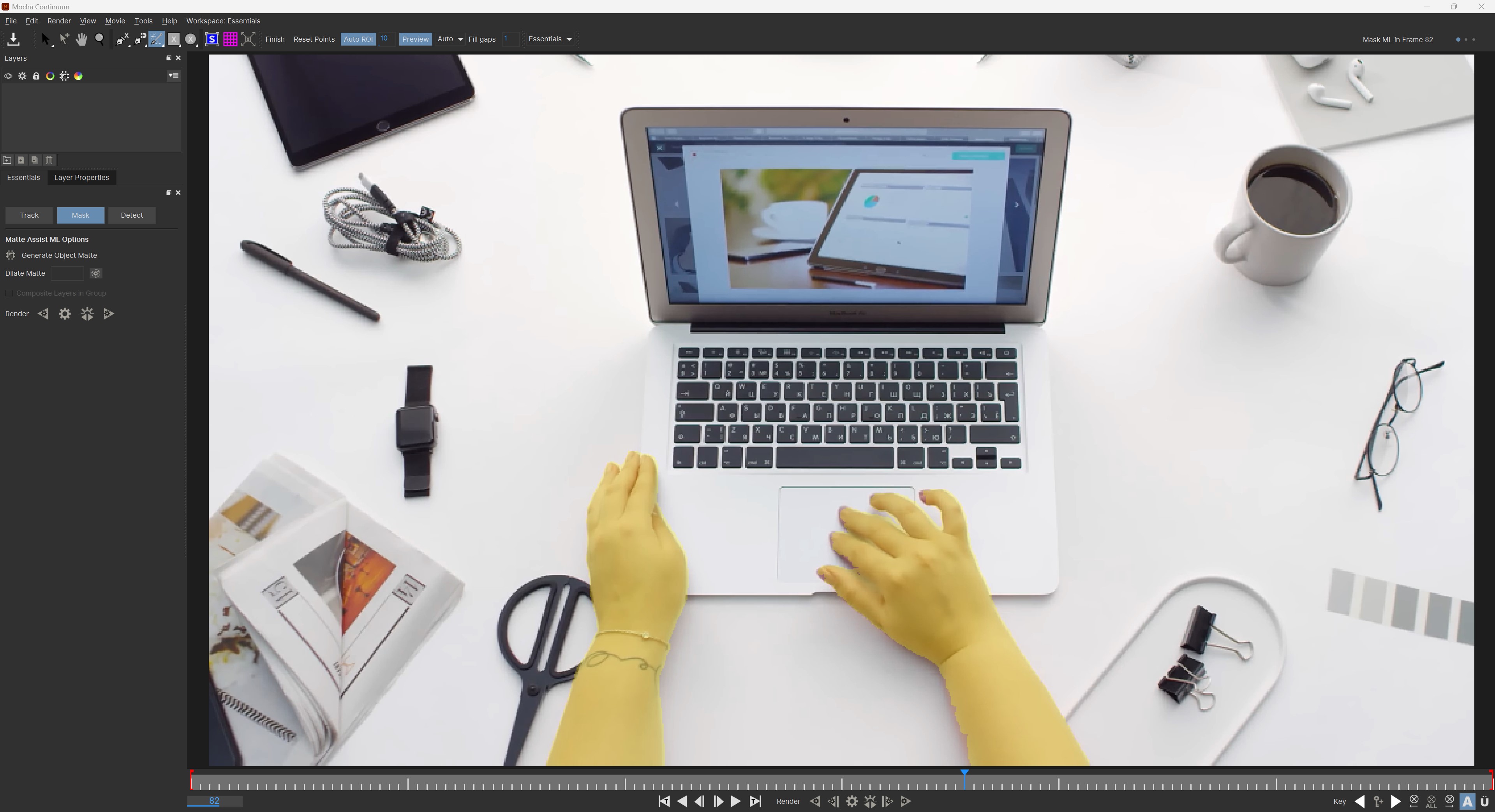
There are also improvements to Matte Assist and Refine Matte. Matte Assist can now use a search area to help the mask follow an object more accurately from frame to frame. Refine Matte has new automatic controls that help it look beyond an object’s edges to capture softer details, while reducing unwanted speckles and other imperfections. These changes may seem small, but they can make a real difference when working with moving subjects or difficult edges, saving time that would otherwise be spent fixing masks by hand.
Another useful improvement is a new alternate layer picker for the Mocha and Pixel Chooser workflow. This lets you use a different clip as the source for the image or motion information needed for masking, tracking or pinning. In other words, if the clip you’re using to drive a mask or track is different from the clip you’re applying the effect to, you now have more flexibility to work with both.
Overall, these updates build on Mocha’s existing tools rather than completely changing how they work. The focus is on making selections more predictable, producing cleaner masks and reducing the amount of manual cleanup needed to get the job done.
Fixes, Refinements, Localization & Presets
Continuum 2027 isn’t just about new effects. Boris FX has also made plenty of improvements to help things run better and make everyday work easier. There are performance improvements for Premiere Pro, better GPU handling, fixes for problems in Particle Illusion and Title Studio, and improvements to compositing and other tools. Vegas users also get better access to BCC+ Composite, while artists can take advantage of support for eight additional languages and more than 500 new presets. There are also plenty of smaller fixes and changes that may not grab your attention right away, but they all add up to a smoother experience and give you even more options to work with.
- BCC+ Composite: Expanded compositing capabilities with a background layer picker/input, blend modes and Light Wrap, allowing artists to perform more complete composites within a single effect.
- Vegas Integration: BCC+ Composite is now available as a Custom Composite mode filter in Vegas.
- Premiere Pro GPU Suite Support: BCC+ filters now support Premiere’s GPU Suite, delivering significant improvements to playback performance and overall usability.
- GPU Memory Management: Reduced GPU memory pressure and fewer fallbacks to CPU processing, helping improve performance when working with GPU-accelerated effects.
- Premiere Pro Fixes: Addressed issues involving effects applied to clips smaller than the sequence, as well as problems with vertical sequences and effect positioning.
- Particle Illusion: Fixes for playback hangs, disappearing particle trails, emitter libraries, undo behaviour, timeline selection and graph editing.
- Title Studio & BCC Text: Improved text rendering, font handling, special-character support, editing controls and overall stability.
- GPU & Rendering: Fixes for GPU errors, interlaced footage, masking, warping and pinning, including issues affecting AMD graphics cards.
- Workflow Refinements: Improved Denoise ML controls, clearer warping pinning interfaces, enhanced licence information and easier access to preferences from both classic BCC and BCC+ filters.
- Classic BCC Filters: Several filters have been moved to the Obsolete folder where newer BCC+ versions replace them.
- Language Localization: Eight additional languages supported in Title Studio, Particle Illusion and the BCC+ FX Editor: Brazilian Portuguese, French, German, Japanese, Korean, Polish, Simplified Chinese and Spanish.
- 500+ New Presets: Added across new and updated effects, including BCC Text, Noise Map Studio, Vector Blur, Curl, Bulge, Waves, Ripple and Time Displacement.
- Additional Preset Resources: New Noise Map Studio gradient presets and 21 gradient-based gobo/map images for Displacement Map and Light effects.
You’ll see that I’ve called Continuum 2027 “The Best,” and to be perfectly honest, when you look at the cost compared to everything you get, I still think it’s the absolute best deal on the market. As a long-time Continuum user, I love seeing how Boris FX continues to build on an already impressive collection of tools, adding new effects, improving existing favourites and giving artists even more to work with every year. No software is perfect for everyone, and the subscription model may not appeal to all users, but for the sheer amount of creative power packed into Continuum, it’s hard to argue with the value.
Want to see what Continuum 2027 can do for your workflow? Head over to www.borisfx.com to explore the latest features, check out the available options and see for yourself what makes Continuum such a great addition to any post-production toolkit.
Disclosure: I have not received any compensation from Boris FX for this article. These are my own opinions, based on my experience using Continuum.