

Filmtools
Filmmakers go-to destination for pre-production, production & post production equipment!
Shop NowAltman: It’s quite terrible for DRAM to be locked inside personal computers

 The first half of the year was impressive for After Effects, with months of big features, AI and freemium competition, and 3rd-parrty news. The current release of AE is September 2026 release (version 26.5 at IBC). Video summaries of 26.3 were linked earlier.
We’re looking forward an end of year push soon to finalize more beta features, perhaps with the usual announcement at Adobe Max, planned for November 8-12.
With various Fixed issues and Known issues, the September 2026 release (version 26.5) included:
- New guides functionality in After Effects
- Disk Caching for Object Matte
- Color labels for effects
- Effect Controls panel modernization
- Frame.io V4 panel
- ACES 2.0 Support in After Effects
The beta app was last updated on October 7, 2026; see Announcements for community feedback. Top features in beta include:
- After Effects AI Assistant
- Stylize footage with Contour Paint effect
- Use layers as material sources
- Apply materials to 3D text and shapes
- Duplicate layers using Alt/Option-drag
- Change anchor point in a more efficient way
- Editable text from Illustrator layers
- Reduce sibilance with De-esser effect
- Set your PNG compression level on export
- Access your Adobe account easily
- Adobe Stock panel in After Effects
- Recover projects easily with improved Auto-Save
In 24 After Effects Features You Probably Missed (2026 + 2027), Plainly took a longer look back at recent AE releases to gauge progress of features in AE. But first, After Effects Basics looks at the current beta app in INSANE Update For Adobe After Effects! (V27). Later, Boone Loves Video added After Effects 2026: My Favorite New Features.
Perhaps the biggest news of the month was the Artcraft release of 14 apps attempting to clone Creative Cloud apps. The vibe-encoded After Effects clone is EffectCraft, available on Mac, Win, and Linux. There’s potential but the apps are early in development and AE and Premiere projects and plug-ins are not supported (two workarounds?). And of course features and shortcuts are missing, and some functions requirement spending credits for tool replacement by AI models.
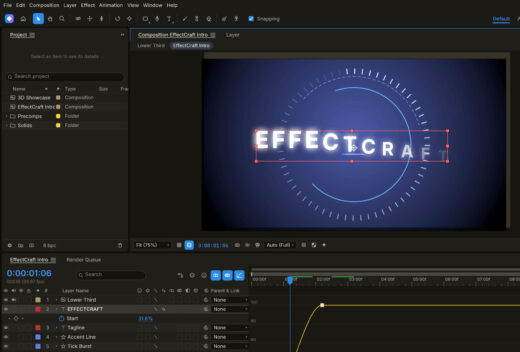 EffectCraft isn’t an exact clone but it’s useful for some and close enough to AE that you can learn a lot. There are already dedicated tutorials, and running commentary videos for regular feature updates already.
It seems the previous AE competition that “turned free” might still be better alternatives though the Artcraft apps are surprising. Canva Cavalry, Maxon Autograph, and Blackmagic Design suite all are currently stronger alternatives with complementary features, for now at least. For an earlier discussion see Free After Effects, or freemium loss leaders. None of the alternatives will soon have the vast array of 3rd-party plug-ins and tools offered by the Adobe ecosystem.

Layer Lemonade shared a balanced look with ✦ ANALYZING THE AFTER EFFECTS CLONE: EFFECTCRAFT ✦ | NinM EPI.32
Envato looked at ArtCraft vs Adobe: Free alternative tested with real files. And SonduckFilm took a quick look in Pro Motion Designer Tries Vibe Coded After Effects. There’s a good number of other looks, but I Tested EffectCraft on Real After Effects Projects by The Video Shop had some depth. But first out of the gate was AE developer Motion by Nick (Nick Greenawalt) with I tried the cloned Adobe apps…
Some people were more impressed with EffectCraft in combination with an AI assistant. Lines To Designs says I Gave Claude 5 VFX Tests in the FREE After Effects Clone, while Applorable wants to tell you Why EffectCraft Beats Adobe AfterEffects for Al Video Editing (With MCP).
SternFX used Firefly Boards and compared results to AE handmade in order to ask, Can AI Animate This Without Destroying It?
Motion Dock from Davey Design is a free After Effects toolkit. All 28 Motion Fun tools are in one panel you arrange yourself. Petals, AEbar, Picky and the favorites, plus 20 new Essentials for renaming, parenting, keyframes, text, counters, comp sizes and renders. Eran Stern has a tour of this free package in One FREE Panel Replaced 4 After Effects Extensions.
Jake In Motion has 600+ FREE Presets for After Effects! sort of… Jake built Preset Browser, a completely free After Effects extension that lets you visually browse, preview, and apply all 600+ built-in presets in seconds. So, no more guessing what a preset does or wasting time applying effects just to see what they look like. You can even generate video previews for your own After Effects presets, making your entire preset library easier to browse and use. This was a long time coming!
Boone Loves Video talks CC Composite in This is One of My Favorite Effects in Adobe AE 😍
sheikh sohel used the Turbulent Noise effect and CC Chromatic in Aberration to Animate Chromatic Aberration Background | After Effects Tutorial. He did not explain how he transformed his accent from British to American!
School of Motion explains a green screen update and more in CorridorKey 2.0 Levels Up + A$AP Rocky’s AI VFX Controversy | Motion Monday. See also, I Solved Green Screen, and I’m Giving it to YOU! from Corridor Crew. Compositing Academy seems to show that it’s not a Magic Bullet so procedural mattes are still needed.
Imaginary Forces turned HBO’s ‘War‘ titles into a painterly Abstract Expressionism battlefield. It’s fresh, but then again I think their titles to ‘Seven’ are still fresh. According to AWN:
“To make the sequence, the team hand-animated the movement and performance of the paint in Procreate with an Apple Pencil on an iPad, then brought the work into Krita for a richer, textured paint quality. The imagery then moved into Cinema 4D and Redshift, where they team added the physical canvas, lighting and surface detail, giving it a more tactile, dimensional quality while preserving the spontaneity of the original brushwork.”