Filmtools
Filmmakers go-to destination for pre-production, production & post production equipment!
Shop NowTL;DR: Premiere 27.0 is out this week. AS EXCITED AS YOU ARE…Wait 7 days before you install it. If you want to try the new features, consider trying the beta on a project that isn’t live. And if you do install 27.0, UNCHECK “Remove old versions” in the Creative Cloud app first (or be in a world of re-downloading pain!)

Welcome to Tool Tip Tuesday for Adobe Premiere on ProVideo Coalition
Look, I know Adobe is having a really amazing week. Adobe MAX is happening. And the first thing you want to do is go download the new version of the tool, or the current beta.
All I can tell you is: take your finger off the Update All button.
If you’re in any level of professional environment, the days the new tools come out are the most dangerous, even if your systems are locked down. All you need is one person to upgrade their system, and everything that touches that project now requires the new version.
And if anyone on your team is on an Intel Mac, they can’t follow you: 27.0 needs an Apple silicon Mac (M1 or newer) on macOS 15 or later. Intel Macs stay on 26.x. On Windows, it’s Windows 11 24H2 or later, and Premiere won’t launch without a GPU.
That’s not why you should hold off on upgrading. The single most important reason to hold off is that you don’t want to be the canary in the coal mine that kills your post-production workflow. That’s it.

You should know never to upgrade mid-project. But…nearly everybody reading this has, at some point, upgraded mid-project (after all, we’re professionals. We know what we’re doing. Right?) Most of the time, nothing bad happens. But there’s nothing like taking your $3k+ setup and the project you’ve been working on for months (or longer) and making it stop working. Because you couldn’t wait 7 days.
So let’s talk about how to do this safely.
Wait 7 days
First, as hard as it is, do nothing for 7 days.
If you really want to try the new version and play with toys, I’d suggest you actually jump to the next beta on a project that isn’t live. The beta installs as its own app, so you get to play with the new features without accidentally setting your system to double-click into the new “shipping” version.
Keep your old versions
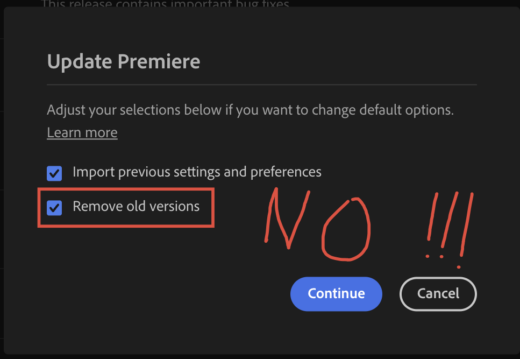
Adobe’s Creative Cloud app removes prior versions by default. I’d have you change this.
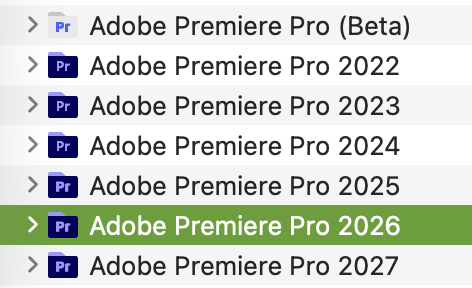
I keep multiple versions of Premiere installed on my system. I try to start and finish a project on the version it started on whenever possible. Yeah, it’s a bunch of extra space, but getting these is convoluted and sometimes the older software gets pulled due to age or licensing reasons.
What I’d like you to do is not even download Premiere 27.0 yet. But if you are going to download it, please absolutely make sure to uncheck Remove old versions.
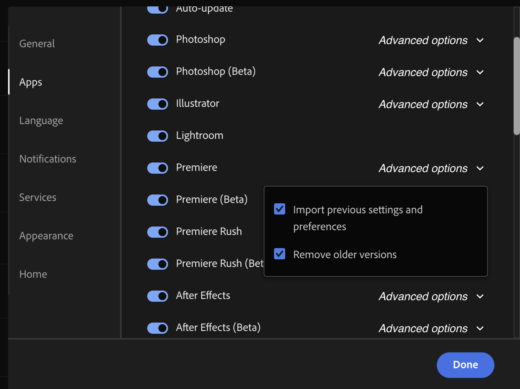
If you update by hand, it’s right there in the Update Premiere dialog. For auto-update, it’s in the Creative Cloud app under Settings > Apps, in Premiere’s Advanced options (where it’s called “Remove older versions”). I hate the auto update setting, and have had trouble getting it to remember to NOT remove prior versions.
Every upgrade cycle, I get a call from a couple of clients who pressed the button and want to know why suddenly everything needs to be saved as a new version. That’s because they downloaded a full new version of the software.
Premiere thankfully leaves your original project alone when it converts it; the converted project is saved as a new file. But now we have all this PROJECT_1 (or _2, or _3) lying around.
I’m very careful. Best choice? Install and test on a separate system. Even so, I’m always a little squirrely about projects that have After Effects round-trip items, Audition pieces, etc. It’s possible. Just messy. I try to limit the upgrade to fresh projects, so I don’t get involved in mixing versions.
If it goes south
If you’re not in the middle of a project, you feel brave, and it turns out you were wrong and everything goes south, I’ve typically used one of the Premiere Pro project downgraders. That’s the general workaround, and way better than XML workflows. But you should avoid needing tools like this.
Final thoughts
You’re going to see a lot of attention on Adobe MAX and the new features everywhere over the next few days. Adobe’s PR machine is in hype overload and a lot of what they’re showing is amazing.
Tomorrow night, though, they’ll show even more of their research with Adobe MAX Sneaks. As great as the future is, a lot of us are working right now and I’m trying to help you avoid the pain of taking your working system and breaking it.
This series is courtesy of Adobe.