


Welcome to Tool Tip Tuesday for Adobe Premiere Pro on ProVideo Coalition
Over the years, I’ve picked up a ton of paid and free audio plugins. Some fix small audio problems, some give distinctive metering options, and some just make my life easier.
Except there’s clutter. Way too many plugins in my Audio Effects panel. we’re going to clean them up.
Tip part 1. How to open the Audio Plug-in Manager.
This is a lesser-known part of Premiere. There are two ways to open this pane
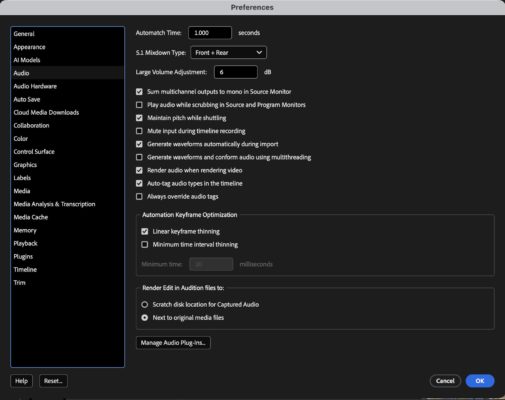
You can go to Preferences > Audio > Manage Audio Plug-ins…

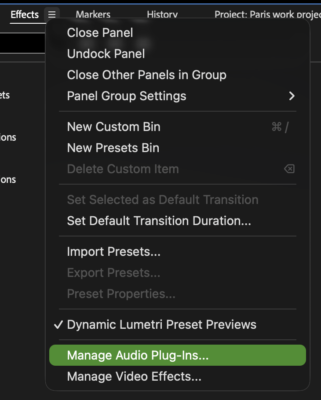
Or in the Effects panel, you can click on the flyout menu and choose Manage Audio Plug-ins…

Tip part 2. Which ones do you want to turn off?
If you’ve installed any third-party plugins, you’ll see them here. If you have installed any and don’t see them, hit the scan button.
VST3, VST and AU
Most audio plugins install in multiple formats. Here’s what you’re looking at:
VST is Steinberg’s original “Virtual Studio Technology” — it’s cross-platform and widely supported, but at this point it’s the legacy format.
VST3 is the newer version. More efficient, better CPU handling, dynamic I/O, improved automation. Same idea, just smarter under the hood.
AU is Apple’s “Audio Units” format. Native to Logic and other Mac apps, and it does have lower latency. But it’s Mac-only.
VST3 is the one you want
VST3 is cross-platform. Mac, Windows, doesn’t matter.
If you apply a VST3 effect on your Mac and hand the project to a Windows editor with the same plugin installed, it will work.
If you pick the wrong one and they don’t have it? You’ll have to rebuild every single instance of that audio effect.
VST is largely a legacy format at this point. Remove it (unless it’s the only type for that plugin)
AU isn’t cross-platform. If you’re a Mac-only shop and you know the project will never leave your ecosystem, AU can make sense. But for everyone else? Standardize on VST3 and simplify your life.
Clutter means overload. Manage Audio Plug-ins: Your cleanup tool
Go to Audio Plug-in Manager and turn off the plugins you don’t need. That’s it.
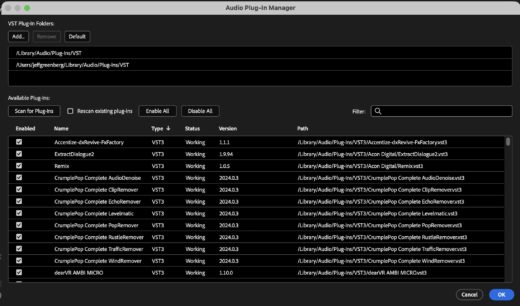

I wish multiple selections worked here. They don’t. I can’t search for just VST.
What I do: Search by manufacturer. Keep the VST3. Uncheck the rest.
Final thoughts
Many Premiere users don’t even know this panel exists. It’s one of those set-it-once situations — do it now, and you won’t have to think about it again until you install your next plugin.
Fewer duplicates. Projects that actually transfer between Mac and Windows. One less thing to debug when something goes wrong.
This series is courtesy of Adobe.