
TL;DR make use of that audio timecode signal you’re recorded

Welcome to Tool Tip Tuesday for Adobe Premiere Pro on ProVideo Coalition.
Every week, we will share a new tooltip to save time when working in Adobe Premiere Pro.

When shooting with multiple cameras a timecode box like a Tentacle Sync or a Deity TC-1 can generate Linear LTC timecode, (also known as Longitudinal Timecode) as an analog audio signal that can be used to sync multiple cameras. There was a time when you had to use external syncing software to make use of Linear LTC timecode but current versions of Adobe Premiere can use that signal and assign that as the master timecode.
First, verity that Linear LTC timecode has been recorded to one of the audio channels. This is usually known because it’s a major part of the production, but if you happen to hear a sound that sounds something like this when you play back the clip, you have Linear LTC timecode.
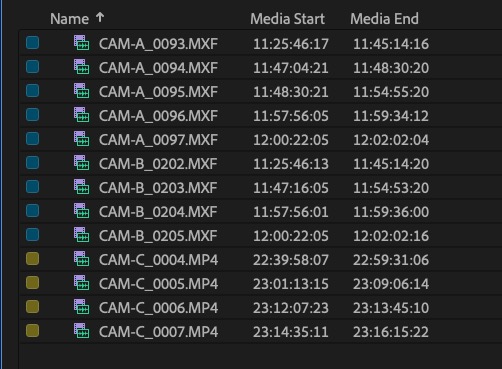
Looking at the media start in the clips in the above image, you can see that both Camera A and Camera B look to have matching sync timecode. But Camera C, marked in yellow, has different timecode in the 22 and 23 hours. If you were to sync all these angles by timecode, only the Camera A and Camera B would sync. Knowing that Camera C has linear LTC timecode, we can modify the clip’s timecode to use it.
This operation can be done in a batch. Select all of the clips you want to modify, then right-click and choose Modify > Timecode…

If the clip has linear timecode, it should be an option to check the Linear Timecode LTC button. If it does not, then it should be grayed out. With the selection made, click OK, and the Media Start and Media End timecods should adjust to the new Linear Timecode LTC signal for each clip.

With the Camera C timecodes adjusted to the Linear LTC timecode signal, we’re ready to sync and create Multicam Source Sequences.
Timecode is a wonderful thing, and the relatively affordable LTC linear timecode generator boxes are worth their weight in gold for multi-cam productions and reality shows when you have a lot of different cameras rolling on the same subject.
This series is courtesy of Adobe.