


Welcome to Tool Tip Tuesday for Adobe Premiere on ProVideo Coalition
You don’t. Because of this, what you did last week…sounds off.
What happens when you raise your computer volume? Or lower it? Is it set correctly for mixing?
You need some level of consistency, and right now you don’t have any. When I work with teams, it’s a problem: everyone does things differently.
This method, what I call the Guerrilla Guide to computer volume, is meant to be a rule of thumb.

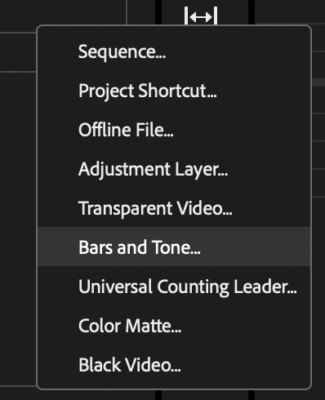
Make tone
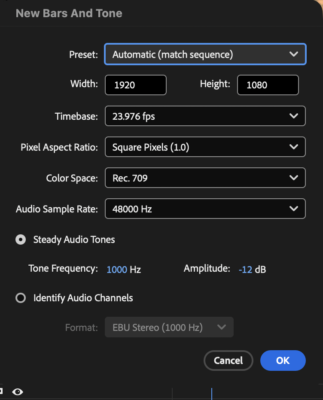
Under File > New > Bars and Tone, create new bars and tone in your project. Use the exact default settings. Notice they’re at -12 dB.
Put it in the source monitor or drop it on the timeline and hit play. OOOOOOOOOO. Yeah, I hate the sound too.

Guerilla calibration
Adjust your computer’s volume until the tone feels a little uncomfortable. Not painful. Uncomfortable.
That’s what your computer should be set at – and checked each time when you sit down to work.
Maybe you’re not just editing. Listen to Spotify? Set Spotify to lower or higher now that your system is set up. STOP ADJUSTING YOUR COMPUTER VOLUME. Got on a Slack huddle? Adjust the volume of Slack, NOT your computer.
Switched from speakers to earbuds? Check again. Play the tone, get back to that same hair of discomfort, and you’re back where you were.
Mixing
Now take any dialogue and adjust it so it sounds right. It should average at -12 or just a little above.
If you now play an unmixed interview and someone sounds too loud or too soft, they are. Your computer isn’t the variable anymore.
Background elements, music playing under someone speaking? They should be about 10 or so decibels below that.
One note: there is a professional version of this. It’s done with a pink noise generator and a sound pressure meter. This tip about tone? It’s a consistently good-enough solution for everyday use.


Final thoughts
Why -12? Technically, there are reasons (broadcast specs) to use other values such as -18 or -20; I’m using -12 as that’s Premiere’s default.
The idea is that everybody starts from the same place. Without it, the next person hears everything as too loud or too soft, starts fixing what isn’t broken, and hands it back changed. With it, “the music is too loud under that bite” means the same thing to both of you.
And if you put this in your approval exports, you can tell them to adjust their volume the same way, and they’re hearing things the way you mixed it.
This series is courtesy of Adobe.