


This is not a review on the MacBook Neo, the first MacBook to be sold as low as US$499 pre-tax—for those who qualify for educational pricing in the United States—or as low as US$599 pre-tax for those who don’t. The only two States of the US which truly offer tax-free sales are Delaware and Oregón. There are plenty of available reviews about the MacBook Neo, in addition to being praised by iFixit as Apple’s most repairable laptop in the past 14 years. The MacBook Neo does not compete with MacBook Air or MacBook Pro models (of which I own a Pro). Instead, the MacBook Neo competes—and beats—Chromebooks and Windows laptops at the same price level and even higher. For those who really need to run Windows apps, the MacBook Neo can indeed run Windows 11 ARM using virtualization and this is also highly rated by trusted reviewers, although the Windows performance on the Neo will be much better if you apply the special techniques I clarified in two recent articles (linked ahead). This is my buyer’s guide for those who have made the decision to purchase a MacBook Neo, not a recommendation to buy one. If you really need a MacBook Air or MacBook Pro, you know who you are and why you should get one of those instead.
What qualifies Allan Tépper to publish a MacBook Neo buyer’s guide, since he doesn’t own one?
- Even though I have used other operating systems too, including ChromeOS (Chromebooks), Linux and Windows, I have been a Mac (macOS) user since it was called «Macintosh» with the first model in 1984. I am writing this article on a MacBook Pro 14″ M4 with Spanish ISO keyboard and matte nanotexture display, which I acquired way before the Neo was announced.
- For many decades, I have used countless other Macs and configured them for myself, friends and clients.
- In the late 1990s, I designed and created my first keymap for macOS, as a subcontractor for Apple’s Latin America’s office in Miami, Florida to help with the transition for users to the (then) newer Spanish ISO layout (not the Latin American keyboard layout), The (then) brand-new keymap suddenly had the normal ascending accent mark usually used in Castilian (´ as in café) in an unfamiliar place, and the descending one, called l’accent grave in French (` as in the French word mère) where it used to be located, so the Mac users who were familiar with the older Apple Spanish keymap (including myself) were naturally going nuts, unintentionally misspelling Castilian words by typing the inappropriate accent mark. This «training-wheel» keymap I created for Apple Latin America and its users alleviated the problem for many people. They were very appreciative.
- After the success of the above «training-wheel» keymap I had created, I was subsequently referred by that same Apple Latin American office to create a special version of the Apple Spanish ISO keyboard layout (called Español ISO-G) under contract by Apple’s official Paraguay distributor, in order to add the special characters required for the Guaraní language. Guaraní is an indigenous language which is co-official with Castilian (castellano) in Paraguay, as indicated in its constitution in article 140, and requires accenting more letters—and with a different type of diacritics—than the Castilian language does. All of that was back in the days of macOS System 9.x, where the keymapping tools were very different than they are now.
- In 2025, I created and offered for public consumption the new Español ISO Mejorado for macOS, which adds four missing characters that don’t have direct access from Apple’s current macOS stock Spanish ISO keymap, but is required for proper Castilian writing, according to the Real Academia Española (Royal Spanish Academy), as covered in detail in this 2025 article: I created a superior software layout for the Spanish keyboard for Mac: «Español ISO mejorado». This year, in 2026, I offered a similar one for Windows, also called Español ISO Mejorado, which is already available to the public.
- I have also aided several developers of software for macOS to translate/localize or correct errors I noticed in the Castilian version of their software.
Which MacBook Neo color to choose?
My comments about the MacBook Neo color will only be practical here, not aesthetic.
- Even though Apple has used its best technology to resist fingerprints, the Silver color is still the most resistant one.
- Considering that no current version of the MacBook Neo offers a backlit keyboard to facilitate aligning your fingers to the keyboard in low-light situations, keep in mind that the highest contrast ratio is available only with the Silver version. The other versions of the MacBook Neo—in other colors—have a darker background on the keys, so it is more difficult to read the letters in a very dark situation than with the silver-colored model. This second point—regarding the keyboard contrast based upon color—is irrelevant if you plan to use the MacBook Neo closed (in the clamshell mode, which is officially supported by Apple) connected with an external display which supplies power (or a hub that supplies power and feeds the display—see ahead), an external backlit keyboard (like the excellent backlit ones from Perixx for Mac) and external pointing device (trackpad or mouse). (To my knowledge, Apple’s doesn’t currently offer any backlit external keyboards, but fortunately Perixx offers great backlit versions for Mac.)
Hub (aka «dock»)
The MacBook Neo is very scarce with ports, with a TRRS 3.5 mm headset jack and only two USB ports, one of which is required for power. One of the USB ports is USB 3 and the other is USB 2. No SD slots are included built-into the MacBook Neo. So if you plan to connect external drives, one or more USB microphones, external webcams, an XLR audio interface, etc. you will likely need a very good powered hub, unless your USB display monitor already has that built-in. (Even the MacBook Pro—at over triple the price—has only three USB ports, so it often needs a hub too.)
Even though my review is still pending for it, my current recommendation for a serious one is the RØDE Hub, just announced recently:


The RØDE Hub features:
- six USB-C 3.2 Gen 2 ports with high-speed data transfer of up to 10Gbps
- a single USB-A port
a dedicated USB-C port for an optional video monitor- both microSD (UHS-II [312 MB/s]) and SDXC (UHS-II [312 MB/s]) card slots
- An included 100 watt power supply, 100 to 240 VAC, 50/60 Hz with international plugs included
- pass-through charging of up to 60 watts to charge a laptop, be it a MacBook Neo, MacBook Air, MacBook Pro or other laptop
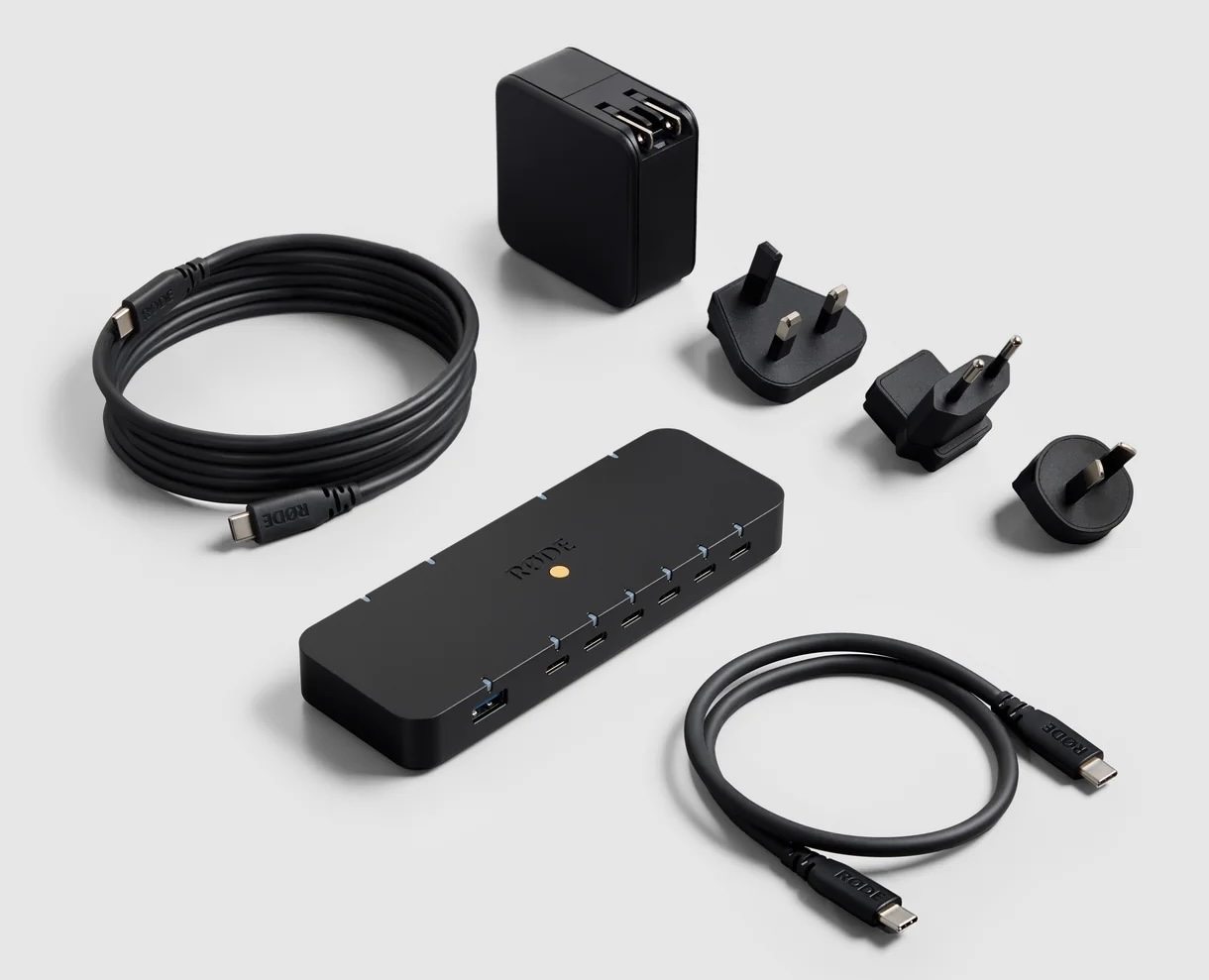

As you can see, the combination of a MacBook with a RØDE Hub is a marriage made in heaven.
TouchID fingerprint reader decisions, also tied to storage decisions


Above are the choices when ordering online. Apple has combined the TouchID fingerprint reader decision with the higher capacity decision. For US$100 more, you’ll get double the storage (currently 512GB instead of 256GB) and the TouchID fingerprint reader, which facilitates logging in, installing or updating apps, purchasing apps in the AppStore and accessing certain password managers like 1Password and Proton Pass. If you qualify for the educational pricing, it will only be US$599 pre-tax with the upgraded storage and TouchID, so that’s what I recommend.
Keyboard decision
Even though the United States is the number 2 country in worldwide population of Castilian-speakers (second only to México), Frame.work and Apple are among the very few laptop brands to offer laptops in the United States with the no-additional-cost option of requesting it built-to-order with a true Spanish ISO keyboard, which Apple and Frame.work simply call Spanish on the sales page (without mentioning that it’s indeed ISO in both cases, fortunately not ANSI).
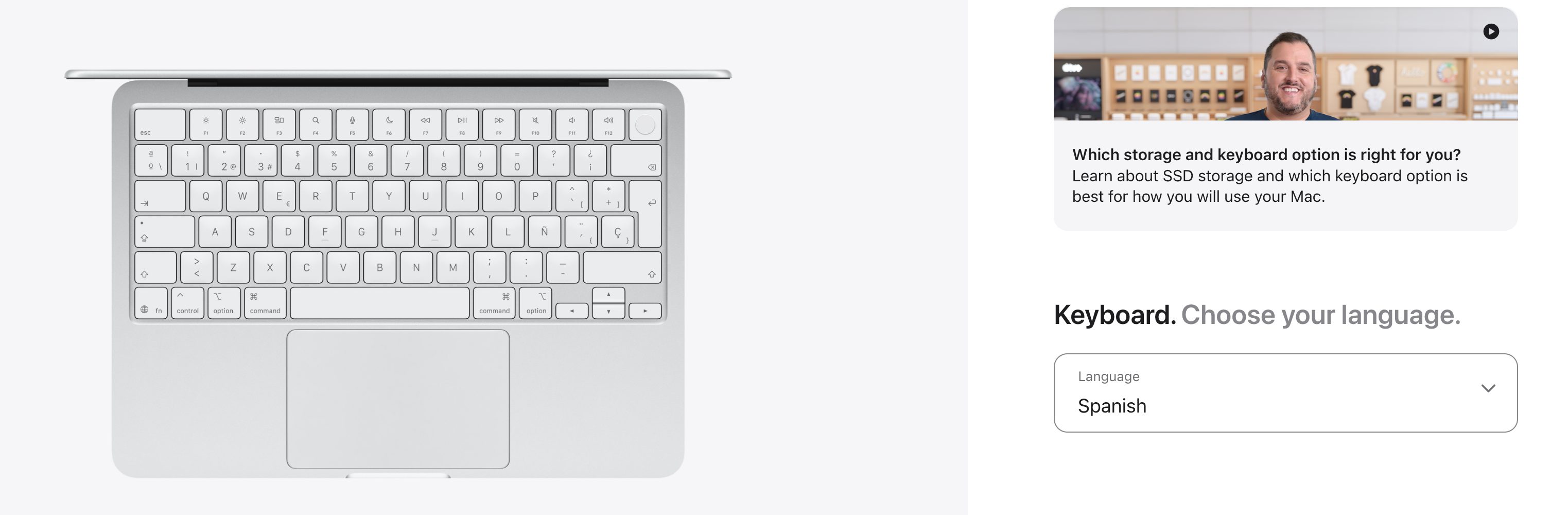

Above, the Spanish ISO keyboard on the MacBook Neo, silver color with the highest contrast on the keyboard.
CTL.net used to offer this option in the United States, but no longer does on its US order web page. Lenovo in the US offers to configure a «Spanish» keyboard built-to-order with some models, but sadly sends an inferior Latin American keyboard in the purchased laptop, instead of a true Spanish ISO keyboard. A personal friend in Miami ordered a laptop from Lenovo in the US and received the undesired Latin American keyboard instead. This is not a patriotic issue. I am neither a Spaniard nor a Latin American. I am speaking from a purely factual perspective, where the Latin American layout is missing access to several important characters and symbols which makes it much more limiting than the true Spanish ISO keyboard, in addition to the Latin American keyboard being machista (offering only masculine ordinal numbers, not feminine) and being much more likely to cause RSI (Repetitive Strain Injury) than the Spanish ISO keyboard, due to the location of the ´ accent mark used in Castilian on each one. It’s in a much more ergonomic position on the Spanish ISO keyboard, on the center row. My current favorite non-Apple laptop is the ThinkPad T480, but since I know—from my friend’s poor experience—that Lenovo of the US is either unable or unwilling to deliver the true Spanish ISO keyboard in the US, I simply buy the brand-new replacement part of the backlit Spanish ISO keyboard for the ThinkPad T480 via eBay for under US$30 and transplant it in under 5 minutes. Years ago, I used to make a similar transplant to upgrade MacBooks to a Spanish ISO keyboard in the US, but that stopped being feasible with the unibody MacBooks in 2008. Even though the MacBook Neo fortunately brings back the keyboard replacement part separate from the top case, my understanding is that it takes 40+ screws to access and replace the keyboard in the Neo, so it’s best to order the MacBook Neo directly from Apple.com with the desired keyboard, rather than transplanting them as I continue to do with the ThinkPad T480 and some other ThinkPad models. In the case of the ThinkPad T480, only two screws need to be unscrewed to transplant the keyboard.
Even if you mainly—or only—type in English, you are better off to order your MacBook Neo directly from Apple.com with the Spanish (Spain) option, not the US or the inferior Latin American keyboard. It gives you direct access to two currency symbols $ and € (euro) and facilitates typing your clients’ names perfectly. The Spanish ISO keyboard is fully-featured to type in Castilian, English and many other languages like Catalán, Euskera (Basque), French, Galician (gallego/galego), Italian, Occitan (occitano), Portuguese, Valencian (valenciano) and many other languages which use the Latin alphabet. There is no contest between the Spanish ISO versus the Latin American keyboard. As you will see in the screenshot above, earlier in this section, all of the letters used in English are in the exact same spot as in the US keyboard layout, but there is much more access to more symbols and dead keys. For more details, see my article Pick the best Spanish keyboard for your new MacBook when ordering it online.
After you receive your MacBook Neo with Spanish ISO keyboard, you’ll be able to make it even better with my Español ISO Mejorado keymap for macOS, which adds four missing characters that don’t have direct access from Apple’s current macOS stock Spanish ISO keymap, but are required according to the Real Academia Española (Royal Spanish Academy), as covered in detail in this 2025 article: I created a superior software layout for the Spanish keyboard for Mac: «Español ISO mejorado».
Virtualization, to run Windows 11 ARM on your MacBook Neo (if you must)
If you must use Windows 11 ARM on your MacBook Neo, I hope you do it for a justifiable reason, not just for Microsoft Office, at least not before you have completely absorbed and tried the free solution, the one I recommend in this article, for a native Mac experience and absolute seamless Microsoft Office interchange, including zero format translation and native Microsoft fonts after you add them: OnlyOffice: How to achieve absolute seamless Microsoft Office interchange on any desktop OS. However, you may have another application you absolutely need to run on Windows. The three ways I know to virtualize Windows 11 ARM on MacBook Neo (and M-series MacBooks) are:
- Parallels Desktop (paid)
- UTM, free and open source (FOSS)
- VMware Fusion (free for personal use)
Whichever virtualization you pick, you’ll have a much better experience if you follow what I published in these two recent articles, to eliminate undesired advertising, bloat and espionage in Windows 11:
- Windows 11 versions beyond Home/Pro, to combat undesired advertising, bloat & espionage
- Tame Windows 11 with Winhance + Group Policy as your preventive Affirmative Defense against undesired advertising, bloat and espionage
Matte display?
As of publication date of this guide, Apple is only offering the MacBook Neo with a glossy, reflective screen. So far, the only laptops Apple is offering in 2026 with matte nanotexture display are the MacBook Pro, which is what I have. Apple is not yet offering any matte option for MacBook Air or MacBook Neo models, although I hope Apple will. Here are your two possible solutions:
- If you are mainly planning to use the MacBook Neo in a desktop setup, i.e. closed (clamshell mode) as covered earlier, you are free to connect an external matte display, external keyboard and pointing device, i.e. Magic Trackpad or mouse. Then you will only see the glare and reflections when you take the MacBook Neo into the field.
- You may purchase any of the highly-rated matte screen protectors made for the MacBook Neo, including the budget-friendly NeoSupershieldz Anti-Glare Screen Protector or the more premium ViaScreens Matte Screen Protector for about US$22:
Lee esta guía en buen castellano
(Re-)Subscribe for upcoming articles, reviews, radio shows, books and seminars/webinars
Stand by for upcoming articles, reviews, books and courses by subscribing to my bulletins.
In English:
- Email bulletins, bulletins.AllanTepper.com
- In Telegram, t.me/TecnoTurBulletins
- Twitter (bilingual), AllanLTepper
En castellano:
- Boletines por correo electrónico, boletines.AllanTepper.com
- En Telegram, t.me/boletinesdeAllan
- Twitter (bilingüe), AllanLTepper
Most of my current books are at books.AllanTepper.com, and also visit AllanTepper.com and radio.AllanTepper.com.
FTC disclosure
None of the listed individuals or companies mentioned above has paid for this article. Some of the manufacturers listed above have contracted Tépper and/or TecnoTur LLC to carry out consulting and/or translations/localizations/transcreations. So far, none of the manufacturers listed above is/are sponsors of the TecnoTur, BeyondPodcasting, CapicúaFM or TuSaludSecreta programs, although they are welcome to do so, and some are, may be (or may have been) sponsors of ProVideo Coalition magazine. Some links to third parties listed in this article and/or on this web page may indirectly benefit TecnoTur LLC via affiliate programs. Allan Tépper’s opinions are his own. Allan Tépper is not liable for misuse or misunderstanding of information he shares.