

Filmtools
Filmmakers go-to destination for pre-production, production & post production equipment!
Shop NowFor a one-time US$35, Fission can do more than just editing or trimming audio files.

The software editors that get the most press coverage (at least from me) tend to be programs like Hindenburg (Pro), DaVinci Resolve (Studio) and Descript. However, there is another editor (audio only) which I also use quite frequently that doesn’t get nearly as much coverage as it should. Fission (macOS-only, US$35 one time purchase price) is from Rogue Amoeba, the same people who create Airfoil, Audio Hijack, Farrago, Loopback, Piezo and Sound Source. Fission is a single-track audio editor whose main claim to fame is its lossless editing (even from compressed and lossy audio files like MP3), meaning without decoding and re-encoding, aka without any generation loss. I also often use Fission to edit metadata and cover art on audio files, especially AAC as .M4A files. However, this targeted review article is about using Fission for batch conversions of a group of audio files to a different format and (when required) even with a change of audio sampling frequency.
My recent need for a batch conversion of audio file formats
As I have covered in many past articles, the MP3 audio format has been obsolete since 1997. Nonetheless, some people still haven’t read the memo: 27+ years have gone by since the AAC códec (often with a .M4A suffix) essentially replaced MP3, since it is much more efficient (higher quality at a lower bit rate=smaller file) for final distribution. I remind those who don’t recall: When Apple first launched iTunes in 2001 (which later partially converted to Apple Music), it never used the already archaic MP3. Despite a popular myth, Apple was never the developer or owner of the AAC códec. AAC was developed by AT&T Labs, Dolby Laboratories, Fraunhofer Society, Sony Corporation and has been used within H.264 since the beginning. Beyond Apple’s acceptance (but not development or ownership), AAC has been adopted as the default or standard audio format on products including Nintendo’s Wii, DSi and 3DS and Sony’s PlayStation 3. AAC is also further supported on various other devices and software such as Android, Blackberry, iPhone, iPad, iPod, PlayStation Portable and Vita, PlayStation 5, digital audio players like Sony Walkman and SanDisk Clip, media players such as QuickTime Player, VLC, Winamp and Windows Media Player, various in-dash car audio systems and is used on Spotify, Google Nest, Amazon Alexa. Apple Music, and YouTube. AAC has been further extended into HE-AAC (High Efficiency, or AAC+), which improves efficiency over AAC-LC. Another variant is AAC-LD (Low Delay).
Even though AAC blows away MP3 as a final delivery format, I wouldn’t want to use it for production or intermediates for distribution stages. For that, I prefer to use WAV, AIFF or FLAC. Even though FLAC is compressed, it is lossless compression, just like a .ZIP file. As I have covered in several past articles, I have been deeply involved in audiobook production and distribution for the past few years. Even though the approximately 37 platforms where we generally distribute audiobooks for clients still accept the archaic MP3 format, all but one also accept the lossless FLAC format, so that’s why I use FLAC as a lossless intermediate to distribute to all of them (except one), as well as the direct sales version I create in .M4B format using Audiobook Builder (reviewed here), since it too accepts the lossless FLAC format as its assets.
The only exception to the great majority of audiobook platforms (and tool) which sadly doesn’t accept FLAC, WAV or AIFF is called ACX (Audiobook Creation Exchange). ACX is a marketplace for professional narrators, authors, agents, publishers and rights holders to connect and create audiobooks. ACX is owned and operated by Audible Inc., an Amazon company. In addition to being the platform which pays the absolute lowest royalties to authors, ACX is also the most backward technologically, since it still demands submissions in the archaic lossy MP3 format (even though it is going to re-encode the final product again for the end listener). This sadly means that the audio distributed by ACX to Audible and Amazon suffers a second-generation loss.
Since I refuse to drop the quality of the other 37 platforms to the ACX poor behavior, I master all of the audiobook clips in lossless FLAC (one for each audiobook section), since they are accepted by all of the other audiobook distribution platforms except ACX. In the past two years, only one of our many authors have insisted on distributing via ACX (in addition to the other platforms) despite ACX’s extremely low royalty to authors compared with any other audiobook distribution platform. In order to make a batch conversion of all of the audiobook files from the lossless FLAC files to MP3 (only for ACX until they finally change this policy), I use Fission to do the batch conversion.
Steps to batch convert in Fission
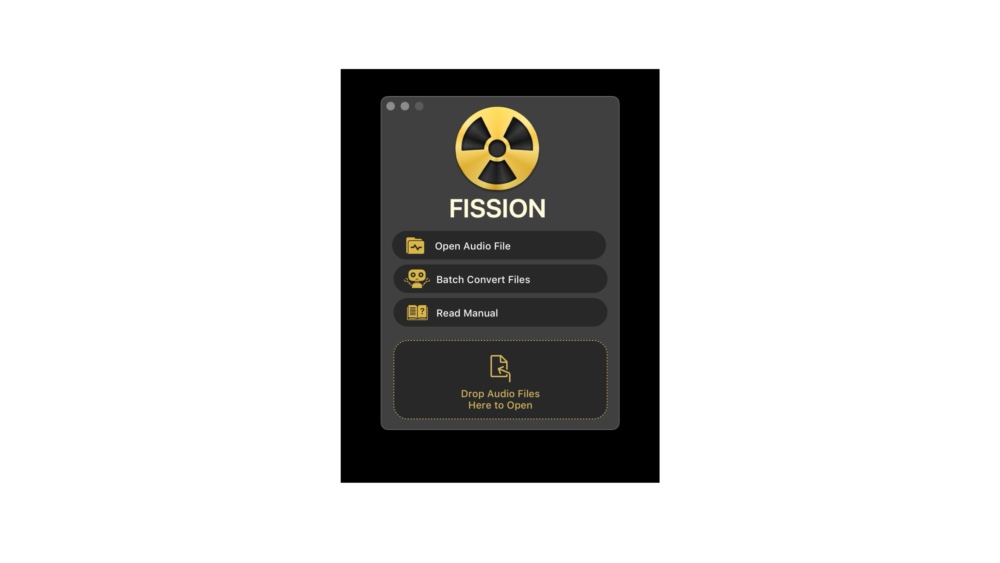
- 1: Open Fission.

- 2: Click on the second option: Batch Convert Files.
- 3: Import multiple files using the + symbol below Files to Convert. (In this case, I imported 31 .FLAC files in one shot.)
- 4: Select the Export Format (in this case, MP3), Maximum Bit Rate (in this case, 320 kbps, knowing that ACX will re-encode it again), Channels (Mono unless there is stereo music or sound effects in the recordings), Sample Rate (44.1 kHz as sadly demanded by ACX even though all of the other audiobook platforms fortunately accept 48 kHz FLAC files).

- 5: Select the Export Destination where I create a specific MP3 subfolder.
- 6: Click on Convert… (You’re done!)
A few minutes later, I had 31 MP3 files at the downsampled rate, without further intervention.
User interface language
The user interface only appears in English in the latest versions of Fission, Audio Hijack and Farrago even though my macOS and most other programs appear in Castilian. If Rogue Amoeba would like to have the user interface(s) translated/localized to Castilian (aka «Spanish»), the company may contact me.
Conclusions
In addition to all of its other great functions of losslessly editing and trimming audio, editing metadata including cover art in audio files, Fission from Rogue Amoeba does a wonderful job of batch converting audio files, including downsampling when required. I highly recommend it for any of those purposes. Fission does not compete with Hindenburg (Pro), DaVinci Resolve (Studio) or Descript, it complements them! For more information, visit the Fission product page here.
Lee este artículo en buen castellano
(Re-)Subscribe for upcoming articles, reviews, radio shows, books and seminars/webinars
Stand by for upcoming articles, reviews, books and courses by subscribing to my bulletins.
In English:
- Email bulletins, bulletins.AllanTepper.com
- In Telegram, t.me/TecnoTurBulletins
- Twitter (bilingual), AllanLTepper
En castellano:
- Boletines por correo electrónico, boletines.AllanTepper.com
- En Telegram, t.me/boletinesdeAllan
- Twitter (bilingüe), AllanLTepper
Most of my current books are at books.AllanTepper.com, and also visit AllanTepper.com and radio.AllanTepper.com.
FTC disclosure
Rogue Amoeba has not paid for this article. Some of the manufacturers listed above have contracted Tépper and/or TecnoTur LLC to carry out consulting and/or translations/localizations/transcreations. So far, none of the manufacturers listed above is/are sponsors of the TecnoTur, BeyondPodcasting, CapicúaFM or TuSaludSecreta programs, although they are welcome to do so, and some are, may be (or may have been) sponsors of ProVideo Coalition magazine. Some links to third parties listed in this article and/or on this web page may indirectly benefit TecnoTur LLC via affiliate programs. Allan Tépper’s opinions are his own. Allan Tépper is not liable for misuse or misunderstanding of information he shares.