
Skip to content
ProVideo Coalition
  • Latest
  • News
  • Production
  • Post Production
  • Podcasts
  • Reviews
  • Experts
  • More
    • About Us
      About Us MM Image
    • Meet the Experts
      Meet the Experts MM Image
    • Advertise
      Advertise MM Image
    • Contact Us
      Contact Us MM Image
  • Subscribe
  • Search
    • Search MM Image
      • FOLLOW US
      • TOP LINKS
      • TIPS
      • TOPICS
      • WEBINARS
Post Production

Creating and animating 3D logos in Motion

Creating and animating 3D logos in Motion 1
  • twitter
  • facebook
  • pinterest
Support ProVideo Coalition
Shop with Filmtools Logo

Filmtools

Filmmakers go-to destination for pre-production, production & post production equipment!

Shop Now

This week on MacBreak Studio

Profile Picture
Mark Spencer
July 20, 2016
Comment

This week on MacBreak Studio, I show Steve Martin from Ripple Training how you can turn a flat logo into a 3D animation by using the text features of Motion.

Now you may ask, what does text have to do with making a logo 3D or animating it?

Well, one of the interesting things about Motion is that you can apply its 3D text engine to graphic objects by first creating a font out of those objects. In today’s example, I take a simple logo, break it into four separate SVG vector files, and then use a free web-based app called Glyphter to turn those graphics into letters of a custom font.

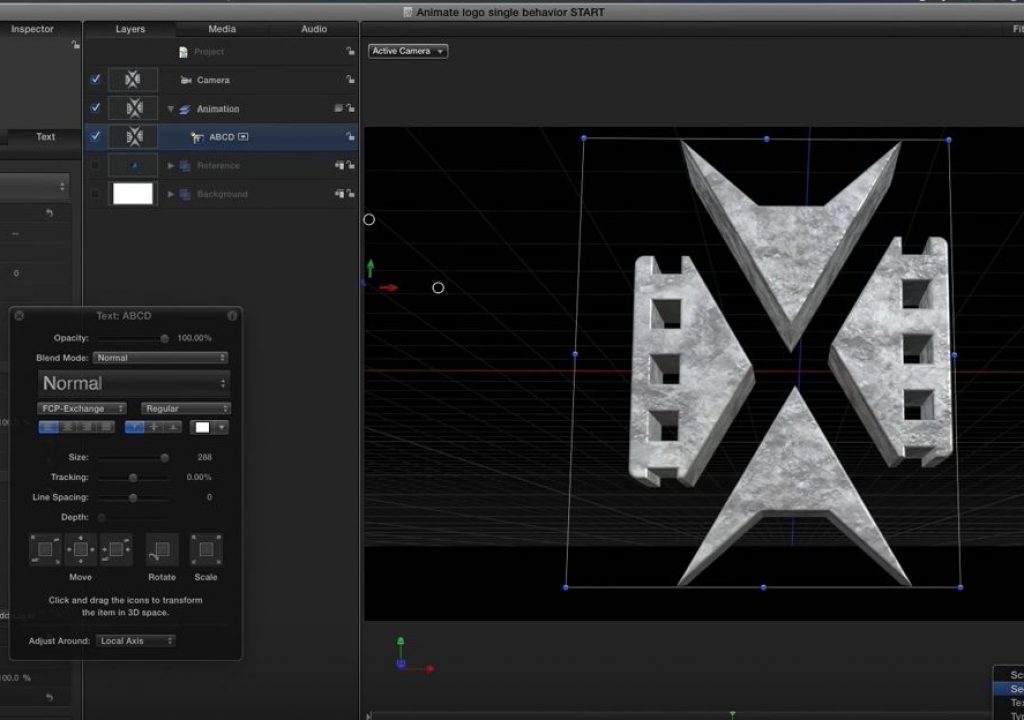
Once created and installed in FontBook, the font is available to be applied to a text layer in Motion. Since I assigned each graphic to the first 4 letters of the alphabet, all I need to do is to select the Text tool, select the custom font in the Heads Up Display, then click and type “ABCD” in the Canvas. What appears are the 4 parts of the logo.

Note that while you could use a separate text layer for each part of the logo, putting them all in the same layer has a distinct advantage when it comes to animating the logo.

Before we get to that, however, we need to rebuild the logo by moving each part to the right location and making it the right size. I imported a copy of the original logo as a reference, then I use the Adjust Item tool (only available when a text layer is selected) to move, rotate and scale each glyph independently.

Once the logo is assembled, I enable 3D text in the Inspector, and have some fun choosing materials, lighting, depth, and more. And by adding a camera I can quickly create a dramatic framing.

Now for the animation, because the logo is a single text layer, I can take advantage of Motion’s Sequence Text behavior presets, or build my own, to easily animate each element of the logo into place.

Check it all out above. If you want to learn more about what you can do in 3D in Motion, check out this tutorial.
3D logo glyphter logo logo animation macbreak martin Motion spencer

What Do You Think? Let Us Know.

Subscribe
Login
Notify of
guest
guest
0 Comments
Oldest
Newest Most Voted

PVC Favorites

4 weeks ago

Adobe Premiere is adding a Generative Media Tool

Adobe Premiere is adding a Generative Media Tool 2
Review: Insta360 Luna Ultra 3
Production

Review: Insta360 Luna Ultra

KSUN ZL35
Business

Review: KSUN ZL35 network walkie talkie radio with wifi/4G & Zello

Pentacon lens with zebra-striped barrel on a desk next to a drinking glass.
Production

Finding more classic stills lenses

Latest

24 hours ago

Fire Alive horror film shot with Blackmagic Camera app

Fire Alive horror film shot with Blackmagic Camera app
Zhong Yi Optics announces Pittura 30mm f/2.4 lens for medium format
Pro Photo

Zhong Yi Optics announces Pittura 30mm f/2.4 lens for medium format

Tool Tip Tuesday for Adobe Premiere Pro: Getting your Mask/Key to look real 4
Adobe

Tool Tip Tuesday for Adobe Premiere Pro: Getting your Mask/Key to look real

Review: DJI Mic Mini 2S 5
Production

Review: DJI Mic Mini 2S

You Might Also Like

After Effects Portal June 2026 6

After Effects Portal June 2026

Written by Rich Young
June 30, 2026
The first half of the year was action-packed for After Effects, with months of big features, AI and freemium...
After Effects Portal May 2026 10

After Effects Portal May 2026

Written by Rich Young
May 31, 2026
After a breakneck few months of big features, AI and freemium competition, news on Adobe After Effects has returned...
After Effects Portal March 2026 16

After Effects Portal March 2026

Written by Rich Young
March 31, 2026
Adobe followed up the big news of new 26.0 versions in January with recent beta announcements that improve on...
After Effects Portal February 2026 20

After Effects Portal February 2026

Written by Rich Young
February 28, 2026
The big news of new 26.0 versions in January still dominates, but recent beta announcements shows that the AE...
ProVideo Coalition

Contact

  • +1-747-444-1870
  • [email protected]

Useful Links

  • Advertise With Us
  • Mobile App
  • Topics
  • Meet the Experts
  • Webinars
  • Contact Us

Our Websites

  • Filmtools
  • PacRad
  • Tour Supply
  • Moviola.com
  • Moviola Digital

Sign up for the ProVideo Coalition weekly e-newsletter and get the most popular articles, blogs, and reviews right to your inbox.

By entering your email, you agree to our Terms & Conditions and Privacy Policy

© 2026 ProVideo Coalition, a Filmtools Company. All Rights Reserved.
Terms of Service Privacy Policy Cookie Policy Sitemap
Manage Cookie Consent
We use cookies to optimize our website and our service.
Functional Always active
The technical storage or access is strictly necessary for the legitimate purpose of enabling the use of a specific service explicitly requested by the subscriber or user, or for the sole purpose of carrying out the transmission of a communication over an electronic communications network.
Preferences
The technical storage or access is necessary for the legitimate purpose of storing preferences that are not requested by the subscriber or user.
Statistics
The technical storage or access that is used exclusively for statistical purposes. The technical storage or access that is used exclusively for anonymous statistical purposes. Without a subpoena, voluntary compliance on the part of your Internet Service Provider, or additional records from a third party, information stored or retrieved for this purpose alone cannot usually be used to identify you.
Marketing
The technical storage or access is required to create user profiles to send advertising, or to track the user on a website or across several websites for similar marketing purposes.
Manage options Manage services Manage vendors Read more about these purposes
View Preferences
{title} {title} {title}
Manage Cookie Consent
We use cookies to optimize our website and our service.
Functional Always active
The technical storage or access is strictly necessary for the legitimate purpose of enabling the use of a specific service explicitly requested by the subscriber or user, or for the sole purpose of carrying out the transmission of a communication over an electronic communications network.
Preferences
The technical storage or access is necessary for the legitimate purpose of storing preferences that are not requested by the subscriber or user.
Statistics
The technical storage or access that is used exclusively for statistical purposes. The technical storage or access that is used exclusively for anonymous statistical purposes. Without a subpoena, voluntary compliance on the part of your Internet Service Provider, or additional records from a third party, information stored or retrieved for this purpose alone cannot usually be used to identify you.
Marketing
The technical storage or access is required to create user profiles to send advertising, or to track the user on a website or across several websites for similar marketing purposes.
Manage options Manage services Manage vendors Read more about these purposes
View Preferences
{title} {title} {title}

Newsletter Sign Up

Sign up for the ProVideo Coalition weekly e-newsletter and get the most popular articles, blogs, and reviews right to your inbox.

×
wpDiscuz