

Welcome to Tool Tip Tuesday for Adobe Premiere Pro on ProVideo Coalition


We’ve been looking at Replace Edit for the last two weeks. So far, we’ve looked at:
But this is all to prepare you for Replace from Source Monitor, Match Frame.
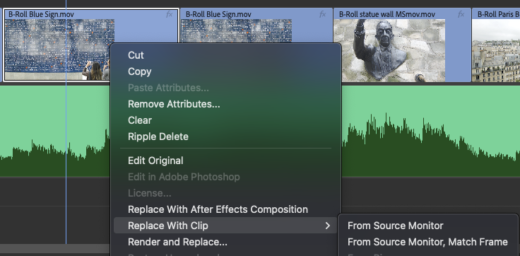

I was talking with Scott Simmons and we both agree – it’s our favorite method of Replace Editing and one that most editors miss.
Let me explain how it works, then I’ll show you two killer uses.
How Replace from Source Monitor, Match Frame works
In all of the prior methods, Premiere uses the In Point (or the first frame) of your source clip to determine where the replacement starts.
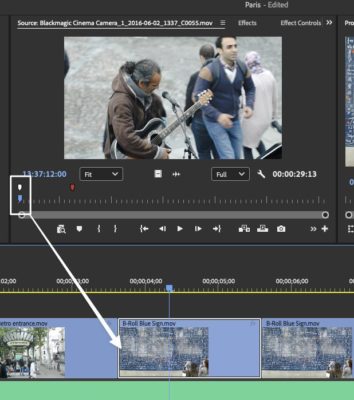

The white marker (not needed beyond this picture) is going to be the first frame when I do a standard Replace Edit.
But what if we wanted the middle of a clip – a moment of action to line up in the middle of a clip, such as on a sound beat in the timeline?
That’s the basic concept of Replace from Source Monitor, Match Frame
It uses the playheads. Both of them.
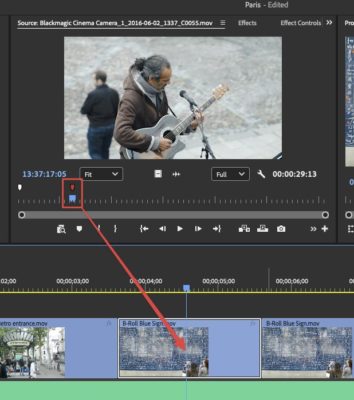
The duration comes from the timeline clip you’re replacing. The replacement clip centers based on both playheads. Think of it spreading left and right around the timeline playhead.
You’re telling Premiere, “This frame in my source needs to land exactly where my timeline playhead is sitting.”
Practical Use 1: Swapping a Take
You’ve got a line reading you don’t love. You know there’s a better take. Hit F to Match Frame, find the same word in a different take, park your playhead right on that word, and Replace from Source, Match Frame. The sync point matches perfectly. You may still need to adjust the start or end of the clip, due to different pacing, but the major lift has already been done.
Practical Use 2: A Perfect Slip Without Slipping
Slip keeps the clip’s duration on the timelilne, but allows you to adjust what frames you’re looking at.
What if you want a moment in the middle of a clip to line up with the audio?
Match Frame, F. Now find the moment in the source you want. Then replace the clip with itself. Use Replace from Source, Match Frame to
B Roll? Match Frame to load the clip, scrub to a different moment—maybe a better reaction, a tighter moment—and replace. Same clip, same duration, different framing. It’s a slip with surgical precision.
Final thoughts
Once you understand that the playheads are your sync points, you’ll find uses for it everywhere.