


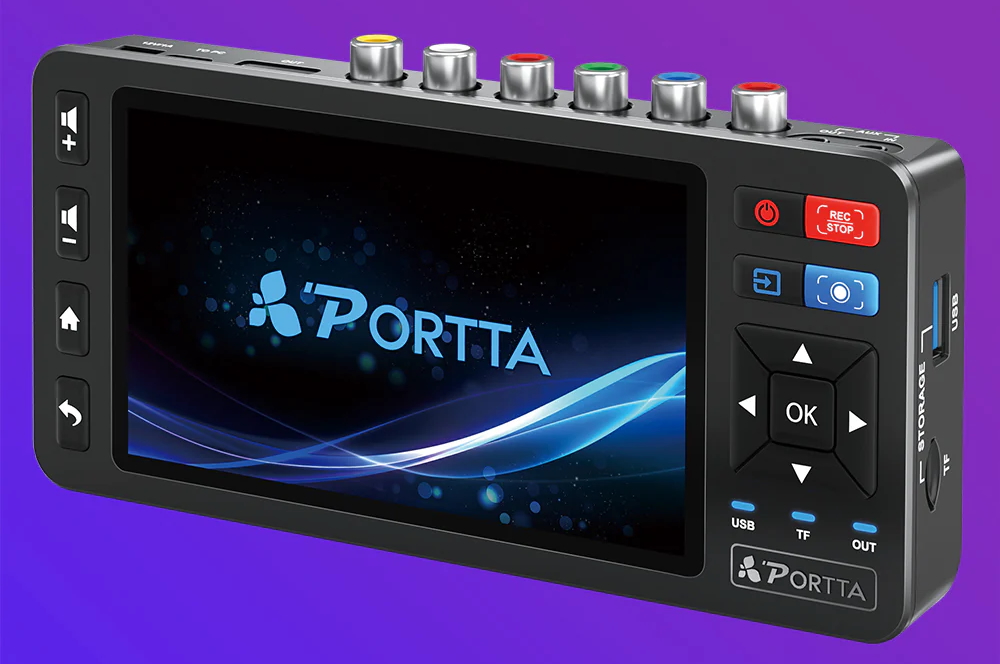
I’m delighted to share my combined review of the top two current real-time digitizer upscaler recorders from SD to 1080p60 from PORTTA. Those are the VD20P & VD22P (aka CHR202P). Either costs ≈US$180, including most of the required connection cables and the external AC power supply. Batteries are optional, but not required. Both can accept multiple variants of interlaced NTSC and PAL standard definition material to 1080p 60.00 and respect our standard 48 kHz audio sampling, in real time. Both include a built-in 5″ HD display and an internal proc amp to adjust the selected input before digitization for its ideal setting, including adjustments for Brightness (black level), Contrast (white level) and Saturation (chroma level). Both can record to either a USB drive (externally formatted as exFAT in my testing) or to a microSD card (which PORTTA calls a TF Card, not tested by me). The differences between the VD20P & VD22P (aka CHR202P) are with the type of inputs. Although both include a composite video input (including a 3D comb filter for better quality Y/C separation, when composite input is required), only the VD22P (aka CHR202P) has a component analog input, i.e to capture Y, R-Y, B-Y (aka YPbPr aka YUV) from a MII or Betacam SP deck, and only the VD20P has an S-Video input (aka Y/C) to capture from an S-VHS deck, Hi8 deck or modified U-Matic SP deck. Both PORTTA models also have an HDMI output to use as a standalone video player and both include a remote control. There’s a lot to unpack here, so please put on your seat belt and take a deep breath.

About the USB drive I used with all of my tests
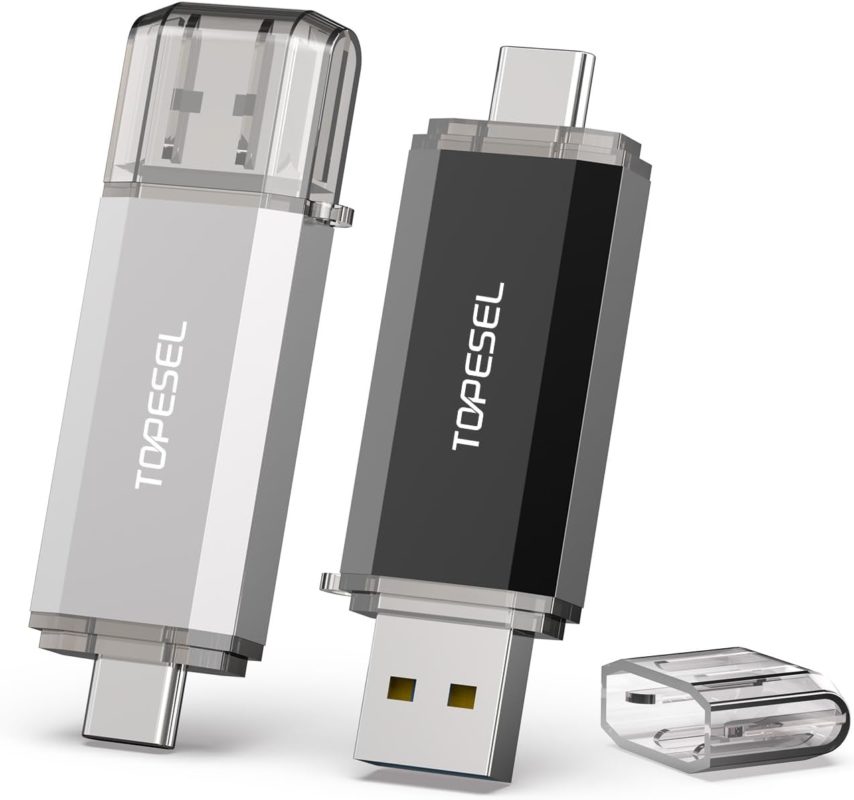

Because both of the PORTTA devices covered use a USB 3.x using the older A-type connector, I used a dual-head 128GB USB 3.0/3.1 drive, which offers the A-connector on one end and the USB-C on the other. I formatted the drive externally as exFAT and was glad to see that both PORTTA devices functioned with it perfectly, including creating a single 15.18GB MP4 file from one videotape, which had a duration of slightly more than two hours. Since the exFAT worked so well with the PORTTA devices, I did not try any other formatting varieties, since I knew that using FAT32 or FAT16 would have had a file size limitation of 4,294,967,295 bytes (4 GB − 1). I am so glad that PORTTA supports exFAT fully, due to the cross-platform capability, for later Sneakernet transfer to another device, which could have either USB-C or USB-A.
Códec and bitrate used
With the current firmware, both units record exclusively using the 8-bit H.264 códec at a maximum bit rate of 16.2 Megabits per second for the full payload (15.9 Megabits per second for video, listed in the PORTTA menu as just 16 for simplicity, which is the one I used in all of my testing. If desired, you can set it lower:
- 4 Megabits per second as listed in the menu (not tested by me)
- 8 Megabits per second as listed in the menu (not tested by me)
- 12 Megabits per second as listed in the menu (not tested by me)
For stereo audio, the options are 320 kilobits per second (which I used) in addition to 128 and 192 kilobits per second.
Because 8-bit H.264 is a clean yet lossy códec, our goal is to set the incoming signal perfectly before capture using the inboard proc amp adjustments indicated earlier, given the low latitude for post adjustments in such a recording. The moment where we have the greatest latitude —and without additional generation loss is just before the capture, using the powerful inboard proc amp in these PORTTA devices (more information about how I measured and adjusted the proc amp for each unique source later in this article). After the capture of the video file with the PORTTA devices, the file can be renamed on a computer, and the file can be trimmed without any generation loss, using the Shutter Encoder app (free for Linux, macOS, and Windows), as covered in my recent article:


Shutter Encoder: How to trim compressed videos losslessly, without additional generation loss.
This process is to trim the head and tail of the captured video file and is nearly instantaneous, since (despite the program’s name), there is no re-encoding with this particular process, as explained in detail in that article.
The final captured H.264 audio/video file can then be played via any modern computer, smartphone, tablet, local media player, HDTV set, or cloud video platform including Bunny, Vimeo, YouTube etc.
Aspect ratio options of the final 1080p file
Most classic interlaced NTSC and PAL footage is natively 4:3. For that, the current firmware from PORTTA for these devices offers what is called 1080 4:3, which is actually a 1440×1080 placed on top of a 16:9 1920×1080 black canvas. This is compatible with all of the venues mentioned above. I hope PORTTA will also offer a native 1440×1080 4:3 1080p version with a future firmware update, since they are also compatible with Vimeo, YouTube, etc. and take better advantage of certain smartphone screens. In addition, a native 1440×1080 4:3 1080p version will take better advantage of space when embedded into a web page, as I’ll demonstrate ahead in this article.
A smaller percentage of classic interlaced NTSC and PAL footage is natively widescreen anamorphic. For this, the current firmware from PORTTA offers unsqueezing the anamorphic signal and placing it into a 16:9 1920×1080 for true widescreen. I did not test this mode since I did not have any source material shot this way. I’m glad the option exists.
Cables, included with these two PORTTA devices
Both units include:
- An AC power supply that can receive 100-240 volts and outputs 12 volts for the PORTTA device (which requires 12V/1A).
- A yellow-colored RCA cable for composite video (CVBS, which stands for either composite video baseband signal or color, video, blanking and sync depending upon whom you ask).
- An red-green-blue cable set for component analog to capture component analog video: Y, R-Y, B-Y (aka YPbPr aka YUV) —only included with the VD22P (aka CHR202P) model.
Additional cables/adapters you may need
- If you want to connect S-Video (Y/C) to the VD20P model only, you need to supply your own cable for that, at least at publication time of this article.
- If you want to connect component analog from Betacam, Betacam SP or MII decks, you’ll need three adapters from RCA female to BNC male.
- If you need to connect line broadcast level +4 dBu audio (approximately 1.23 volts RMS) from the XLR outputs of most Betacam, Betacam SP, MII and many U-Matic and U-Matic SP decks, you should use an attenuator which adapts the very high level signal about 10 dB lower, while converting from balanced to unbalanced.

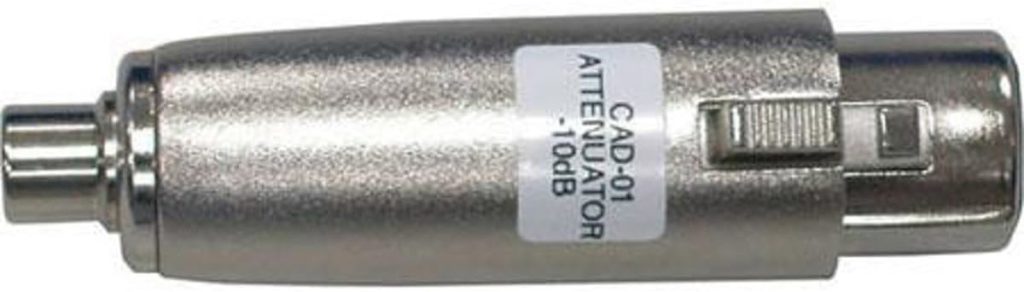
A pair is great if you want to capture the two audio tracks discreetly, in the case of a stereo master. In the case of a mono master or camera-original footage shot which used a single channel (often channel 2 with U-Matic and U-Matic SP), you will likely want to take that channel and then (after conversion to consumer line level via the attenuator), use a Y-RCA cable to allow that single channel to feed both the left and right channels of the capture. You might do the same thing if two different microphones were recorded on two separate tracks (i.e. interviewer and interviewee) on raw camera footage.
Variety of NTSC, PAL and SECAM supported by both PORTTA devices
- NTSC-J (Japanese, with zero IRE black)
- NTSC-US (with 7.5 IRE black)
- NTSC ≈4.43 MHz (common with multi-standard players, with either black level)
- PAL-M 525 line ≈59.94 interlaced (Brazilian consumer decks)
- PAL-625 line, including PAL B/D/G/H/I/N (PAL-N is generally from Argentina, Paraguay and Uruguay consumer decks, not professional or broadcast, since they are PAL B.)
- SECAM (Usually from French consumer decks, not professional or broadcast, since they are PAL B.)
I am so glad that PORTTA supports NTSC ≈4.43 MHz (common with multi-standard players) since it is not supported by the Canopus/Grass Valley ADVC110 (reviewed in 2024) and PAL-N.
From NTSC ≈59.94i and Brazilian PAL M ≈59.94i sources: About the conversion to 60.00p (not ≈59.94p)
The traditional over-the-air broadcast engineer inside you in ex-NTSC ≈59.94i and Brazilian PAL M ≈59.94i regions may be cringing as you discover that (at least with the current firmware), PORTTA is forcing a rate conversion from ≈59.94i (59.94 fields per second) to exactly 60.00p (60.00 progressive frames per second), not 59.94p. If the material you are going to capture and upscale to 1080p is really destined for traditional over-the-air broadcast, your concern is valid. Your concern would also be valid if you are planning to edit the captured material with other scenes shot at the ≈59.94 or ≈29.97 cadence, since then you would have to retime the material back again to the original cadence and have your editing system set up to monitor with this ≈59.94 or ≈29.97 cadence, as I have covered in past articles.
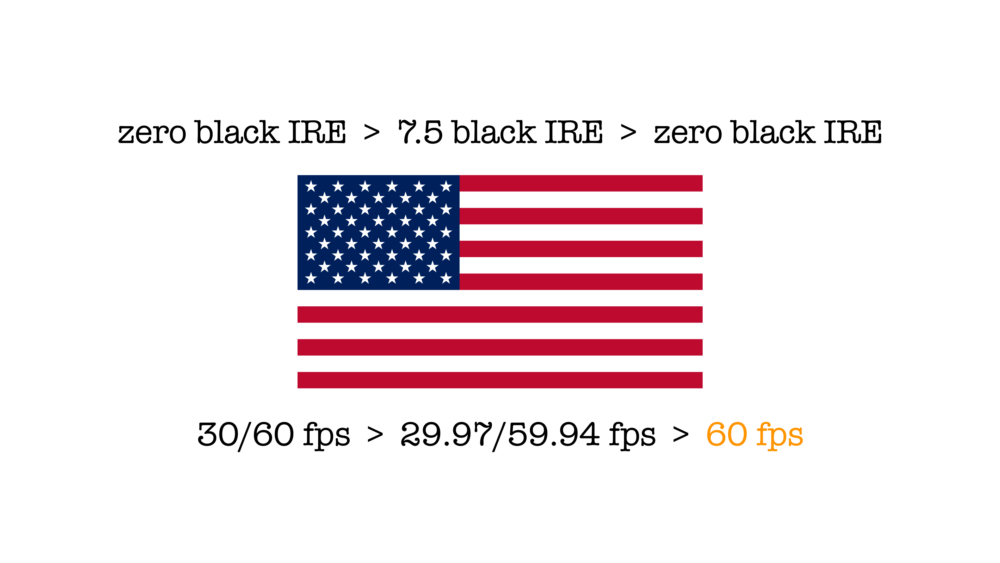
However, if you only plan to view or play the upscaled footage by itself on a computer screen, smartphone, tablet, local media player, HDTV set or cloud video platform including Bunny, Vimeo, YouTube etc., the forced conversion to exactly 60.00p will not cause harm. For more information, see my recent article:

US video and TV: Reversing «necessary» evils from 1941 and 1953
How does PORTTA do a conversion from ≈59.94i to 60.00p?
In order to scientifically test how PORTTA does the real-time conversion from NTSC (or Brazilian PAL M) interlaced footage at ≈59.94 fields per second, I recruited Francisco Javier Arbolí and his Sony PVW-X70 camcorder, which can shoot (among many other formats) in 1080i at ≈59.94 fields per second (despite Sony’s cruel onscreen rounding in cameras under US$5000) with a real time downconversion to standard definition NTSC. I put the camera into color bars with the timecode generator visible, set to NDF (non-drop frame), including the visible frame counter.
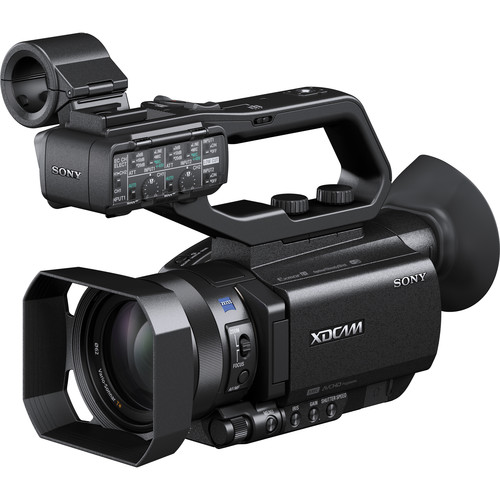

This real-time downconversion on the Sony PXW-X70 is offered in composite video (not Y/C aka S-Video nor component analog video) since nowadays, people prefer to use the HDMI output, so this recording you’ll see below is a testament to both the downconversion quality of the PXW-X70 camcorder, the quality of the 3D comb filter in the PORTTA devices when using the composite input and their general quality of capture and real time upscaling:

If you go full screen, be sure to click on the gear to select 1080p60 under quality.
Even though neither the Bunny nor you YouTube player allows it, when I played the final 1080p 60.00 video above frame-by-frame on my computer and paid attention to the frame numbers, I saw that all original interlaced frames (numbered from zero to 29) are included. Each of the original fields was upscaled to 1080 progressive frames to maintain the same smoothness as was previously seen with ≈59.94 fields per second on a CRT.
From PAL 50i sources: About the conversion from 50.00i sources to 60.00p (not 50.00p)
The traditional over-the-air broadcast engineer inside you in the ex-PAL 50.00i regions may be cringing as you discover that (at least with the current firmware), PORTTA is forcing a rate conversion from 50.00i (50.00 fields per second) to exactly 60.00p (60.00 progressive frames per second), not 50.00p. If the material you are going to capture and upscale to 1080p is really destined for traditional over-the-air broadcast, your concern is valid. Your concern would also be valid if you are planning to edit the captured material with other scenes shot at the 50.00 or 25.00 cadence, since then you would have to retime the material back again to the original cadence and have your editing system set up to monitor with this 50.00 or 25.00 cadence, as I have covered in past articles.
However, if you only plan to view or play the upscaled footage by itself on a computer screen, smartphone, tablet, local media player, HDTV set, or cloud video platform including Bunny, Vimeo, YouTube, etc., the forced conversion to exactly 60.00p will not cause noticeable harm in the cadence when played at normal speed. However, the repeated frames do make the H.264 compression less efficient, since it’s a waste of valuable available bandwidth: The current 15.9 Megabits per second budget for video (as clarified earlier) divided by 60 frames per second = 33.125 kilobytes per frame, while the same 15.9 Megabits per second budget, if divided by only 50 frames per second would be 39.75 kilobytes per frame, so each frame would be compressed substantially less if there were only 50 frames per second.
In the distant past, you might have been concerned about 60.00p playback on PAL-region computer monitors or TV sets. However, my research indicates that in 2026 and recent years, the vast majority of computer monitors sold in Europe and other ex-PAL regions utilize a default refresh rate of 60 Hz (or multiples thereof, such as 120 Hz, 240 Hz, or 360 Hz). Even though Europe and other ex-PAL regions have historically utilized a 50 Hz power frequency, this standard no longer dictates the refresh rates of modern computer display hardware. Although over-the-air television broadcasting and some multimedia content in Europe and other ex-PAL regions still adhere to 50 Hz standards, general-purpose computer monitors, laptops, and professional displays consistently prioritize 60 Hz and its high-refresh-rate multiples for global compatibility and gaming performance.
Likewise, in 2026 and recent years, most consumer TVs sold in Europe and other ex-PAL regions are designed to be globally compatible, typically supporting both multiple signal inputs. While legacy standards were tied to local electrical grids—Europe’s and other ex-PAL mains frequency historically dictated 50 Hz (25 frames per second, 50 fields per second or 50 progressive frames per second) video standards—modern TV displays in ex-PAL regions are no longer strictly limited by this. Most consumer panels in ex-PAL regions operate at a native base refresh rate of 60 Hz or 120 Hz, although they also support 50 Hz sources.
How does PORTTA perform the conversion from 50.00i to 60.00p?
In order to scientifically test how PORTTA does the real-time conversion from PAL interlaced footage at 50.00 fields per second, I again recruited Francisco Javier Arbolí and his Sony PVW-X70 camcorder, which can shoot (among many other formats) in 1080i at 50.00 fields per second, with a real-time downconversion to standard definition PAL. I put the camera into color bars with the timecode generator visible, including the frame counter. This real-time downconversion to standard definition is offered on the Sony PXW-X70 in composite video (not Y/C aka S-Video nor component analog video) since nowadays, people prefer to use the HDMI output, so this recording you’ll see below is a testament to both the downconversion quality of the Sony PXW-X70 camcorder, the quality of the 3D comb filter in the PORTTA devices and their general quality of capture and real time upscaling:

If you go full screen, be sure to click on the gear to select 1080p60 under quality.
Even though neither the Bunny nor you YouTube player allows it, when I played the final 1080p 60.00 video above frame-by-frame on my computer and paid attention to the frame numbers, I saw that all original 25 interlaced frames were included (numbered from zero to 24), where each field was upscaled to a progressive frame and certain ones are repeated to make 50 original fields per second fit into 60.00 progressive frames per second to maintain the same smoothness as were previously seen with 50.00 fields per second on a CRT. It could be said that PORTTA is performing a pulldown technique, similar to the 3:2 (aka 2:3) pulldown used with telecine, when film was transferred to NTSC video. Before colorized NTSC, it was 24 frames per second pulled down to 60.00 fields per second.
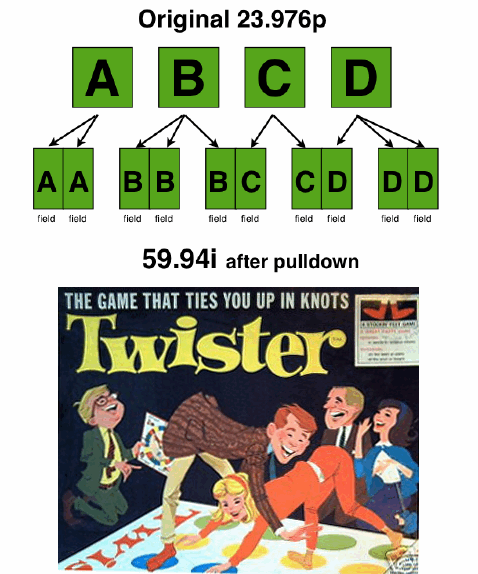

(After color was added to NTSC in 1953, it was ≈23.976 frames per second, pulled down over ≈59.94 fields per second as indicated above.) What PORTAA is doing in this case is 50.00 fields per second to 60.00 progressive frames per second. I don’t know the exact sequence PORTTA has implemented, but we can get a notion of it by playing the above ex-PAL derived video frame-by-frame, slightly above in this section, and looking at the frame numbers.
Actual NTSC footage upscaled by PORTTA to 1080p60.00
From NTSC Betacam SP:
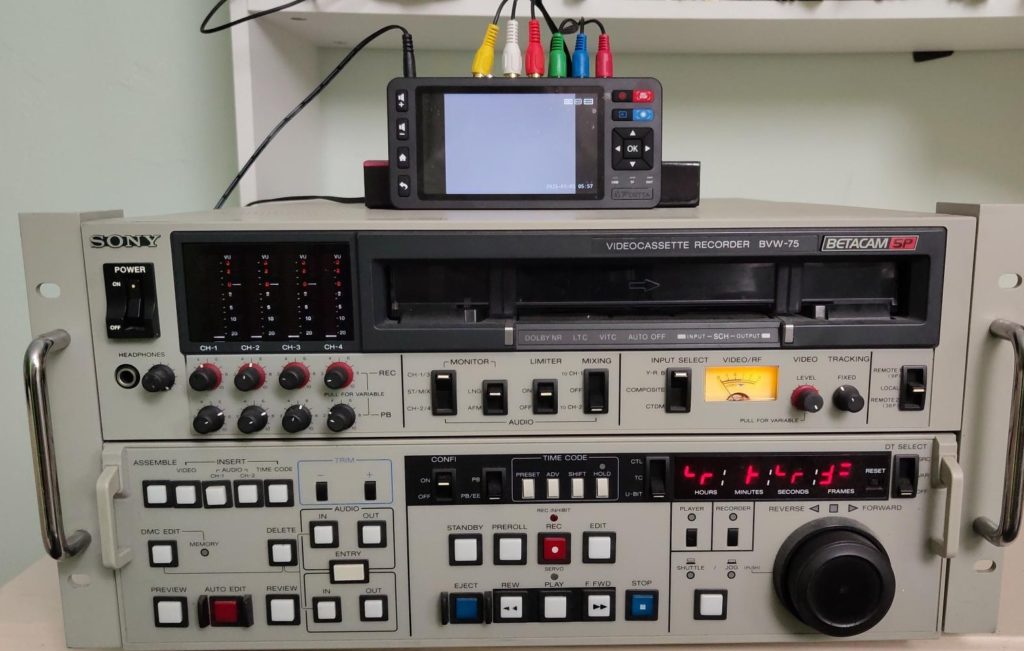

Above, front of RAMM Production’s Sony BVW-75 Betacam SP deck with a PORTTA VD22P (aka CHR202P) on top.
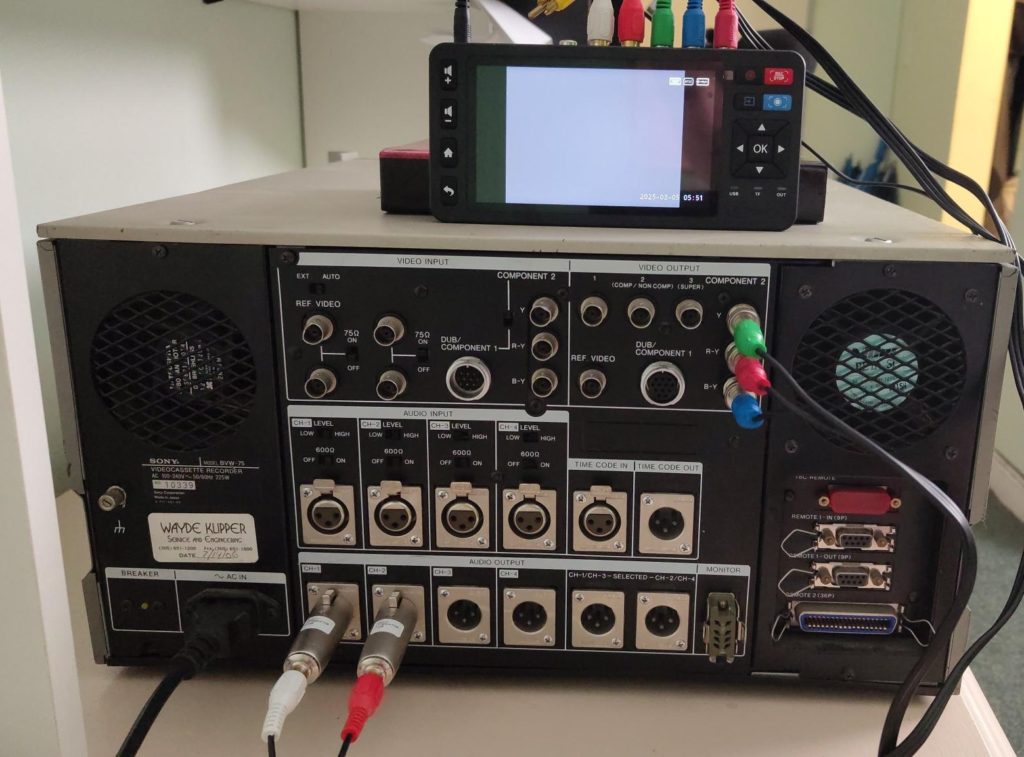

Above, rear of RAMM Production’s Sony BVW-75 deck with a PORTTA VD22P (aka CHR202P) on top, with proper connections for component analog and stereo audio capture, including the mentioned attenuators and BNC adapters.

If you go full screen, be sure to click on the gear to select 1080p60 under quality.
The above raw-camera Betacam SP footage is courtesy of 3x Emmy Award winner Memo Sauceda (even though Memo is not the actor who appears in the video above, Memo has the rights and gave us permission). I picked this portion since it has fast motion, to show how the PORTTA devices indeed take advantage of all of the original ≈59.94 fields per second to achieve 60.00 progressive frames per second (as opposed to cutting the number of frames per progressive frames per second in half, with other inferior devices). We used Memo’s wonderful Sony J-30SDI player, as covered in my recent article: Sony J-30SDI: a nearly universal Beta player-only deck I just discovered accidentally.

If you go full screen, be sure to click on the gear to select 1080p60 under quality.
The above Betacam SP footage with 2D animation demo is courtesy of RAMM Productions. RAMM Productions also lent me a Sony BVW-75, but it turned out not to accept any cassettes, so we used Memo Sauceda‘s J-30SDI deck instead.
From Hi8 interlaced NTSC footage:
If you go full screen, be sure to click on the gear to select 1080p under Quality.
The above Hi8 (high-band Video8) interlaced NTSC videotape footage is courtesy of a friend. I picked this portion since it has fast motion, to show how the PORTTA devices indeed take advantage of all of the original ≈59.94 fields per second to achieve 60.00 progressive frames per second (as opposed to cutting the number of frames per progressive frames per second in half, with other inferior devices).
Below is a screenshot simulation of the native 4:3 1440×1080 embedded:


Above is simulation of embedding the native 1440×1080 4:3, which I am unable to achieve in ProVideo Coalition due to a security configuration, where I don’t have Administrative access. Look for this same section in the Castilian version of this article to see the native 1440×1080 4:3 video embedded video. I had to spend more time to create the native 4:3 video version and cause a generation loss to demonstrate how it takes better advantage of the space when embedded into a web page as a native 4:3 video at 1440×1080. Fortunately, it does play well on the other server in Castilian. This is why I hope PORTTA will add this option for native 4:3 1440×1080 via a firmware update.
Delayed U-Matic SP capture from NTSC
My capture from a lent NTSC Sony VO-9850—modified decades ago with Y/C (S-Video output)—is delayed since the unit has an intermittent mechanical error, despite having replaced all of its belts with new ones. I’ll add it later to this article if we solve this issue in the VO-9850.
Actual PAL standard video images upscaled by PORTTA to 1080p60.00 + making a tape camcorder tapeless
Although many people who purchase these PORTTA devices will likely do it to capture old classic videotapes, a certain percentage of them will use them to make their classic tape camcorder tapeless, the reason why these PORTTA devices can also run on battery power. Although I did not purchase any battery to use with the PORTTA devices being reviewed here, in order to demonstrate the smoothness of movement conversion from PAL (25 interlaced frames per second, aka 50 fields per second), I purchased a classic standard-definition PAL camcorder, the Sony CCD-TRV55E. Even though this PAL camcorder is designed to record PAL on videotape, I chose to connect the PORTTA unit directly via composite video, since this camcorder has no S-Video (Y/C) output. Nonetheless, the 3D comb filter on these two PORTTA devices is very good, as I saw and you will likely see. Below, you’ll see the result of the PAL 50i source after conversion to 1080p 60.00. (This clip is silent.):

If you go full screen, be sure to click on the gear to select 1080p60 under quality.
Even though 625-line PAL had superior spatial resolution: 100 additional scan lines compared with NTSC’s 525 scan lines, 625-PAL also had lower temporal resolution, i.e. a lower frames per second—and fields per second—than NTSC, which is naturally noticeable above.
How I properly adjusted the black level and white level with all of the different sources
As indicated earlier in this article, both PORTTA devices being tested in this review article have a powerful internal proc amp to adjust the selected input before digitization for its ideal setting, including adjustments for Brightness (black level), Contrast (white level) and Saturation (chroma level). Because at least the current versions of the PORTTA devices don’t include any waveform monitor, vectorscope or false color mode, I connected an HDMI cable from the output of each PORTTA device into a T5+ monitor/instrument from OSEE (review pending).


The above image is courtesy of the OSEE T5+ user manual. I used the luma option for this situation.
The T5+ includes an inboard waveform monitor, vectorscope and false color mode. I hope PORTTA will include at least some of these features in the future, especially if PORTTA develops a Pro or Broadcast version of these devices. (I will make other suggestions at the end of this article.) With the source material that I received, which included color bars, I used the PORTTA’s «Brightness» (black level) control on the inboard proc amp so that the blackest black would be at zero IRE on the waveform monitor on the T5+ and the whitest white at 100 IRE. With the source material that did not include color bars, I looked for a scene with pure black and with pure white to do the same.
As I had indicated in my recent article called US video and TV: Reversing «necessary» evils from 1941 and 1953, although IRE (Institute of Radio Engineers) units are technically a holdover from analog video voltage measurements (0-100 IRE), it is commonly accepted in modern production to use them for monitoring digital video luminance: 0-100% (expressed as 0-1023 for 10-bit video in the DaVinci Resolve’s waveform monitor) as a functional, relative reference. IRE provides a simplified, consistent, standardized scale for exposure and signal mapping.
Key points regarding IRE in digital video:
- Definition: IRE represents the dynamic range of luminance, where 0 IRE is pure black (excluding the US-NTSC 7.5 IRE «necessary» evil, which only existed with analog video, never with proper digital video) and 100 IRE is pure white.
- Digital Translation: Digital video scopes often map 0-100 IRE to the legal digital signal range, i.e. with the digital waveform monitor feature included with many Feelworld and OSEE monitors, (although others use 16-235 in 8-bit, or 64-940 in 10-bit, as I covered in 2013 in NewTek’s new waveform monitor graticule), making 0-100 IRE a convenient, standardized tool for checking black and white levels, even though it is not measuring voltage anymore.
The waveform monitor is the ideal instrument to measure the varying black levels depending upon different standards, like NTSC-J (Japanese NTSC, also used in many consumer camcorders sold in the United States with zero IRE black), Brazilian PAL-M (with zero IRE black), 625-line PAL (with zero IRE black) and NTSC-US (with 7.5 IRE black). The vectorscope is the ideal instrument to measure the required chroma saturation, given the varying chroma saturation when capturing component analog from Betacam, Betacam SP or MII, since they varied from the EBU N10, SMPTE and Sony’s proprietary Betacam SP level, which persisted in the NTSC world, but was completely rejected in the 625-line PAL world, so Sony gave in and reset to the EBU N10 levels and actually put a physical sticker on the PAL Betacam SP cardboard boxes to indicate that they were calibrated to the EBU N10 standard levels. I was very aware of this situation many years ago when I supervised a PAL installation in Buenos Aires, Argentina, with three PAL Sony BVW decks, a PAL JVC KM-3000E and a Pinnacle Systems’ Prizm 3D digital workstation, all connected in component analog at the EBU N10 levels, with the collaboration of Fernando Monetti. For more details about these different analog component levels, see Tektronix’s 38-page white paper called Solving the Component Puzzle.
It should be noted that when connecting any external monitor to the PORTTA devices via HDMI, the internal monitor in the PORTTA device shuts off, and then we see anything required on the external monitor. This is normal and does not cause any problem. I was able to see the PORTTA menus and the settings of the proc amp on the screen of the T5+ from OSEE. Later, when I disconnected the T5+, the internal screen on the PORTTA device turned back on.
Of course, if you don’t have a T5+ or other instrument, you can make the adjustments «by eye», but it will not be as accurate as having and using an instrument. As I stated earlier in this article:
Because 8-bit H.264 is a clean yet lossy códec, our goal is to set the incoming signal perfectly before capture using the inboard proc amp adjustments indicated earlier, given the low latitude for post adjustments in such a recording. The moment where we have the greatest latitude—and without additional generation loss—is just before the capture, using the powerful inboard proc amp in these PORTTA devices.
Conclusions + Suggestions for PORTTA
I am very impressed with the quality and flexibility of the two PORTTA devices, the VD20P & VD22P (aka CHR202P), especially since they do such a great job of making a high-quality file, de-interlacing and upscaling to 1080p while conserving the original smoothness, all in real time. Doing it in real time makes it much more practical than rendering out via software, which in some cases takes about six hours for each original hour, as I have covered in prior articles. So, for example, if you have 100 hours of material to capture, de-interlace and upscale, it might take you 600 hours total instead of only 100 hours. I find the VD20P & VD22P (aka CHR202P) to be a very good value, and I highly recommend them given their current price.
In case PORTTA wants to develop a Pro or Broadcast version of these devices, I suggest the following, in order of priority:
- Add a menu option to retain the matching original rate, i.e. from ≈59.94 fields per second sources (like NTSC and Brazilian PAL M), make the final recording ≈59.94p, i.e. ≈59.94 progressive frames per second. Of course, PORTTA can shorten it in the menu to Match rate. This will also mean that with all other types of PAL (625-line) and SECAM which have 50 fields per second, the final recording will be 50.00p, i.e. 50 progressive frames per second.
- Add a luma waveform monitor + vectorscope and/or false color mode to facilitate proper use of the wonderful proc amp already included in the PORTTA existing products I tested.
- Please consider using H.265, AV1 (AOMedia Video 1), VVC (Versatile Video Coding / H.266) or VP9. H.264 is still useful, but the three options mentioned are even more efficient.
- Add a menu option to offer a native 4:3 1080p 1440×1080, in addition to the current one, which places a 4:3 1080p 1440×1080 on top of a 1920×1080 canvas, with vertical black bars, for all of the reasons covered in the article.
- Please consider using a full-size SDXC or the newer full-size SDUC slot instead of the current microSD slot, aka TF.
- Please consider using a USB-C connector instead of a USB-A connector.
When I say priority, the items at the beginning of the list should have more priority than the lower ones, even though they are all important suggestions. For more information, visit the PORTTA website.
Lee este artículo en buen castellano
Este artículo analiza de manera científica y diplomática las ramificaciones de forzar 60,00 cuadros por segundo tanto desde fuentes de ≈59,94i como de 50i.
(Re-)Subscribe for upcoming articles, reviews, radio shows, books and seminars/webinars
Stand by for upcoming articles, reviews, books and courses by subscribing to my bulletins.
In English:
- Email bulletins, bulletins.AllanTepper.com
- In Telegram, t.me/TecnoTurBulletins
- Twitter (bilingual), AllanLTepper
En castellano:
- Boletines por correo electrónico, boletines.AllanTepper.com
- En Telegram, t.me/boletinesdeAllan
- Twitter (bilingüe), AllanLTepper
Most of my current books are at books.AllanTepper.com, and also visit AllanTepper.com and radio.AllanTepper.com.
FTC disclosure
None of the listed individuals or companies mentioned above has paid for this article. PORTTA send the two evaluation units to facilitate reviews. Some of the manufacturers listed above have contracted Tépper and/or TecnoTur LLC to carry out consulting and/or translations/localizations/transcreations. So far, none of the manufacturers listed above is/are sponsors of the TecnoTur, BeyondPodcasting, CapicúaFM or TuSaludSecreta programs, although they are welcome to do so, and some are, may be (or may have been) sponsors of ProVideo Coalition magazine. Some links to third parties listed in this article and/or on this web page may indirectly benefit TecnoTur LLC via affiliate programs. Allan Tépper’s opinions are his own. Allan Tépper is not liable for misuse or misunderstanding of information he shares.