


Topaz Labs have been the dominant name in AI upscaling for the best part of a decade now and I’ve covered them more than once on ProVideo Coalition. Since then, a lot has happened, and not all of it has gone down well with the existing user base. “Topaz Video AI”, the app most editors will know and many will own, was phased out. It topped out at v7.1.5 last September and won’t be getting any more model updates. In its place came what was effectively v8 with some nice UI improvements – but now it was now subscription-only, had a subtle and slightly confusing name change to “Topaz Video”, and started again at v1 (at the time of writing it sits at v1.6.1.)
And then came the big news: Adobe officially announced its acquisition of Topaz Labs. As Scott noted in his breaking coverage, Adobe Premiere has lacked quality upscaling and denoising for a long time and buying Topaz Labs is a great way to fix that (as well as all the great image enhancement too). It does leave us with some questions as to how it affects costs, how it integrates & when that will happen. I’m inclined to think it’s good news overall & kudos to the devs at Topaz Labs who have brought a lot of improvement since it came on the scene.
I thought it was a good time to run some tests (below) to see what Topaz Video can do for you.

Recent pricing changes were unpopular to say the least

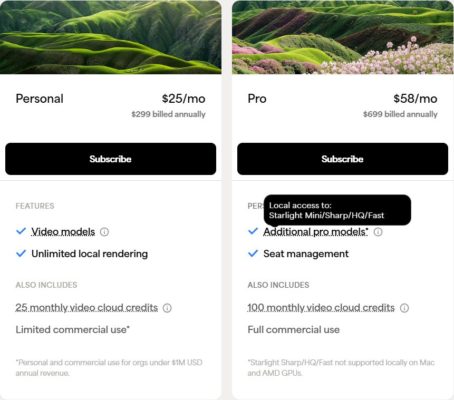
Topaz users weren’t that pleased when they found out in September last year that the pricing model was moving to subscription only. To be fair, a lot of people were paying yearly to keep up with updates, which felt a bit like a subscription. But the crucial difference was that you could still use the app if you decided not to.
Also, people weren’t best pleased that some of the functionality, like local rendering of the Starlight models, was only to be included in the “Pro” tier. I think a lot of people understand that if your organization has more than $1M revenue then it’s fair to be charged more, but for individual freelancers to be forced into that tier just to have local rendering for the newer models – not so much.
Users who own Topaz Video AI can still use it forever, with the models that it has, but they are frozen as there are. And it won’t be updated to support future OS and hardware development, so it’s not going to last forever. Users who were on auto-renew in September (like myself) were given “Founder” status and enjoy some of the privileges of the pro tier without having to pay for it.
What is Topaz Video
If you haven’t used it, a quick introduction: Topaz Video enhances and “fixes” your footage – its main feature is to intelligently upscale your footage to a higher resolution – say HD to UHD or SD to HD, but it also does noise reduction, de-interlacing, slow-motion, frame rate conversion, SDR to HDR, motion blur & jitter removal and stabilization. There is also mention of foreground removal and colorization in the API. It does this with different models which have been trained in different ways. This is perhaps the only difficult part of using this software, as you have to decide which model to use. To help you, I have compiled a handy table below. But first a quick overview:
- Astra (the newest model) – it is online only, it is not included in the Topaz Video subscription, it is designed and marketed as being for gen-AI video, but as you will see if you watch my tests below, does a remarkable job in rescuing old footage.
- The Starlight family – the newest generation of upscaling within the app which are a big chunk better than all the older models, at least with the more difficult tasks. These can run locally (if you have a Pro or Founder subscription) – as long as you have a powerful GPU and don’t mind being locked out of your computer for some time (see my guide to render times below).
- The older models (Proteus, Iris, Artemis etc.) – the original models which still work well in a lot of scenarios, but can’t rescue really bad footage.
- The specialist models (Aion, Hyperion, Nyx etc.) – they deal with frame rate conversion, slow-mo, HDR, noise etc.
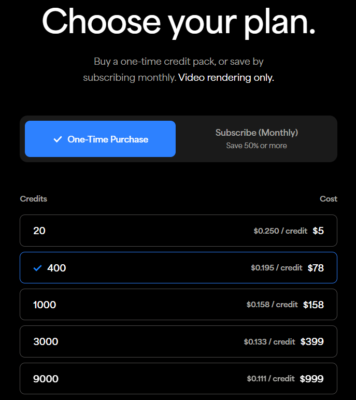
And a note on “Cloud credits” – if you don’t want to wait a long time to render on your computer or don’t have the GPU for it anyway, you can pay to send your export to the cloud. I have listed in the table below the cloud credits that would be used for each model for a 5 minute upscaled video (HD to UHD, 30fps). You can see that there is a large range of costs, with Astra being around 10x the cost of the older models. As a rough idea, let’s say you have used up the credits that come with your subscription and need to send 5mins of video to Starlight Precise 2.5. Let’s say you buy a top up of 9000 credits – that export would cost you $167. Or let’s say you have a series of 5 x 10s shots, so 50s total, and buy 400 credits – that would use about a third of them and cost you about $24. Topaz have provided a handy cloud credit calculator and also list the costs on the Topaz Video developer guide. But the point being that the subscription costs and the cloud credit costs are separate and the latter can really add up.

Definitive guide to all Topaz Video models
Online only enhancement
| Model | GPU Load | Cloud Credits (5m to UHD 30p) |
Description |
|---|---|---|---|
| Astra | Extreme (Cloud Only) | 1,500 | Highly resource-intensive creative diffusion model built explicitly for GenAI-generated video – but still interesting to try on other footage. Is allowed to creatively infer (i.e. hallucinate). Billed at twice Starlight costs and it’s online only at astra.app (switch tab to “Creative”). |
Enhancement
| Model | GPU Load | Cloud Credits (5m to UHD 30p) |
Description |
|---|---|---|---|
| Starlight Precise 2.5 | Very High | 750 | High quality diffusion based model – very good, but costs roughly 5x the cloud credits over the non-Starlight models. Doesn’t always out-perform the other Starlights. |
| Starlight Mini / Sharp / Fast 2 / HQ | Very High | 750 (375 for Fast) | First gen Starlight models, with four options which can all run on your machine on the pro tier. I particularly like Mini a.k.a. Starlight Pro-Mist. |
| Proteus / Proteus Natural | Medium | 151 (162 for Natural) | Proteus is (or maybe was) the “go-to” versatile workhorse. It features 6-parameter manual slider controls if you need them (Compression, Detail, Sharpen, Reduce Noise, Dehalo, Anti-Alias/Deblur) or you can keep it automatic. Proteus Natural is the next gen version and, you guessed it, more natural (but less sharp) – and you don’t get the 6 sliders. Designed to be 2x. |
| Iris | Medium | 151 | Specialist face recovery and enhancement. Specifically trained to reconstruct facial details, eyes, and skin textures in low-to-medium quality (LQ/MQ) or compressed footage. |
| Nyx / Nyx Fast / Nyx XL | Medium high | 151 (94 for Fast) | Model purely designed for noise and grain reduction. Excellent at cleaning up high-ISO or low-light footage while preserving the integrity of underlying fine details. Designed to be 2x & high quality input. |
| Rhea / Rhea XL | Medium high | 151 | Fine details – and trained for 4x (eg 960×540 to UHD). Good with low quality input. XL is more detailed. Supposedly heavier on the GPU, but I didn’t notice that. |
| Artemis | Medium | 151 | Well balanced automated model which renders quickly. Great for rapid processing of standard progressive clips or classic anime/cartoons where sharp edges are preferred. |
| Gaia HQ / CG | Medium high | 151 | Another older, but lighter model and with a version designed for computer generated video. |
| Gaia 2 | Low | 72 | Works frame by frame – good for animation or motion graphics only. |
| Theia Fidelity/Detail | Medium | 151 | An older model featuring manual fidelity vs. detail sliders, allowing you to balance sharp edge detail against artifact reduction. |
| Dione (DV / TV / Dehalo / Robust) | Medium | 151 | Interlaced only – geared strictly toward legacy media formats like old camcorder footage (DV), broadcast tape (TV), or progressive files with baked-in fields. Note: Proteus and Iris can also handle interlaced input. |
Frame Interpolation
| Model | GPU Load | Cloud Credits (10s to 8x slow) |
Description |
|---|---|---|---|
| Aion | High | 105 | Latest model for frame interpolation and slow-motion. Handles complex, fast-moving action sequences with fewer artifacts than older models, but 3x the cloud costs. |
| Apollo / Apollo Fast | Medium | 17- 35 | Designed for non-standard frame rate conversions (like 24fps to 60fps) and ultra-smooth slow motion. Apollo Fast offers a lighter computational footprint. |
| Chronos / Chronos Fast | Low to Medium | 35 | Standard frame rate conversion and smooth slow motion down to 4x. Great for simpler motion fields and regular progressive video pacing. |
SDR to HDR
| Model | GPU Load | Cloud Credits (5m to UHD 30p) |
Description |
|---|---|---|---|
| Hyperion | Medium to High | 38 | Intelligently expands Standard Dynamic Range (SDR) footage into High Dynamic Range (HDR) through Inverse Tone Mapping (ITM) a.k.a. “Up Mapping”. Maps existing colour data into Rec. 2020 or native HDR10 spaces while expanding color bit-depth. |
| Hyperion 2 | High | 38 | Next-gen colour space expansion and increased brightness range. Offers superior luminance mapping, preventing clipping in peak highlights and smoothly gradient-mapping midtones without banding artifacts. |
Stabilization
| Model | GPU Load | Cloud Credits (5m to UHD 30p) |
Description |
|---|---|---|---|
| Auto-Stabilize (No model name) | Low to Medium | 38 | Analyses the entire clip sequentially to track pixel movement over time. It dynamically smooths out camera camera shake, jitter and handheld panning issues without losing frame edge boundaries by intelligently synthesizing missing margins or introducing subtle cropping. |
Motion Deblur
| Model | GPU Load | Cloud Credits (5m to UHD 30p) |
Description |
|---|---|---|---|
| Themis v2 | Low to Medium | 38 | Specialized frame interpolation explicitly tuned to remove motion blur and camera shutter jitter. Bear in mind that the best models above also do some of this naturally. |
Time to put it to the test
So enough theory, it’s time for some tests! I ran 4 different clips of different qualities through all the models. I started with a couple of clips that were very low res and low quality. I then took a fairly normal beach scene and finished with an ad with embedded graphics to see how they would handle the letters and numbers. I’ve tested even the models that are specialist ones as you never know how they will come out.
Test 1
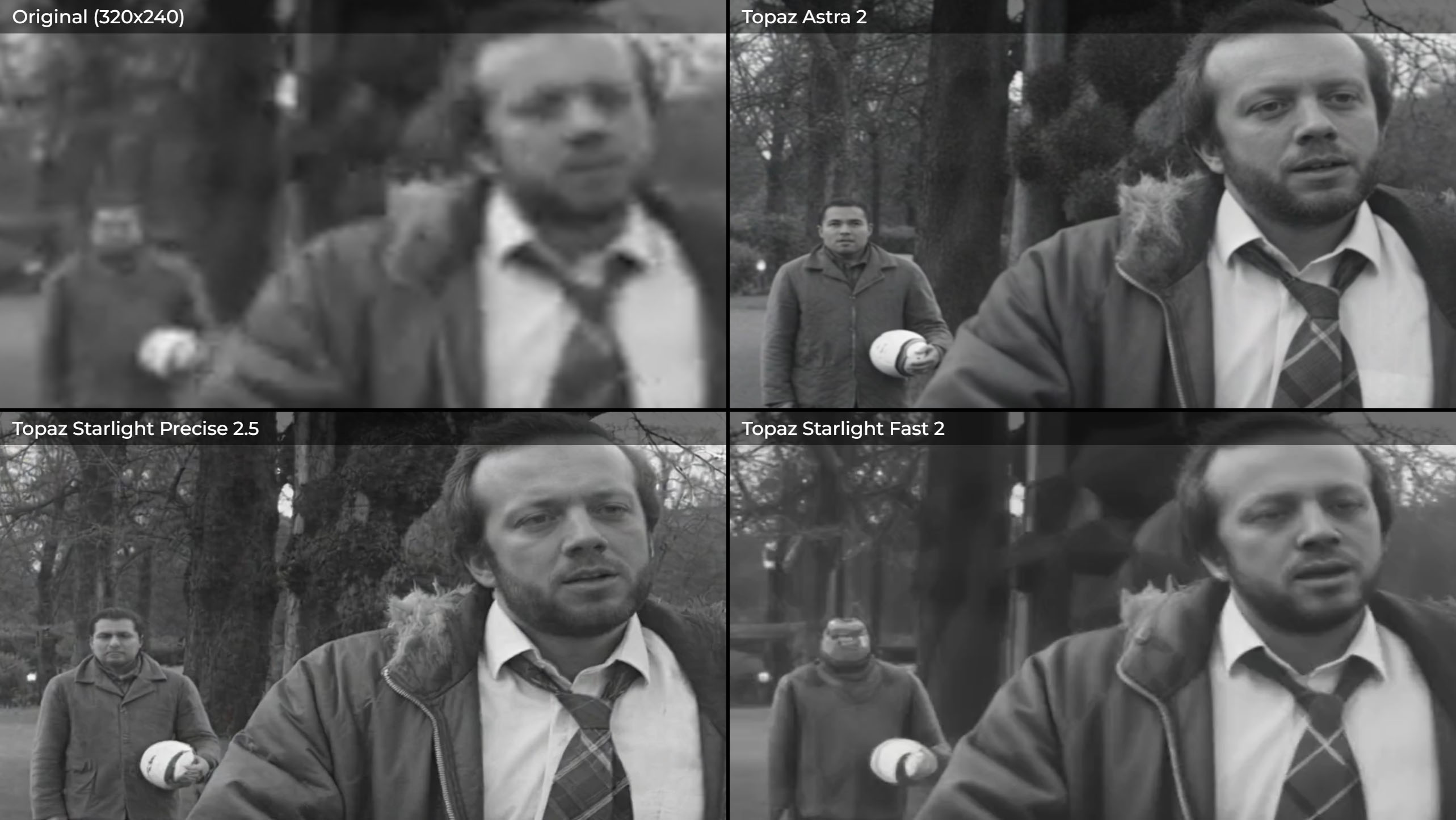
This test is from a film I made a long time ago with Steve Oram (Dune: Prophecy) for the Straight8 film festival which don’t you know was screened at Cannes. It was shot on 8mm film, but sadly all I have is a 320×240 file! So this is about as hard as it gets, not just the res and the blockiness, but also that we know faces, so it’s the thing we’re most sensitive to. In fact it kind of rules out AI upscaling a lot of the time as it only has to get it slightly wrong and it looks weird. That aside, I like to throw the worst case at these things and see what happens.

Both Astra and Starlight Precise do a pretty incredible job given the circumstances. Astra’s effort is not a bad likeness for Steve. Though it’s not done so well for Alexander Kirk who is in the background, though it had next to nothing to go on. If it was very clever I think it might have used a shallower depth of field to blur him out a bit. But it shows it has uses beyond just gen AI upres.
All the other models, especially the older ones, have struggled here & Fast 2 was the best of a bad lot, albeit a complete fail on Alex.
In all the tests I’ve done a 4-up comparison of the best three against the original, which you can open in a new tab if you want to pixel peep.

Test 2
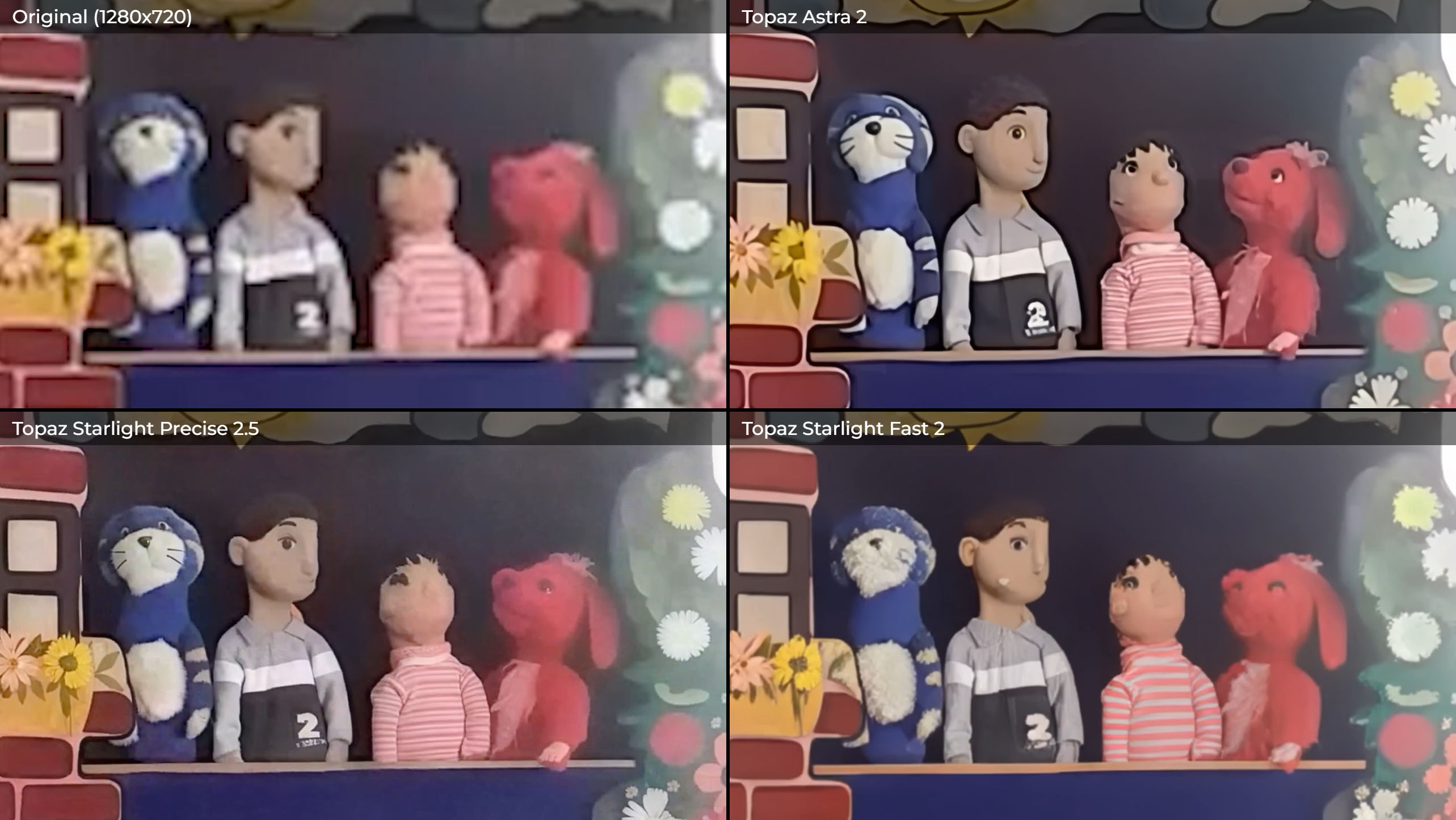
Here I found some old footage of a puppet show from many years ago that was very poor and ran it through a 3x upres from 720p to UHD.

Astra has done a lovely job here & dealt with the text really well. It didn’t even make that much up, which I suppose is partly because I had the creativity setting at its lowest. Starlight Precise and Fast also look pretty good, albeit Precise seems to suffer from blockiness sometimes & Fast struggled with the text. HQ, which you would have thought would be the best, was in fact the worst by a long shot. Also, the Starlight that you can send to the cloud from the older app called Topaz Video AI is much worse than any of the newer Starlights which is a pity. I did however confirm that Starlight Mini is the same in v7. Again, none of the older models did a credible job here.
Test 3
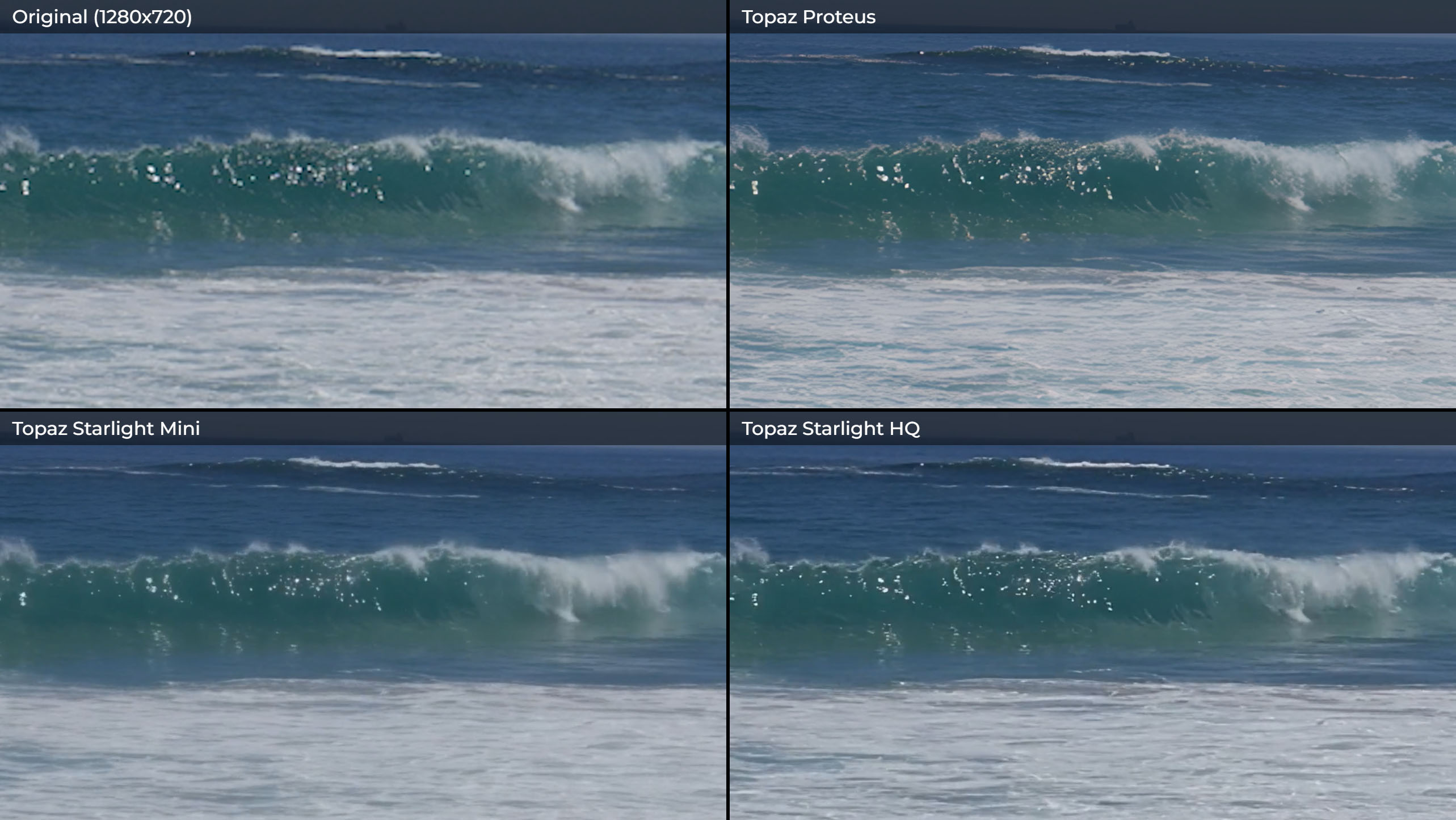
This test asks less of the models – it’s still a 3x upres, but from some fairly decent footage, though the camera is moving, as are the waves.

Astra looks a bit fake to me this time. Precise has severe blocking in the sky though it’s done great with the waves. Mini looks beautiful, though it does depend on whether you want a softer, more filmic, pro-mist type of look. Fast looks fairly nasty here. HQ finally brought us some quality! Don’t even talk to me about the Starlight from v7. And then there’s good old trusty Proteus. I think it’s the best of the bunch here. Proteus Natural felt a bit unnecessarily soft here, but I can imagine on some other footage that was too sharp, then Natural could help. Of the rest, I thought Rhea did a great job and the others weren’t too bad, aside from Gaia 2 which really is for animation or anime only.
Test 4
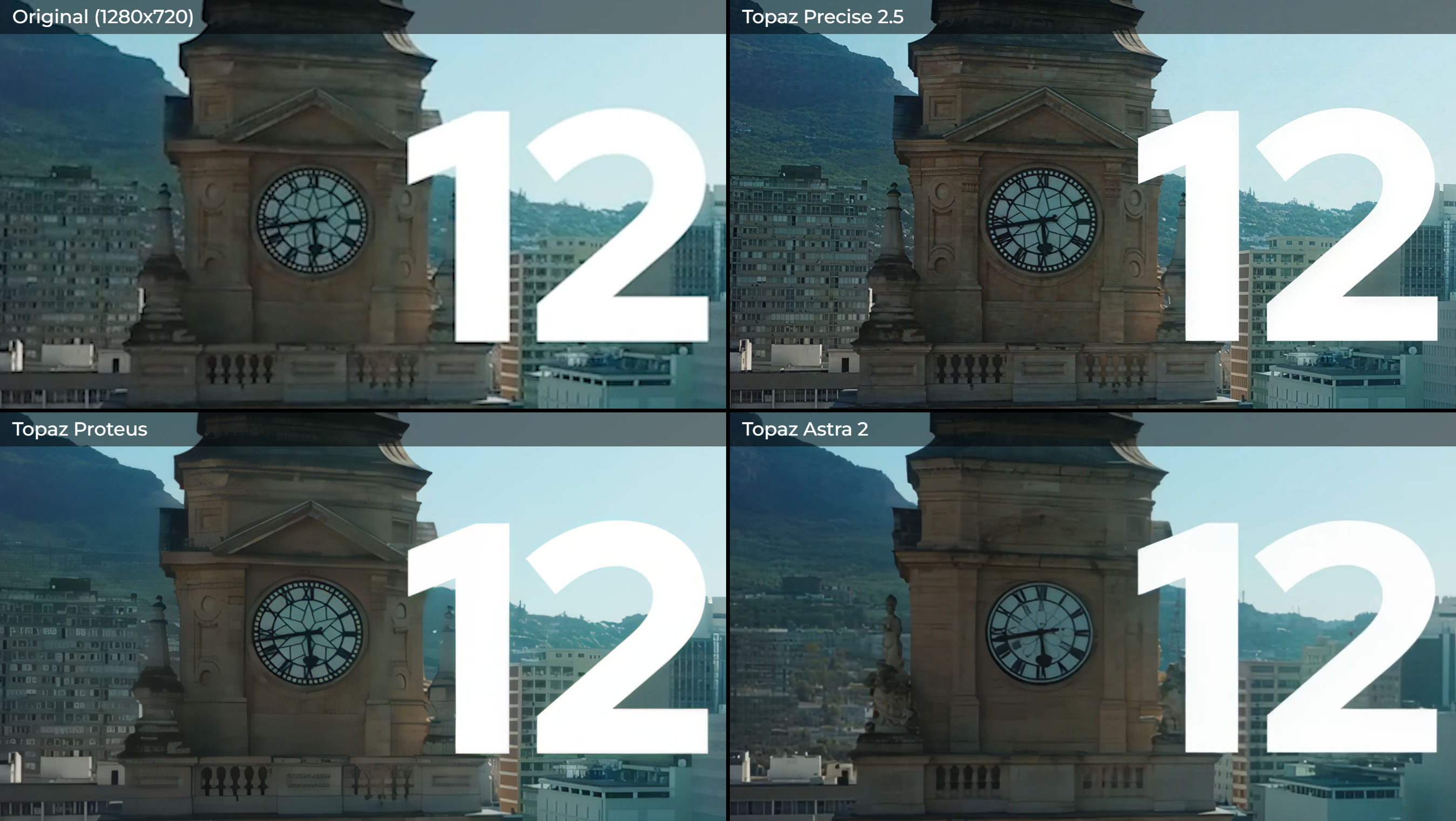
This tests the models’ ability to deal with text as well as video.

Astra 2 did a great job overall, though if you look at the freeze frame, you see it has completely made up the statue on the clock! Though you don’t actually really notice that when you watch it. It did also struggle with the scrolling text. Starlights Precise and HQ look pretty good & handle the text well. Mini’s signature look over text is not great. Proteus again shows it can compete & the other models are all decent, again aside from Gaia 2.

Bonus Test 5: slow-mo models
I thought I’d do a quick test of the slow-mo models also as it’s always quite impressive.

Aion’s 16x slow down is something special. If you’ve used for example Premiere’s optical flow, you’ll have been used to it being pretty hit and miss and often prone to artifacts. But this is perfect. Apollo and Chronos also look great, albeit limited to 8x.
How about Open Source?
Every time I look into this I feel I should keep up with the world of Open Source. I did try to test a couple of models. One was the Real-ESRGAN model within Video2X, but it was so much less good that I didn’t even include it in the end. It was at least easy to install and use, though the files it made slowed Premiere down to a crawl and needed to be converted. The other option I tried was SeedVR2 within ComfyUI (following this guide). That was a lot more complicated & it took me quite a while to get it working. I did in the end & the result I could get was a fair bit worse than the Topaz models and it was slower to render. That said, I did have to turn down the quality effectively to get it to run on my 4080. If you had say a 5090, you might have better luck. But I’ll be honest, you often hear people on forum who swear by open source and I currently do not believe them.
Render times
As an example, with my system, with a RTX 4080, these were the kinds of fps I was getting for the Starlight models. So it was pretty nice getting the cloud to do this instead. I had long assumed “Mini” meant quick render times, but it definitely doesn’t! Sharp is the only quick one and in my experience, rarely one of the best.
| Model | FPS | Time to render 10s of 30fps video (in hours) |
|---|---|---|
| Starlight Precise 2.5 | 0.06 | 1.3 |
| Starlight Mini | 0.04 | 2.0 |
| Starlight Sharp | 0.41 | 0.2 |
| Starlight Fast 2 | 0.11 | 0.8 |
| Starlight HQ | 0.06 | 1.4 |
Starlight local rendering specifications
Here is some detail from the Topaz help pages on what you need in your computer to even do it at all.
| Model | License Requirement | VRAM Requirements | Min. system RAM | OS / Hardware Limitations |
|---|---|---|---|---|
| Starlight Precise 2.5 | Available for all licenses to run locally (at least it doesn’t specify pro only on their website) | 12GB minimum | 16GB | Windows / NVIDIA Only. GPU compute >8.9. |
| Starlight HQ | Pro account required for local rendering | 10GB minimum | 12GB | Windows / NVIDIA Only. |
| Starlight Fast 2 | Pro account required for local rendering | 16GB minimum (32GB yields higher detail) | 32GB | Windows / NVIDIA Only. |
| Starlight Sharp | Pro account required for local rendering | 16GB minimum | 32GB | Windows / NVIDIA Only. |
| Starlight Mini | Pro account required for local rendering | 10GB minimum, 16GB better (AMD: 20GB) |
32GB minimum (Mac: 36GB) |
Cross-platform compatible (adds native Mac and AMD paths). GPU compute >7.0 |
Conclusion
My overall conclusion is that Topaz Video is a fantastic tool. It really can rescue some almost unbelievably bad footage and I’ve seen it do that on big productions, where for example you get some bad phone archive from the contributor. Hopefully my tests above give you an idea of what it can do. And I think they show that generally you have to try a number of models to see which comes out best each time.
On the other hand, it’s not cheap and there’s both the subscription and extra cloud credits to deal with, though we are getting used to that with the LLMs. Fingers crossed, the way Adobe integrates it will make that side of it much better for us.