


Welcome to Tool Tip Tuesday for Adobe Premiere on ProVideo Coalition
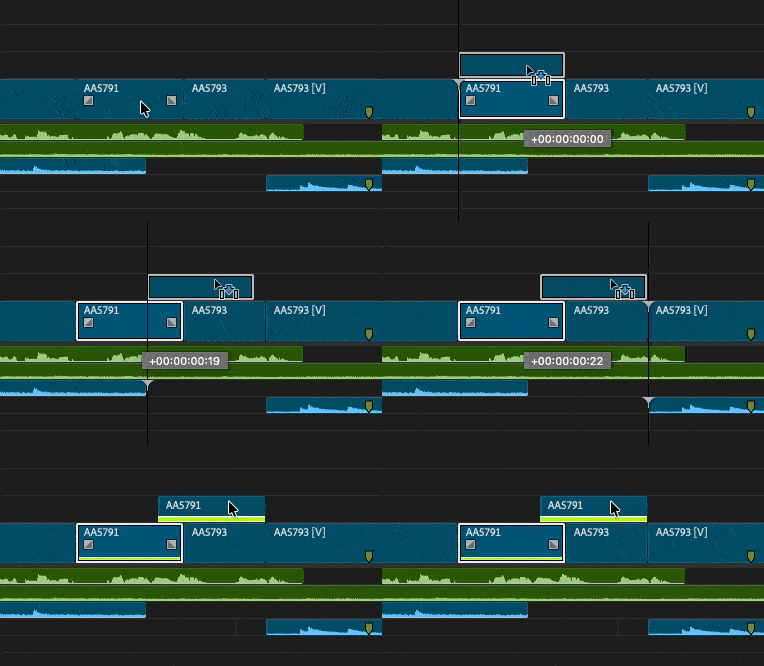
There’s a very useful timeline setting that will add colored stripes to any duplicated frames in a timeline. Head under the timeline wrench menu and choose Show Duplicate Frame Markers (or turn on “dupe detection” as it’s known). When that item is checked, any clips that are duplicated in the timeline will display a colored marker (or stripe) at the bottom of the clip to indicate that the clip contains duplicated or reused frames.


This is especially important if you’re building a show in multiple segments or acts, as you may not be duplicating any frames within individual segments, but once you build an entire program, Show Duplicate Frame Markers will identify duplicates you might not realize are in the timeline. This works per timeline and will not find duplicates in different timelines.


And when this is turned on it happens in real time.

Speaking of finding duplicates in different timelines, check out this Tool Tip Tuesday: Video and Audio Usage columns. Using that tip, you can identify clips that have been used in multiple timelines.
This series is courtesy of Adobe