




The Professional’s Guide to Buying a Mac with Apple Silicon
I’m still on my M1 Max MacBook Pro. I think I should have upgraded last year…and like everyone else I’m trying to do it affordably.
Today, it would be an M5 Max with at least 64GB of RAM, and about a thousand more than the same machine from 4 years ago.
WARNING: That $699 MacBook Neo looks great, don’t it? Or that $899 stock Mac mini with 16GB of RAM & 256GB drive?
DON’T BUY THESE SYSTEMS. The Neo runs on an iPhone chip [5], and both it and the stock Mac mini have too little RAM and not enough storage.
TL;DR BUYER’S GUIDE if you skip the rest of the article, here’s the part to read.
I put a TL;DR in nearly everything I write. You can read just this, buy what you need and skip the rest. The rest of the article is why and how I make my decisions. Yes, disagree; just understand how I got to my conclusions.
The key points:
- The Neural Accelerators are why the M5 matters. GPU-run AI tools got two to three times faster in one generation (see the box below).
- Tier beats generation. An M5 Pro is a better editing machine than the brand-new M6.
- Stop counting performance cores. The top M5 Pro and the M5 Max have the same CPU. The Max is a GPU, memory and encoder upgrade.
- This year’s Max is about as fast as last year’s Ultra.
- RAM is the big decision, and has become far more expensive.
- No Pro means no Thunderbolt 5. Only Macs with a Pro, Max or Ultra chip have it. The MacBook Air, the new 14″ MacBook Pro with the M6, the M6 Mac mini and the iMac are Thunderbolt 4 (see the Thunderbolt box).
- While I love laptops, desktops are the value play; unless you need a laptop, don’t get one.
Buy now or wait?
- Desktops: buy now. The Mac mini and Mac Studio shipped in September.
- Laptops: buy now. Apple announced new MacBook Pros last week [30][32]. The plain 14″ moved from the M5 to the M6 (still $1,999 to start, still Thunderbolt 4). The M5 Pro and M5 Max models now come with an OLED touch screen Apple calls PROLED XDR, for $400 more; the versions with the regular screen are still on sale at the same prices. Pre-orders are open, and they ship November 6.
- Don’t wait for an M6 Pro or M6 Max. Bloomberg’s Mark Gurman reports there won’t be one; the M7 Pro and Max are expected in late 2027 [15]. He’s been really accurate over the years.
- Don’t wait for prices to drop. Apple’s memory costs are reported to rise again in 2027 [19].
What I’d buy
One note before you read the prices: Apple raised Mac prices in June, and the RAM upgrades went up the most. Apple’s own words: “We have never seen a component price increase this much, this quickly.” [17] Some of the numbers below are going to sting.
Prices are from Apple’s US site as of October 28, 2026, before tax. Each price links to that exact configuration on apple.com.
Laptop, budget: MacBook Air 13″ @ $1,999
- M5 (10-core GPU)
- 32GB RAM
- 1TB SSD
- Thunderbolt 4, not 5 (two ports)
Laptop, power: MacBook Pro 14″ @ $5,099 ($5,399 as a 16″)
- M5 Max, 18-core CPU, 40-core GPU
- 64GB RAM
- 2TB SSD
- Thunderbolt 5 (three ports)
- Regular (mini-LED) screen; the new OLED touch version is $400 more
Desktop, budget: Mac mini @ $1,999
- M5 Pro, 15-core CPU, 16-core GPU (NOT the M6)
- 24GB RAM
- 1TB SSD
- Thunderbolt 5 (three ports)
- (Want more RAM on a budget? The M6 with 32GB and 1TB is $1,799, but it’s Thunderbolt 4, not 5.)
Desktop, power: Mac Studio @ $4,299
- M5 Max, 18-core CPU, 40-core GPU
- 64GB RAM
- 2TB SSD
- Thunderbolt 5 (four ports), 10Gb Ethernet
Desktop, supercharged: Mac Studio @ $5,999
- M5 Ultra, 30-core CPU, 64-core GPU
- 96GB RAM (256GB is $9,999)
- 2TB SSD
- Thunderbolt 5 (SIX ports)
- Delivers in 6 to 7 weeks, as of November 2
Should you upgrade? Find your chip.
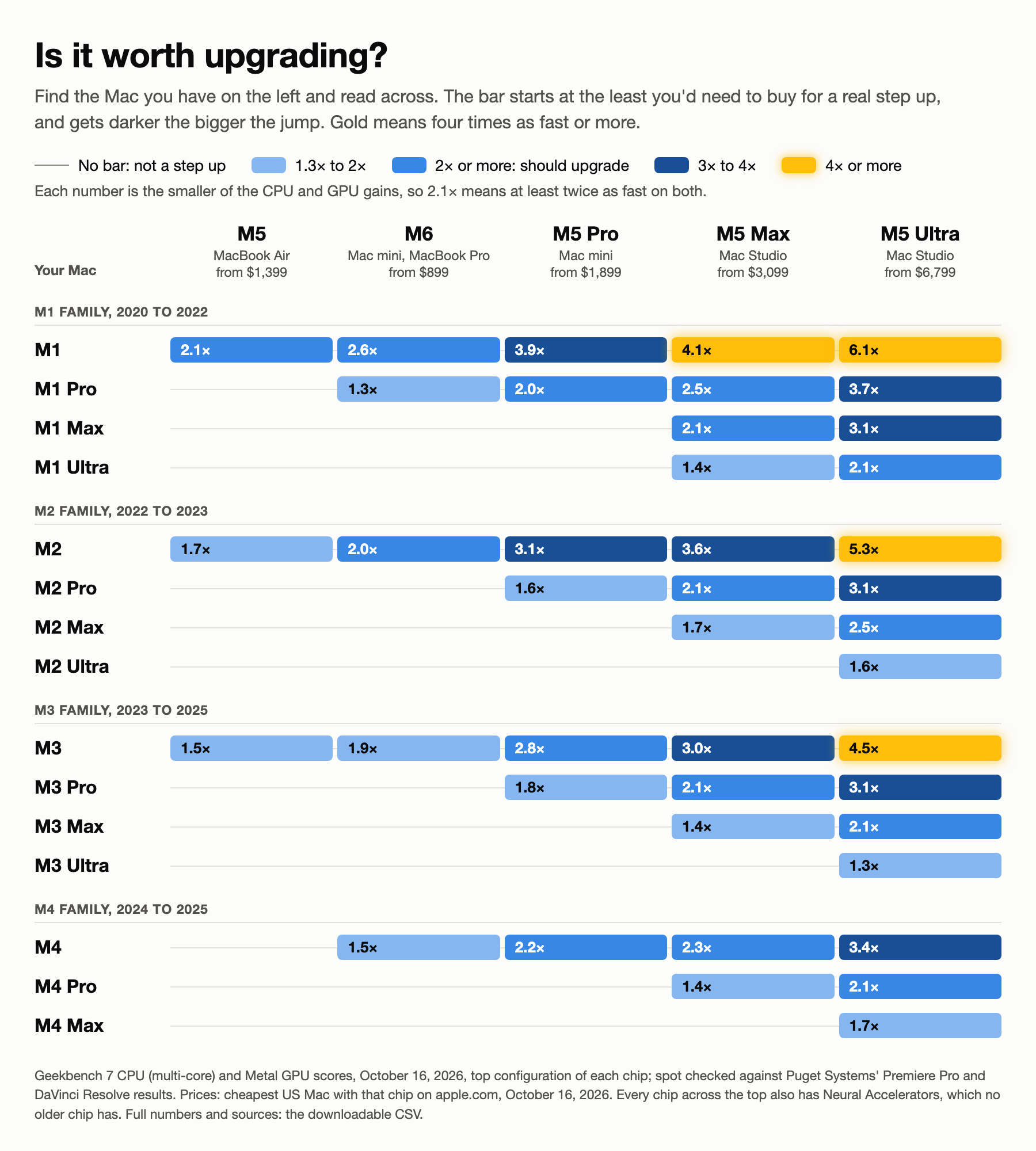
This is the chart I wanted for myself. Find the chip you have now in the left column, then read across. Each row compares today’s chips to yours, for CPU and GPU, using Geekbench 7 scores [10].
The numbers are multipliers: 2.0× is twice as fast as your Mac. Each one goes by the weaker of the two (CPU or GPU), because a machine that’s twice as fast on CPU and slower on GPU is not an upgrade for anyone grading in Resolve. No bar means it’s not a real step up. Twice as fast or more on both is a should upgrade, the bar gets darker as the jump grows, and gold means four times as fast or more on both.
I spot checked the steps against Puget Systems’ public Premiere Pro and DaVinci Resolve results [12]. Puget can’t separate CPU from GPU for the Mac, so I use it as a touchstone: it matches 88% of the time, and never more than one step off.
The numbers behind the chart, with a source for every score: the chips (CSV) and every upgrade comparison (CSV).
To beat an older Max on the GPU, you need a Max. An M5 or M6 will beat an M1 or M2 Max on CPU and lose badly on GPU.
One note: this chart is raw CPU and GPU. It doesn’t show the Neural Accelerators (below), which every chip across the top has and none of the older ones do. For AI tools, every box on the chart gets better.
The M6 column covers the new M6 MacBook Pro too. It’s the same chip as the M6 Mac mini (12-core CPU, 12-core GPU, up to 32GB) [30]. There are no benchmarks of the laptop yet, but the same chip should land in the same place. Apple’s own claim, up to 30% faster graphics than the M5, fits: in Geekbench, the M6 Mac mini is about 1.2× the M5 on both CPU and GPU [10].
When it’s smart to upgrade, family by family
Coming from an M1: Yes. It’s time.
- M1 → anything new, even the M5 MacBook Air: you should upgrade (CPU 2.1×, GPU 2.6×).
- M1 Pro → the M6 at minimum (CPU 1.6×, GPU 1.3×), the M5 Pro to reach “should upgrade” (twice as fast on both).
- M1 Max → the M5 Max: should upgrade, twice as fast on both (CPU 2.5×, GPU 2.1×). That’s my row. The M5 Pro more than doubles the CPU (2.4×) but the GPU only moves to 1.2×.
- M1 Ultra → the M5 Max (CPU 1.5×, GPU 1.4×).
- Why: the M1 generation has no AV1 decode, no hardware ray tracing, no Neural Accelerators and no Thunderbolt 5. The stock M1 never even had a ProRes engine. Apple claims the M5 Max renders Resolve video effects up to 5.4× faster than an M1 Max, and runs Magic Mask up to 5.3× faster [3][7]. (I’ve run Magic Mask on my M1, and I find it fairly slow.)
Coming from an M2: Yes, but stay in your tier.
- M2 → the M5 (CPU 1.8×, GPU 1.7×).
- M2 Pro → the M5 Pro (CPU 2.0×, GPU 1.6×).
- M2 Max → the M5 Max (CPU 2.1×, GPU 1.7×). NOT the M5 Pro (GPU 1.0×, the same) and definitely not an M5 or M6 (GPU half to two thirds as fast).
- M2 Ultra → only the M5 Ultra is a clear step up.
- Why: the M2 has the same missing pieces as the M1 (no AV1, no ray tracing, no Neural Accelerators, Thunderbolt 4), and about two thirds of the memory bandwidth of its M5 counterpart.
Coming from an M3: Stock and Pro, yes. Max, only if AI matters.
- M3 → the M5 (CPU 1.6×, GPU 1.5×).
- M3 Pro → the M5 Pro (CPU 2.0×, GPU 1.8×). The M3 Pro was the weak one: Apple cut its performance cores and memory bandwidth compared to the M2 Pro.
- M3 Max → the M5 Max, but it’s a smaller jump in raw numbers (1.4× on both).
- M3 Ultra → the M5 Ultra (CPU 1.3×, GPU 1.4×).
- Why: the M3 added AV1 decode and hardware ray tracing, so it’s a better machine than an M2. What it doesn’t have is the Neural Accelerators, and that’s where the M5’s big gains are.
Coming from an M4: Stock, yes. Pro and Max, only for the AI tools.
- M4 → the M6 (CPU 1.5×, GPU 1.6×).
- M4 Pro → the M5 Max (CPU 1.4×, GPU 2.1×), or the M5 Pro if the AI tools are your only reason to move.
- M4 Max → in raw numbers, the M5 Max is about the same (1.2× on both).
- Why: if Magic Mask, transcription, Enhance Speech, Topaz or local AI models are part of your day, the M5 is two to three times faster at exactly those. If they’re not, keep your M4 Pro or Max.
What changed since my 2025 guide
My March 2025 guide was a decoder ring; basically it boiled down to:
- Count the performance cores.
- GPU is rarely the bottleneck.
- Max out the RAM until you hit 64GB.
- Pick the newest generation.
- At least 1TB of internal SSD.
With the M5 family, so much has changed that this article is a full rewrite. Apple’s pushed quite a bit of technology, renamed some key parts and software has benefited from the new architectures.
A little history (of this article) and the M series chips.
When Apple released the M series of chips, I found myself confused about the tiers. Once I figured it out? It’s exhausting and less precise than Apple should ever be. If I needed help, other people would, too.
That first guide worked because the chips followed a pattern: the same four tiers (Stock, Pro, Max, Ultra), the same two kinds of CPU cores, and the same rough math. Learn the pattern, and you could compare any two Macs by crossing out what was identical, like a math equation.
What didn’t change: I’m approaching this as a professional user, not looking for the best deal. And Apple has made upgrading anything (the RAM, CPU, or storage) impossible, so you have to get it right the first time. Saving $100 or $200 on RAM or storage is still a bad choice, even now that RAM costs more.
The rest of this article is broken down into six sections:
- Why the Neural Accelerators matter: a box on why the M5 and M6 are worth it.
- Thunderbolt 5: a box on which Macs have it, and why it matters.
- What changed under the hood: what actually makes the M5 better, in plain English.
- The new rules: what that means for editors, colorists and motion designers.
- What I’d buy, and why: budget and power builds for laptops and desktops, plus the supercharged option.
- Last thoughts: refurbs, leasing, displays, a eulogy for the Mac Pro, and the stuff that didn’t fit.
Why the Neural Accelerators matter: nothing before the M5 has them

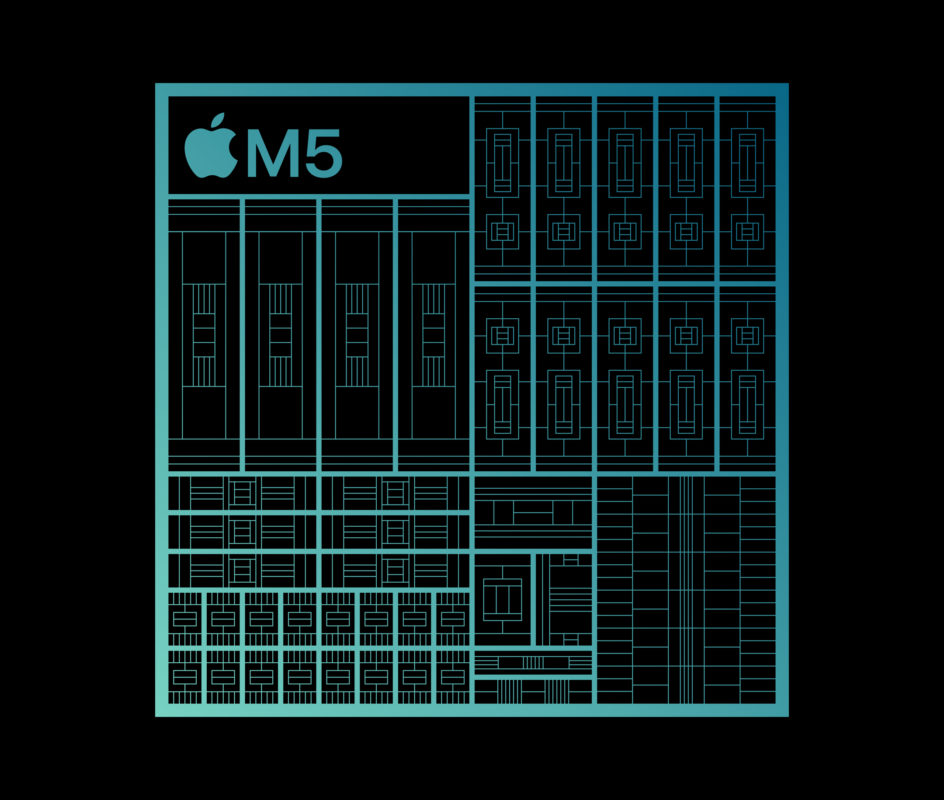
Apple calls them Neural Accelerators: a dedicated AI unit built into every GPU core. Every M5-family chip has them (M5, M5 Pro, M5 Max and M5 Ultra), and so does the M6 [1][6].
Because there’s one per GPU core, the count scales with the chip: 8 or 10 on the M5, 10 or 12 on the M6, 16 or 20 on the M5 Pro, 32 or 40 on the M5 Max, 64 or 80 on the M5 Ultra. So a 40-core M5 Max has four times the Neural Accelerators of an M5.
Where it shows up in video work, comparing the M5 Max to the M4 Max:
- Resolve: Magic Mask and Person Mask about 2 to 3× faster, Speed Warp about 2.5×, Smart Reframe about 3×, Relight about 1.8× (Puget’s Resolve test, feature by feature) [12]. Apple’s own number for Magic Mask: up to 3× [7].
- Premiere: Enhance Speech up to 2.9× faster, M5 vs. M4, per Apple [3].
- Topaz Video: up to 3.5× on the AI enhancement models, per Apple [3]; Topaz’s user benchmarks show about 2.4 to 2.7× on Rhea and Starlight Mini [14].
- Local AI models (LM Studio, MLX): the wait before the first word of an answer is about 4× shorter [13].
Scott Simmons saw the same pattern in real projects on the M5 Ultra [11]. Against the M3 Ultra, Premiere’s Enhance Speech ran 3.9× faster on a 57-minute interview, batch transcription of seven interviews ran 2.8× faster, and Final Cut’s captions ran 2.4× faster.
And where it doesn’t show up: plain GPU effects and noise reduction (1.1 to 1.2×), Resolve’s transcription and Super Scale (about 1.3×), visual search indexing in all three NLEs (1.05 to 1.14×), and video encoding.
I run Premiere’s transcription and visual search, and I’ve run Resolve’s Magic Mask on my M1. By these numbers, transcription and masking are where I’d feel an M5. Visual search, not so much.
GPU-run AI tools got two to three times faster in one generation. Not every AI tool, and not all of Resolve’s: the masking and motion tools, yes; transcription and Super Scale, barely. Adobe and Blackmagic haven’t publicly credited the Neural Accelerators, but that’s the part of the chip that changed.
Topaz against NVIDIA is mixed. In Topaz’s user benchmarks, an M5 Ultra beats an RTX 5090 on Proteus at 2× and on Rhea, and loses badly on Proteus at 1×, Iris, Gaia and Proteus Natural [14]. Some Topaz models (Starlight Sharp) only run locally on NVIDIA. If Topaz is the job, NVIDIA is still the stronger box.
Why it matters when you buy: this is the reason the M5 and the M6 are worth buying over anything older, even a discounted M4 in the same tier, and the reason the Max’s extra GPU cores are worth more than they used to be.
Thunderbolt 5: which Macs have it, and why it matters

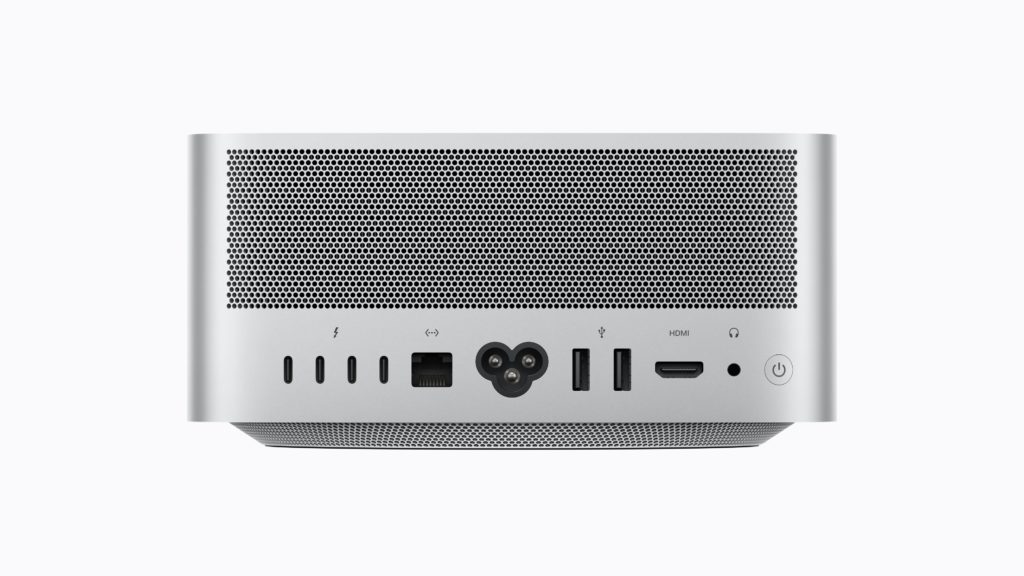
The dividing line is easy to miss on Apple’s site:
- Thunderbolt 4: the MacBook Air, the M6 14″ MacBook Pro, the iMac, and the Mac mini with the M6.
- Thunderbolt 5: anything with an M5 Pro, M5 Max or M5 Ultra, including the Mac mini with the M5 Pro. On the M5 Pro and Max, every port gets its own controller. The Mac Studio has up to six [9].
Why it matters: Thunderbolt 5 moves data at 80Gb/s, twice Thunderbolt 4’s 40Gb/s (Apple’s 120Gb/s figure is for display traffic) [9][23]. It carries DisplayPort 2.1 for more and bigger external screens. And it’s fast enough that a good external SSD or RAID becomes working storage: the best drives read at about 5 to 6 GB/s [23]. Any system without Thunderbolt 5 is a compromise for professional work.
On my desk, that’s the OWC Thunderbolt 5 Dual 10GbE Network Dock: Thunderbolt 5 plus two 10Gb Ethernet ports [24].
One note: a lot of Thunderbolt 5 SSDs write fast only until a cache fills (often around 50GB), then drop to 1.5 to 2 GB/s [23]. If you’re dumping a big card, test with a big copy, not a benchmark.
Storage inside: I will never recommend a system with less than 1TB. For professional work I’d go 2TB, because we’re installing so many AI models on these machines now. Your fastest caches still live on Apple’s internal SSD, which runs up to about 14.5 GB/s on the M5 Pro and Max [3], more than twice any Thunderbolt 5 drive.
What changed under the hood
Five things to know about the M5 family. I’m putting the most important one first.
1. An AI accelerator in every GPU core. Every M5 chip and the M6 have them, and nothing older does. It’s the biggest change in this generation, so it gets its own box above.
2. New names for the CPU cores. This is the one that’s going to trip people up.
- What Apple used to call a performance core is now a super core.
- Performance core is now the name of an all-new, middle kind of core.
- Efficiency cores are still around, but only on the stock chips.
So “performance core” on a 2026 spec sheet does NOT mean what it meant on a 2025 spec sheet.
This list should help:
- M5 = 4 super cores + 6 efficiency cores
- M6 = 2 super cores + 4 performance cores + 6 efficiency cores
- M5 Pro = 5 super + 10 performance (15-core), or 6 super + 12 performance (18-core)
- M5 Max = 6 super + 12 performance (18-core)
- M5 Ultra = 10 super + 20 performance (30-core), or 12 super + 24 performance (36-core)
Notice the M5 Pro and M5 Max??? The 18-core M5 Pro and the M5 Max have the same CPU.
3. The Pro and Max are two chips in one. Apple calls it “Fusion Architecture.” The M5 Pro and M5 Max are each built from two dies joined into one chip [2]. The M5 Ultra is two M5 Maxes joined together, so it’s four. (Yes, the Ultra is still “glue two Max chips together.”)
4. More memory, and much faster memory, as you go up the tiers.
- M5 = up to 32GB, 153GB/s
- M6 = up to 32GB, 170GB/s
- M5 Pro = up to 64GB, 307GB/s
- M5 Max = up to 128GB, 614GB/s (460GB/s on the 32-core GPU version)
- M5 Ultra = up to 512GB (orderable since October 28), 1.2TB/s
That second number is memory bandwidth, how fast the chip moves data in and out of RAM. It roughly doubles at each tier. That matters for big timelines and heavy grades, and it really matters for AI.
5. The Media Engines didn’t change.
- M5, M6 and M5 Pro = one video encode engine, one ProRes engine
- M5 Max = two video encode engines, two ProRes engines
- M5 Ultra = four video encode engines, four ProRes engines
Those are the same counts as the M4 and M3 chips in the same tier [9]. Everything has AV1 decode. And that explains something in Scott’s review: the M3 Ultra and the M5 Ultra have identical media engines, and his ProRes Proxy transcode in Compressor took 12:42 on the M5 Ultra vs. 13:24 on the M3 Ultra [11]. As Scott put it about the Ultra’s extra engines over the Max, “double the media engines doesn’t mean twice as much of everything.” If your day is mostly exporting, a newer chip in the same tier won’t change much.
The new rules
Tier beats generation: the M5 Pro is better than the M6 stock.
In 2025 I said: in every place possible, pick the newest chips. That’s not good advice anymore.
The M6 is new…but it’s clear that Apple is holding off for some reason. Apple’s first 2nm chip shipped in September in the Mac mini, and last week it came to the 14″ MacBook Pro and the iMac [6][8][30][31]. It has the Neural Accelerators too. But there’s no M6 Pro or M6 Max, and Mark Gurman reports there won’t be one: Apple is skipping to the M7 Pro and Max in late 2027 [15].
So which is the better editing machine: the brand-new M6 Mac mini, or the M5 Pro Mac mini?
The M5 Pro. Even the 15-core version: about 1.3× the M6 on CPU and 1.4× on GPU in Geekbench, and about 1.4× in Puget’s Premiere test and 1.3× in Resolve [10][12]. It has more GPU cores (so more Neural Accelerators), Thunderbolt 5, up to 64GB of RAM and 1.8× the memory bandwidth. The one place the M6 wins is single-core speed, by about 9%, which you’ll feel in a snappy interface and not much else.
The same goes for laptops: the 14″ MacBook Pro with the M5 Pro ($2,499) over the new one with the M6 ($1,999). It’s the same pair of chips, so it’s the same answer.
Pick the tier first. Then the generation. The M6 is showing up one product at a time: the Mac mini in September, the base 14″ MacBook Pro and the iMac last week, and the MacBook Air reportedly in early 2027 [16][30][31].
Apple’s Pro and Max chips typically have arrived 9 to 17 months apart, and if the M7 Pro and Max land in late 2027, the M5 Pro and Max will be Apple’s current pro chips for longer than any before them. If you like to play the timing game, MacRumors’ Buyer’s Guide tracks the average time between updates for every Mac [29].
Changing my mind: Stop counting performance cores
My old rule: find out how many performance cores a chip has, because those are the ones doing our work. The M4 Pro had two and a half times as many as the M4 stock chip, which is why I said the M4 Pro is the baseline I’d suggest anybody get.
The renaming broke the counting. Worse, between the Pro and the Max, the CPU stopped being the difference at all. In Geekbench, the 18-core M5 Pro and the M5 Max are the same on CPU (1.0×). On GPU, the Max is 1.8× [10].
Biggest jump: stock to Pro.
A smaller jump to the Max: from Pro to Max, you’re not buying CPU. You’re buying:
- Twice the GPU cores (40 vs. 20), which also means twice the Neural Accelerators
- Twice the memory ceiling (128GB vs. 64GB)
- Twice the memory bandwidth (614GB/s vs. 307GB/s)
- Twice the video encode and ProRes engines
- One more external display (four vs. three on the MacBook Pro)
More encoders matter most for ProRes. Apple rates ProRes playback in 8K streams: up to 19 on the M5 Max and up to 33 on the M5 Ultra [9]. And it’s really about pixel count: one 8K stream is the same number of pixels as four UHD streams or sixteen HD streams. (Apple only publishes the 8K number; the rest is pixel math, and it’s an article of its own.)
So who benefits most from the Max? Anyone whose day is GPU work: grading, noise reduction, effects, motion, and the AI tools above. Anyone exporting or playing back a lot of ProRes at once. Anyone who needs more than 64GB. If you mostly cut and a colorist finishes the job, the M5 Pro is a serious machine.
The Max is about as fast as last year’s Ultra
In Geekbench, the M5 Max comes in at 0.9× last year’s top M3 Ultra on CPU and 1.0× on GPU [10]. For most editing and color, a Max now does what took an Ultra last year.
The M5 Ultra moved up to a new job: big AI models, many streams at once, and Resolve at its heaviest. And because its media engines are the same as the M3 Ultra’s, an M3 Ultra owner who mostly exports has little reason to move (see Scott’s numbers above).
RAM is the key question. What is your main use?
You can never, ever add RAM to these systems. That rule didn’t change.
RAM on these machines is shared with the GPU, so it’s also your AI memory. The size of AI model you can run locally is set by how much RAM you bought, and that model shares the RAM with Premiere, Resolve, your browser and everything else. Running huge language models alongside editorial eats everything.
My floors:
- Budget desktop: about $2,000 is where I consider entry level, and I’d want 48GB in it. The M5 Pro mini goes from 24GB straight to 48GB (there’s no 32GB option), and 48GB takes it to $2,599, out of that budget.
- Editing only: 32 to 36GB is my floor, because we’re all using the RAM now.
- Color or Motion graphics: 64GB. I’d compromise at 48GB if I had to. Maybe.
- Heavy AI along with the above: I have a tough time suggesting less than 96GB (that’s 128GB on a Max, or an Ultra) under the idea that you’re going to need that RAM for both uses. REALLY? 256GB is the answer here if you’re talking about SERIOUS local models.
And RAM is now the expensive and necessary part. Since my last guide, Apple’s price for memory upgrades has doubled on the Max chips.
Going from 48GB to 64GB on an M4 Max was $200 in March 2025; on an M5 Max it’s $400. 48GB to 128GB went from $1,000 to $2,000. The Ultra’s 96GB to 256GB step went from $1,600 to $4,000. The Pro chips went up by half to two thirds, and the stock chips didn’t change at all [27]. Apple now charges a flat $25 for every gigabyte you add, on every Mac, up to 256GB. The 512GB Ultra charges about $45 a gigabyte past that.
The memory chips themselves went up far more than that: DDR5 on the spot market costs about twelve times what it did in March 2025 [28]. Tim Cook called it “a 100-year flood on memory pricing” [18], and Apple’s memory costs are reported to climb again in 2027 [19].
My rule now: decide your RAM first, then see what’s left for everything else.
No Pro means no Thunderbolt 5
See the Thunderbolt box above. If the chip name doesn’t say Pro, Max or Ultra, it’s Thunderbolt 4, and for professional work that’s a compromise.
The desktop is the value play
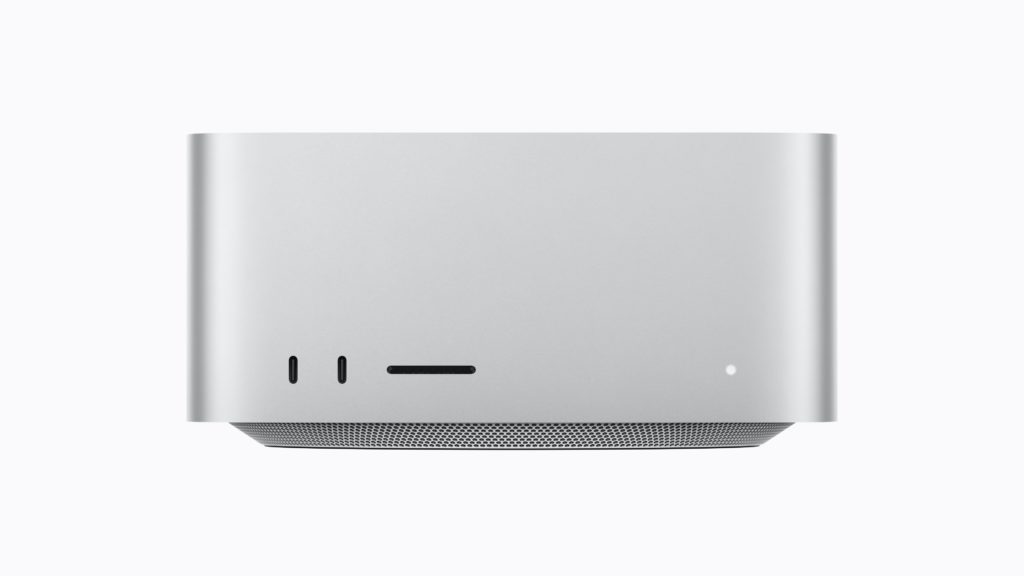
If I didn’t have to travel, I’d skip the allure of laptops. Desktop systems are more stable and cheaper across the board.
This year’s gap:
- Mac Studio, M5 Max (40-core GPU), 64GB, 2TB: $4,299
- MacBook Pro 14″, same chip, 64GB, 2TB: $5,099
- MacBook Pro 16″, same chip, 64GB, 2TB: $5,399
Same chip, same RAM, same storage. $800 to $1,100 buys you a screen, a battery and a keyboard. If you don’t travel for work, that’s a lot of money for a battery.
Between the Mac mini and the Mac Studio, the gap is smaller than it looks. A top M5 Pro Mac mini (18-core, 64GB, 1TB) is $3,199, and $3,299 once you add the $100 10Gb Ethernet the Studio already has. The Mac Studio with the M5 Max, 64GB and 1TB is $3,799. That’s $500, $100 more than in 2025, and for it you get a much better machine: twice the memory bandwidth, twice the GPU, twice the encoders, a 128GB ceiling, a fourth Thunderbolt 5 port, USB-A and an SD slot. I’d take the Studio.
Edge cases
- You cut, someone else grades: the M5 Pro Mac mini with 64GB and 1TB is $2,999. Under three grand, with Thunderbolt 5 and a 15-core CPU.
- You’re on an M3 Ultra or M4 Max: nothing in this lineup is a big raw step up except the M5 Ultra. Upgrade for the AI tools or don’t.
- You live in Topaz: look at an NVIDIA box too. Topaz leans on NVIDIA hard.
- Broadcast or virtual production: the M5 Pro Mac mini and the Mac Studio support genlock over Thunderbolt 5 [7][8].
What I’d buy, and why
Laptops

I’ve been a mobile user since Apple created PowerBooks. I even remember the MacPortable. Ugh. Trackballs.
I get the appeal of working from anywhere: the coffee shop, the beach, downstairs with the dog. If I find you on the beach with a MacBook Pro, I will kick sand in your face and take your computer. Portability is for the client’s office or the set. And note what Apple did last week: the plain 14″ MacBook Pro moved to the M6, and the M5 Pro and M5 Max models now come with an OLED touch screen option (more in the power build) [30][32].
Budget: MacBook Air 13″, M5 (10-core GPU), 32GB RAM, 1TB SSD @ $1,999

- You’re buying this because the power build is too expensive.
- Pick the 10-core GPU model. The 8-core GPU Air is locked at 16GB and 512GB.
- 32GB is the most this machine takes. Base storage is 512GB; don’t.
- No Pro chip, so Thunderbolt 4 and one video encoder [4]. Two ports, so 100% you’re buying a dock.
- For $400 more ($2,399), the new 14″ MacBook Pro with the M6, 32GB and 1TB adds a faster chip (about 1.2× the M5, going by the M6 Mac mini), the XDR screen, HDMI, an SD slot, a third port and up to 24 hours of battery [30]. Still Thunderbolt 4. Or $2,499 for the M5 Pro with Thunderbolt 5, the better chip, but only 24GB.
Power: MacBook Pro 14″/16″, M5 Max (40-core GPU), 64GB RAM, 2TB SSD @ $5,099/$5,399
- 14″ or 16″? The 14″ saves you $300, same as last year. The 16″ gets two more hours of battery by Apple’s numbers (22 hours of video playback vs. 20).
- You need the 40-core GPU to get 64GB at all; the 32-core Max comes only with 36GB.
- RAM: 64GB. 128GB is $1,600 more, and worth it for local AI.
- Storage: 2TB, and that’s not a choice anymore: the M5 Max MacBook Pro starts at 2TB.
- The screen is still fantastic, and if you’re using a second monitor, you’ll want the laptop screen open too.
- New last week: the same build with Apple’s new OLED touch screen (PROLED XDR) is $400 more, $5,499 or $5,799. Same chip, same three Thunderbolt 5 ports. The screen reaches 2,000 nits for SDR as well as HDR, covers Adobe RGB as well as P3, takes touch, and the machine is about half a pound lighter [32]. This build delivers in about 3 weeks, as of November 2.
Desktops
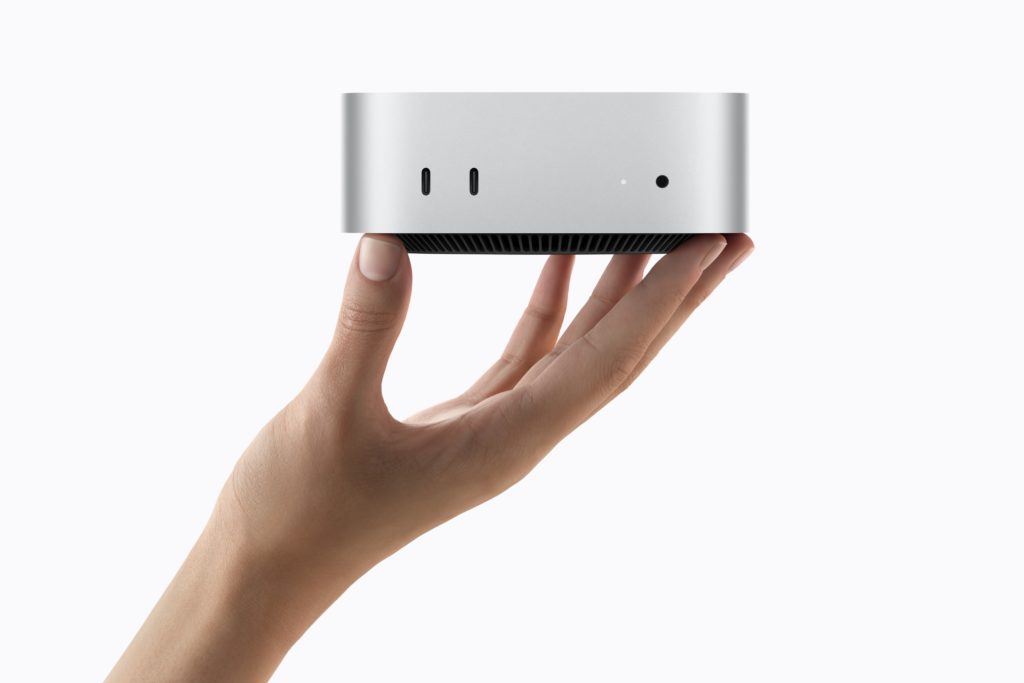
Budget: Mac mini, M5 Pro (15-core), 24GB RAM, 1TB SSD @ $1,999
NOT the M6. The extra cores make a significant difference in playback, and the M5 Pro has more Neural Accelerators to go with them. It’s about 1.3 to 1.4× the M6 across the board, it has Thunderbolt 5, and it’s still under $2,000, same as my budget desktop last year.
- RAM: 24GB is under my editing floor. That’s the trade at this price; 48GB takes it to $2,599.
- The alternate: if RAM matters more to you than speed, the M6 with 32GB and 1TB is $1,799. You save $200 and give up Thunderbolt 5 and about a quarter of the speed. Skip the 24GB M6 at $1,599.
- Add 10Gb Ethernet for $100 if you touch shared storage.
Power: Mac Studio, M5 Max (40-core GPU), 64GB RAM, 2TB SSD @ $4,299
This is a fantastic everyday machine, and it’s playing in last year’s Ultra league.
- There’s one M5 Max CPU. You pick the GPU, and you have to pick the 40-core GPU to get 64GB. The $2,499 starting Studio is the 32-core GPU with 36GB and 512GB, and I wouldn’t buy that one.
- 128GB is $1,600 more.
- This build delivers in 4 to 5 weeks; with 1TB, 1 to 2 weeks (as of November 2).
Supercharged: Mac Studio, M5 Ultra (30-core CPU, 64-core GPU), 96GB RAM, 2TB SSD @ $5,999
The Ultra is the supercharger, and the pricing is crazy. It’s not what I’d buy to replace my M1 Max. But it’s a big chip: up to 36 CPU cores, up to 80 GPU cores, up to 512GB of RAM, four ProRes engines and six Thunderbolt 5 ports.
Resolve is one place where the Ultra is the right choice, and now big local AI models are another.
- RAM: 96GB or 256GB (256GB is $4,000 more), and since October 28, 512GB. With 512GB, the 36-core CPU and 1TB, it’s $22,299 [33].
- CPU: the 36-core CPU with the 80-core GPU is $1,300 more. With 256GB and 2TB, it’s $11,299, and quoting 13 to 15 weeks to ship, as of November 2.
- Notes: this configuration delivers in 6 to 7 weeks, as of November 2.
The Mac Studio with the M5 Max, 128GB and 1TB is $5,399. The M5 Ultra with 96GB and 1TB is $5,499. For about the same money, the Max has more RAM than the base Ultra. If it’s for Resolve, the Ultra. If it’s for AI models, the 128GB Max may be the smarter $5,400.
For teams: put the AI on the network, not on the editing Macs
I’m running LM Studio, mildly, and I’d like to be running it on a much beefier system. But it’s hard to justify running huge local models alongside editorial.
A post house that wants big local models can put one or more machines on the network and let every edit bay use them. LM Studio and Ollama can both serve a model to other machines on the network [25]. Apple says four Mac Studios linked over Thunderbolt 5 can run a model up to 3× faster than one [7]. NVIDIA’s DGX Spark (128GB) is the other box people reach for; it’s $6,950 now, up from $3,999 at launch [26]. More on all of this later this month in a piece on local AI for video professionals.
Last thoughts and things that didn’t fit above
Refurbished: pros and cons
- Pro: Apple’s refurbished store has M5 MacBook Pros at about 15% off right now, for example the 16″ M5 Max (40-core GPU, 48GB, 2TB) at $4,249 instead of $4,999 [9].
- Pro: same one-year warranty as new, and you can add AppleCare [21].
- Con: you take the configurations that are there, and they’re rarely the 64GB, 2TB builds I’d want.
- Con: there’s no refurbished Mac Studio of any kind right now, and refurb prices went up in June too.
- Con: the refurbished M4 machines don’t have the Neural Accelerators, which are the main reason to buy this generation.
AppleCare One: Apple’s subscription ($19.99 a month for up to three devices) can cover a Mac you already own. Anything currently covered by AppleCare+ can come over; a device with no coverage has to be less than four years old and in good condition [21]. My 2021 M1 Max is on my plan, so look before you assume: System Settings > General > AppleCare & Warranty shows what’s covered.
Leasing: the short version, and the catch
Apple now leases Macs in the US. It’s called Apple Upgrade, it launched July 28, and the lease is with Klarna, not Apple [22].
- Pro: lower monthly cost. Apple’s example: a $1,999 14″ MacBook Pro is $38.99 a month over 36 months.
- Pro: an easy path to the next machine.
- Con: you never own it. At the end you upgrade, return it, or buy it out. Do nothing and it rolls month to month for up to six months, then Klarna charges you the rest of the full price.
- Con: no Mac mini, and no refurbished machines.
- Con: AppleCare isn’t included. Return it damaged without AppleCare and Klarna charges a damage fee.
- Con: Klarna won’t take some cards, including AMEX, Chase, Capital One and Citi.
- Con: you give up resale. Mac Studios in particular hold their value well, a point Scott makes in his review [11].
Leasing gets its own article. For now: if you’d keep a Mac four or five years anyway, buy it.
The Studio Display XDR

Apple’s new Studio Display XDR replaced the Pro Display XDR: 27″, 5K, 120Hz, mini-LED, 1000 nits SDR and 2000 nits peak HDR, $3,299 [9]. It’s a great display. It’s not what I would use.
Why no iMacs?
Apple moved the iMac to the M6 last week, so it finally has the Neural Accelerators [31]. It’s still Thunderbolt 4, the $1,499 model gets a cut-down M6 (10-core CPU and GPU) with two ports, and you’re paying for the screen, which isn’t HDR. Buy the Mac mini and get your screen of choice.
A eulogy for the Mac Pro
In 2025 I asked, Did you even know Apple upgraded the “Mac Pro”? Most post friends I mentioned it to didn’t. Apple discontinued it in March, and its pages now redirect to the Mac lineup [20].
It was the last Mac with PCIe slots. In 2025 the M2 Ultra Mac Pro I priced was $7,799, and I said I’d rather buy a Studio and a laptop. Apparently Apple agreed. If you need cards, a Thunderbolt 5 PCIe chassis on a Mac Studio is where that lives now.
Rest in peace, Mac Pro.
Extra expenses
AppleCare: If you’re on a mobile system, you 100% get this. If you’re buying a desktop, make sure your credit card gives you the equivalent insurance, and/or your business insurance has a rider for electronics. Generally, I don’t buy AppleCare for a desktop.
Dock: Yes, you need one, especially as a laptop user. It’s a necessity. Thunderbolt 5 docks run about $320 to $500 now, and the ones with 10Gb Ethernet sit at the top of that range [24]. My favorite is the OWC TB5 network dock. One plug, two 10GbE ports.
Did I miss anything? Probably. The internet isn’t shy. Don’t you be shy either.
Let me know in the comments if you have any questions. When reviews and benchmarks of the new MacBook Pros land, I’ll update this. It’s a living document.
Thanks for reading. Hope I’ve helped you spend your money!
Sources
- Apple Newsroom, “Apple unleashes M5,” 2025-10-15. https://www.apple.com/newsroom/2025/10/apple-unleashes-m5-the-next-big-leap-in-ai-performance-for-apple-silicon/
- Apple Newsroom, “Apple debuts M5 Pro and M5 Max,” 2026-03-03. https://www.apple.com/newsroom/2026/03/apple-debuts-m5-pro-and-m5-max-to-supercharge-the-most-demanding-pro-workflows/
- Apple Newsroom, “Apple introduces MacBook Pro with all-new M5 Pro and M5 Max,” 2026-03-03. https://www.apple.com/newsroom/2026/03/apple-introduces-macbook-pro-with-all-new-m5-pro-and-m5-max/
- Apple Newsroom, “Apple introduces the new MacBook Air with M5,” 2026-03-03. https://www.apple.com/newsroom/2026/03/apple-introduces-the-new-macbook-air-with-m5/
- Apple Newsroom, “Say hello to MacBook Neo,” 2026-03-04. https://www.apple.com/newsroom/2026/03/say-hello-to-macbook-neo/
- Apple Newsroom, “Apple introduces M6 and M5 Ultra,” 2026-08-25. https://www.apple.com/newsroom/2026/08/apple-introduces-m6-and-m5-ultra-for-a-big-leap-in-performance-and-ai-compute/
- Apple Newsroom, “Apple introduces new Mac Studio with M5 Max and M5 Ultra,” 2026-08-25. https://www.apple.com/newsroom/2026/08/apple-introduces-new-mac-studio-with-m5-max-and-m5-ultra/
- Apple Newsroom, “Apple unveils a more powerful Mac mini,” 2026-08-25. https://www.apple.com/newsroom/2026/08/apple-unveils-a-more-powerful-mac-mini-featuring-the-all-new-m6-and-m5-pro/
- apple.com tech specs and store pages (MacBook Pro, MacBook Air, MacBook Neo, Mac mini, Mac Studio, iMac, Studio Display XDR, refurbished), read 2026-10-16; prices re-read 2026-10-28. https://www.apple.com/mac/compare/
- Geekbench Browser, Geekbench 7 Mac CPU and Metal GPU results, read 2026-10-16. https://browser.geekbench.com/mac-benchmarks
- Scott Simmons, “Review: Mac Studio M5 Ultra for video editors, part 1,” ProVideo Coalition, 2026-09-21. https://www.provideocoalition.com/review-mac-studio-m5-ultra-for-video-editors-part-1/
- Puget Bench public results, Premiere Pro (PugetBench 2.0) and DaVinci Resolve (PugetBench 2.0 to 2.1), read 2026-10-16. https://www.pugetsystems.com/pugetbench/results/
- Apple Machine Learning Research, “Exploring LLMs with MLX and the Neural Accelerators in the M5 GPU,” 2025-11-19. https://machinelearning.apple.com/research/exploring-llms-mlx-m5
- Topaz Labs community, “Topaz Video 1.7.x user benchmarking results.” https://community.topazlabs.com/t/topaz-video-1-7-x-user-benchmarking-results/104402
- MacRumors, “Why Apple is skipping M6 Pro and M6 Max chips,” 2026-07-12. https://www.macrumors.com/2026/07/12/why-apple-is-skipping-m6-pro-m6-max-chips/
- MacRumors, Apple’s October 27 MacBook Pro event, 2026-10-08, https://www.macrumors.com/2026/10/08/apple-october-27-macbook-pro/ ; 9to5Mac, M6 Mac release schedule, 2026-09-30, https://9to5mac.com/2026/09/30/m6-mac-release-schedule-heres-when-new-macs-are-coming/
- 9to5Mac, Apple price increases, 2026-06-25. https://9to5mac.com/2026/06/25/apple-price-increases-mac-ipad-more/
- MacRumors, Tim Cook on Apple’s price increases, 2026-07-30. https://www.macrumors.com/2026/07/30/tim-cook-on-apple-price-increases/
- MacRumors, Apple’s higher RAM and storage costs in 2027 (DigiTimes), 2026-09-17. https://www.macrumors.com/2026/09/17/apple-higher-ram-storage-prices-2027-report/
- MacRumors, “Apple discontinues Mac Pro,” 2026-03-26. https://www.macrumors.com/2026/03/26/apple-discontinues-mac-pro/
- apple.com, AppleCare and Apple Certified Refurbished. https://www.apple.com/applecare/ ; https://www.apple.com/shop/refurbished/about
- apple.com, Apple Upgrade. https://www.apple.com/shop/apple-upgrade
- Eclectic Light, “Thunderbolt 5 SSDs are promising but fill their cache quicker,” 2025-01-30, https://eclecticlight.co/2025/01/30/thunderbolt-5-ssds-are-promising-but-fill-their-cache-quicker/ ; MacRumors, OWC Envoy Ultra review, 2025-07-31, https://www.macrumors.com/review/owc-envoy-ultra/
- OWC Thunderbolt 5 docks. https://eshop.macsales.com/shop/thunderbolt/thunderbolt-5-docks
- LM Studio, “Serve on Local Network,” https://lmstudio.ai/docs/developer/core/server/serve-on-network ; Ollama FAQ, https://docs.ollama.com/faq
- The Register, DGX Spark price change, 2026-10-02, https://www.theregister.com/a/5300622 ; NVIDIA developer forum, price change, https://forums.developer.nvidia.com/t/2-23-2026-price-change-announcement/361713
- apple.com configurator pages, March 2025, as archived by the Wayback Machine (for example the 16″ MacBook Pro M4 Max, https://web.archive.org/web/20250302065617/https://www.apple.com/shop/buy-mac/macbook-pro/16-inch-space-black-standard-display-apple-m4-max-with-16-core-cpu-and-40-core-gpu-48gb-memory-1tb , and the Mac mini M4 Pro, https://web.archive.org/web/20250309080318/https://www.apple.com/shop/buy-mac/mac-mini/apple-m4-pro-chip-with-12-core-cpu-16-core-gpu-24gb-memory-512gb ), compared with apple.com on 2026-10-16.
- TrendForce DRAM spot prices: DDR5 16Gb $4.95 on 2025-03-19 (https://www.trendforce.com/news/2025/03/19/insights-memory-spot-price-update-ddr4-ddr3-prices-rise-amid-strong-ddr5-rebound-led-by-sk-hynix/ ) vs. $60.60 on 2026-10-16 (https://www.trendforce.com/price/dram/dram_spot ).
- MacRumors Buyer’s Guide, Mac, read 2026-10-16. https://buyersguide.macrumors.com/#mac
- Apple Newsroom, “Apple introduces the new 14-inch MacBook Pro with M6,” 2026-10-27. https://www.apple.com/newsroom/2026/10/apple-introduces-the-new-14-inch-macbook-pro-with-m6/
- Apple Newsroom, “Apple unveils new iMac with M6,” 2026-10-27. https://www.apple.com/newsroom/2026/10/apple-unveils-new-imac-with-m6/
- Apple Newsroom, “Apple unveils groundbreaking MacBook Pro with PROLED XDR Display and Touch for the first time on Mac,” 2026-10-28. https://www.apple.com/newsroom/2026/10/apple-unveils-groundbreaking-macbook-pro-with-proled-xdr-display/
- MacRumors, Mac Studio with M5 Ultra now available with 512GB of RAM, 2026-10-28. https://www.macrumors.com/2026/10/28/mac-studio-m5-ultra-512gb-ram/