


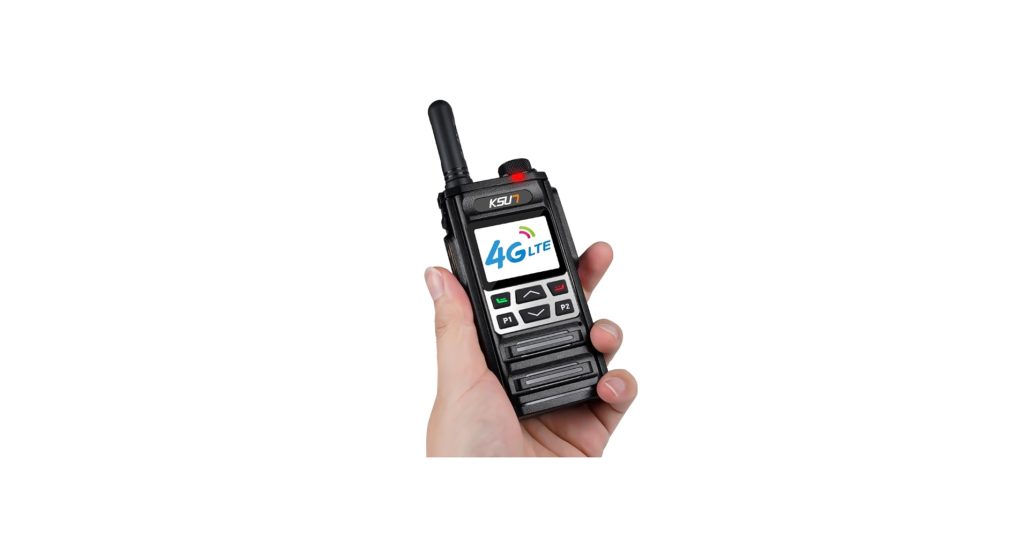
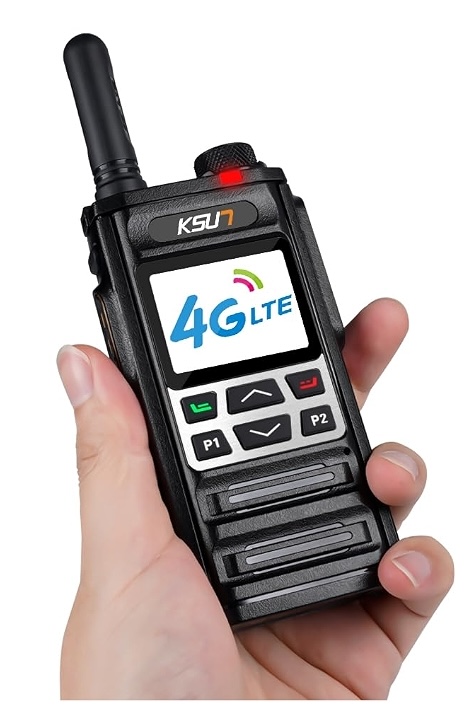
Despite the ubiquity of mobile phones for the past decades—which are nearly always duplex (allowing simultaneous transmission of two messages in opposite directions over one channel)—there are situations where a simplex PTT (push-to-talk) device is still desired. Simplex means that it only allows communication in one direction at a time. This is my review of the KSUN ZL35 which costs under US$46 each. This is my first personal experience with the relatively new category of handheld tranceiver devices called many different ways, including network walkie talkies, network radios or trunking radios. Unlike the prior walkie talkies I had known about before, which use bands/frequencies like CB-FRS-GMRS-MURS-UHF-VHF, network devices like the KSUN ZL35 can use wifi (2.4 GHz), 4G using a physical SIM for cellular data only, or both. It includes two accessories which are optional to use: a belt clip and a lanyard. There is both a 3.5 mm TRRS jack for a wired headset, and a bluetooth transceiver for a wireless headset, of which I tested neither with the ZL35. Ahead, I’ll explain the rather tedious initial setup and the wonderful performance thereafter, and why you might consider using them on video shoots.

Basic nostalgic simplex radio etiquette & vocabulary
First, I’ll review the basic nostalgic simplex radio etiquette & vocabulary before clarifying which are still essential with a network walkie talkie like the KSUN ZL35.
- The Key Up: Pressing down the PTT button (without releasing until after you finish speaking). Always wait 1-2 seconds after keying up before speaking, allowing receiving radios to un-mute and catch your first word.
- Over: Said at the end of a transmission to signal you are done talking and are waiting for a reply.
- Out: Said at the very end of a conversation to signal the channel is now available.
- «Over and Out»: A common media trope, but functionally incorrect to say together in radio communication. We are supposed to use one or the other.
- Copy: Used to confirm you heard the other person (e.g., «I copy that.»).
The first one is essential with the KSUN ZL35. Fortunately, you don’t have to count the seconds, since the ZL35 outputs a chirp tone to let you know when it’s okay to begin speaking. That tone is technically called a PTT Sidetone or Talk-Permit Tone (TPT). That is very different from the other sidetone I have covered in many other articles since that one refers to hearing yourself latency free while speaking, through a headset, headphones or earbuds. The other terms covered above can be considered optional, depending upon the situation.
The data connection: wifi and/or 4G cellular data
In my testing, I only used wifi, which worked perfectly. It only uses 2.4 GHz. My client only needs to use it (so far) with wifi. However, I did research the best deal for compatible data only in the United States, which apparently is this US$100 per year SIM card, including all of the data required. It actually uses multiple networks in the United States for maximum coverage.
The network used by the KSUN ZL35: Zello
Even though the KSUN ZL35 is an Android device, as it comes from the factory, it is limited to using only its settings and a pre-installed app (no app store) which is used with the associated network—both called Zello—which can be free or paid. In my testing, I only used the free version. The paid version is called Zello Work.
In addition to being pre-installed on certain network walkie talkies, the Zello app is also available for Android, iOS, iPad, macOS and Windows. Previously, the Zello app was available for Blackberry and Windows Phone. For the purpose of this review, I used it mainly on the KSUN ZL35 and very briefly on Android, specifically on the Fairphone 6 running /e/OS version 4.0 as described in the Setup section ahead. When using Zello on Android, iOS and iPad OS, it is also for simplex PTT (push-to-talk). On certain smartphones, the Zello app allows you to map dedicated hardware buttons, compatible bluetooth or wired headsets, and specific device keys (like the iOS Action Button) for push-to-talk.
If you want to compare the Zello app with the audio messaging in other apps like Signal, Telegram or WhatsApp, Zello differs in that:
- Zello is designed to emulate a traditional walkie talkie, in the sense that your audible message is played instantly to another party who has already accepted you, or in a Zello Channel (group) already accepted and then that message disappears. On the other hand, with the other mentioned apps (Signal, Telegram, WhatsApp), the audio message is not instantly played and stays on the recipient’s app until played and (if the sender has not activated a special disappearing message option) remains available to be played as many times as desired, until manual erasure.
One area where Zello differs with a traditional walkie talkie is:
- When using a traditional walkie talkie and the recipient is out of range or off, the audio message is completely lost.
- When using Zello with Direct (1:1) messages (not Channels, aka groups), when the recipient is out of range or off, the audio message is cached and later played instantly as soon as the recipient reconnects, as if it were live.
Zello made the news in June 2013 when Turkish protesters used it to circumvent government censors. As a result, Zello was the top most downloaded application in Turkey during the first week of June 2013.
In February 2014, Zello was blocked by CANTV, a major mobile telephone and data provider in Venezuela. Zello released workarounds and patches to overcome the blocks to support approximately 600,000 Venezuelans who had downloaded the application to communicate with each other amidst protests. Zello has been one of the most downloaded applications in Ukraine and Venezuela. Perhaps Zello was preferred by the other apps in those situations since—by default—the transmissions disappear, while with the others, it is required to access a special disappearing message option, which is subject to human error.
In July 2017, in Latvia, Zello was the main application used by thousands of volunteers and rescuers for communication purposes while looking for Ivan Berladin who went missing.
In August 2017 during relief efforts following Hurricane Harvey in Texas, Zello became a popular method for communications between volunteer rescuers (particularly members of the Cajun Navy) and people stranded by the widespread flooding. The app received over 6 million signups in one week as Florida residents responded to hurricane warnings for Hurricane Irma.
In September 2018, while Hurricane Florence caused unprecedented flooding in the US states of North and South Carolina, rescuers used Zello to request information about the locations of people needing help and on street conditions.
Setup of the KSUN ZL35
The bootup is slow. The navigation is also slow. Be prepared mentally for that. The typing of user names and passwords is quite a torture. I asked the manufacturer in advance, who responded that it won’t work with any USB keyboard or bluetooth keyboard, even though the device does have bluetooth for audio, which I did not test personally.
- Screw on the included antenna onto each KSUN ZL35 unit.
- Optionally, mount the belt clip to the included battery, before mounting the battery onto the KSUN ZL35.
- Mount the battery on the ZL35 and charge it until the LED goes to green. The USB-C charging port on the KSUN ZL35’s battery using the included charger. In my own experience and as stated by others online, the KSUN ZL35 won’t charge using any USB charger that goes over 5 volts. It must be another 5-volt only charger with USB-A at the charger end.
- After the battery is charged, connect to wifi and then manually set the timezone. (I found no menu setting to update the Android operating system.)
- You need a unique Zello account for each KSUN ZL35 unit with a unique user name and unique email address for each one. Save yourself a lot of headache by initially creating these Zello account on a smartphone. Even though those Zello accounts can be created from the KSUN ZL35, it will be must faster to create them on a smartphone and (even if you do/did create the Zello accounts from the KSUN ZL35, you’ll be forced to have them on your smartphone temporarily to be able to accomplish the upcoming step 7, ahead.
- Receive a verification email on your computer or smartphone from Zello to confirm the unique email and user name you used in step 5. This is required before continuing.
- After completing all above steps while using each Zello account on your smartphone or tablet, invite each user to communicate with the other. Then you must accept the invitation on the opposite account. Repeat if there are more than two accounts. I found this step to be impossible to accomplish on the KSUN ZL35 and wished I had done step 5 on the smartphone, since it would have been much easier.
- Sign off of all of the accounts on the smartphones that you want on the KSUN ZL35 units, since Zello accounts cannot be signed in on more than one device at at time.
- Log into those accounts on the KSUN ZL35 units. Since you already accepted the relationships in step 7, they willl already have them active when you log in on the KSUN ZL35 .
- If only planning to use a single pair of Zello users or a single Zello Channel (group) where everyone hears everyone else, assign the upper PTT button to default to that one, to avoid any require navigation at all on the KSUN ZL35 after initial setup.
- Set the Zello app to run automatically by default upon bootup.
Zello privacy situation
Zello audio transmissions are securely encrypted, but whether they are strictly end-to-end encrypted (E2EE) depends on your specific app version and communication type:
- Zello Friends & Family (Personal): Direct 1:1 voice messages are end-to-end encrypted. However, public channel messages are not encrypted.
- Zello Work (Enterprise): Direct 1:1 communications are end-to-end encrypted by default. However, if your network admin enables the Message Vault feature, 1:1 messages are encrypted from sender-to-server and server-to-recipient, but not E2EE. Channel communications across the network are fully secured.
Zello relies on strong cryptographic algorithms for its security, using 256-bit AES encryption for audio and call alerts, and 1024-bit RSA for digital signatures and secure media session keys.
Conclusions
Despite the tedious initial setup, the KSUN ZL35 network walkie talkie has a rugged design and high quality audio for communication. At under US$46 each (including removable 3000mAh battery, charger, belt clip and lanyard), the KSUN ZL35 is very reasonable. After initial setup as described, you just have to charge it daily. You might consider using them on video shoots since it can allow you communication among the crew, while having your mobile phone completely off.
Lee este artículo en buen castellano
Reseña: walkie-talkie de red ZL35 de KSUN con wifi/4G, con Zello
(Re-)Subscribe for upcoming articles, reviews, radio shows, books and seminars/webinars
Stand by for upcoming articles, reviews, books and courses by subscribing to my bulletins.
In English:
- Email bulletins, bulletins.AllanTepper.com
- In Telegram, t.me/TecnoTurBulletins
- Twitter (bilingual), AllanLTepper
En castellano:
- Boletines por correo electrónico, boletines.AllanTepper.com
- En Telegram, t.me/boletinesdeAllan
- Twitter (bilingüe), AllanLTepper
Most of my current books are at books.AllanTepper.com, and also visit AllanTepper.com and radio.AllanTepper.com.
FTC disclosure
None of the listed individuals or companies mentioned above has paid for this article. Some of the manufacturers listed above have contracted Tépper and/or TecnoTur LLC to carry out consulting and/or translations/localizations/transcreations. So far, none of the manufacturers listed above is/are sponsors of the TecnoTur, BeyondPodcasting, CapicúaFM or TuSaludSecreta programs, although they are welcome to do so, and some are, may be (or may have been) sponsors of ProVideo Coalition magazine. Some links to third parties listed in this article and/or on this web page may indirectly benefit TecnoTur LLC via affiliate programs. Allan Tépper’s opinions are his own. Allan Tépper is not liable for misuse or misunderstanding of information he shares.