


Fall is marked by sparks of delight. The season offers an abundance of bold colors, blinking lights, and custom displays alongside a feast of creativity and originality with planned outfits and custom hats.
Wait… is this Adobe MAX or Halloween?
If you prompted Adobe Firefly’s Image Generator for an iconic straight-out-of-a-movie Halloween night, it might have reproduced the evening seen on October 31st in Boston. Eerie clouds, wind-swirled leaves, and a tiny chill in the air punctuated the night alongside the expected shrieks of sugar-fueled children. For those of us on the East Coast, this is what we signed up for.
For those of us at Adobe MAX, the conference invites us to jump into our creative endeavors amid the scariest possibilities. We may find the treats. We may find joy in the things that scare us. This is what we signed up for.
The current creative world is a uniquely difficult haunted mansion:
A haunted house but make it media offline.
A haunted house but make it AI taking over jobs.
A haunted house but make it in 8K video editing on a 2018 MacBook Air.
A haunted house but someone is not following 3-2-1 storage.
A haunted house but “I only have one small edit.”
A haunted house but “can you make it go viral?”
A haunted house but make it a system error mid-edit.
A haunted house but you didn’t get to take home a kitten from Adobe MAX.
And last, but not least: A haunted house but you never went after your creative goals and ideas.
No haunted house would be complete without a jump scare, or two, or three…but in the new Adobe Premiere (not Premiere Pro… more on that soon…not a trick!), it might be called “Surprise Me!” The new Film Impact integration in Premiere brings in a bit of whimsy from a retired Netflix button when you’re looking for a random effect.
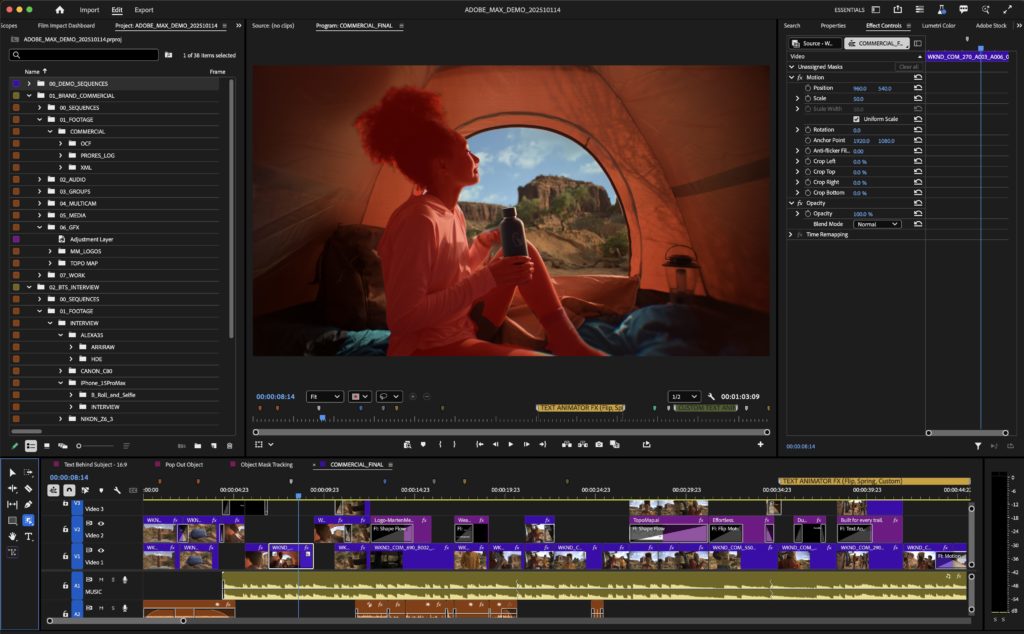

Haunted house but having to round-trip to After Effects or use other video editing software when you want to rotoscope: If having to rotoscope in After Effects is causing the life to drain out of you vampire style or turning you into an editing zombie, you might be ready for “a new era for masking, in Premiere” as defined by Jason Druss, Senior Product Marketing Manager, Video. Object Masking in Premiere Pro (Beta) brings the rather sleek ability to select an object directly in Premiere, track the object bidirectionally, and apply edits directly to that object without ducking into After Effects to rotoscope. “It’s no longer a chore,” Druss continued. “It’s your creative superpower. It’s not for the wizards or the patient or the very advanced anymore. It’s for everyone, as it should be.”
Haunted house but getting the name wrong: “We announced a name change to Premiere.” The words were a jump scare for me. Did I get the name wrong? Did I call it in Premiere or Premiere Pro in my posted news just two days ago (I checked: Premiere). Out of the corner of my eye, I noticed that Premiere Pro (Beta) still includes the original “Pro” indicator on the top left corner of the computer screen of our demo. And afterward, I noticed that Adobe’s help article about Object Masking refers to Premiere Pro (Beta) and not Premiere. But in the Creative Park, the sign above where Druss and I conversed mirrored the change: Adobe Premiere. This shift follows Premiere’s expansion into a “family of apps on multiple surfaces” and the ability “to tie everything together” with the new Premiere for mobile alongside the desktop application. And, colloquially, everyone has been referring to Premiere Pro as simply Premiere for years. “It is and has been and always will be a professional application,” Druss reassures me.
After our converation, I checked the Creative Cloud website, which calls the video editing platform simply Premiere, with a little nugget of confirmation at the bottom of the FAQs that mirrored what Druss shared with me:



Jumping into the shortest line all week for a custom Coca-Cola can? Real magic…or is it AI magic? It’s a new recipe, states an advertisement on the wall of the booth.
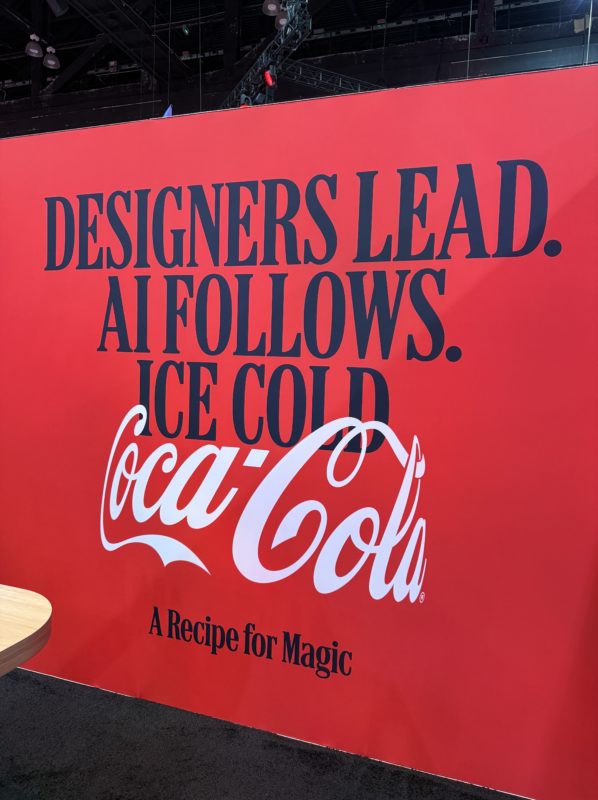

An AI-led world could bring both tricks and treats. A series of prompts, an abundance of language models, Firefly-specific features (including the virtual try-on feature in Firefly boards, which brings to life Cher’s virtual closet try-on feature in Clueless), sketch to image, and text-based editing and transcription in Firefly’s Video Editor feel like treats. And initially, the sign-up period could seem like a trick, but alas: During my floor demo of the Firefly video editor, I received an email that I was off the waitlist.
I realized that Adobe MAX was one of the only places where I could ask any question. There was not one too big nor too small, nor too beginner, nor too advanced.
And so with an abundance of simultaneous hesitancy and possibility, I trekked to a late afternoon session on Data Storytelling with my own creative goal held tightly in my hands.
“How can we give data a voice?” pondered Valentina D’Efilippo, an Adobe MAX veteran, designer, and data visualization storyteller, as she shared excerpts from her work designed to create an experience during “Learning To Speak Data.” I am a novice, not nearly fluent, in the world of data. But I’ve decided to put my new creative goal into the wild: I am interested in data sonification; the art of translating data into music and songs. I hit the session and the show floor, newly armed with the belief that I could make this happen with Adobe tools. It didn’t matter that I was brand new to this world. It didn’t matter that it was a new direction. It just mattered that it was mine. And isn’t that what MAX is all about?
This is what we signed up for: To consider what we’re scared of and how the tools of the realm can help us evaluate the frights inside the creative haunted house.
I came to fight the MAX-third-day-scaries with my own costume denim jacket and bougie latte, taking in the LA vibes and soft air. And like every year, I leave changed and ready to launch, not unlike those fall leaves in Boston.
The MAX has ended. Let us go in peace. Or, at least know that we did our best to spark our creative dreams and head into a season marked by an abundance of change.
