


In-house video teams tend to feel pressure throughout their day. The work increases, the requests stack up, and brand rules become more precise. At the same time, expectations around polish never stop. Each deliverable still needs to look intentional and finished.
Most content creation teams are not struggling because they lack ability, but because the systems supporting their work were never designed for this fast pace or extreme volume. Editors often spend their days managing files, tracking down small inconsistencies, and correcting issues that should never have made it that far, instead of focusing on the story in front of them.
The BBC encountered this same reality at scale. Hundreds of branded assets, including bumpers, trailers, endboards, and promos, were being produced each week by dozens of editors across various regions. A critical requirement was that every single piece had to be visually identical, regardless of the creator or its source. Over time, the traditional After Effects to Premiere workflow could no longer support this stressful demand.
At a recent Adobe MAX conference, Chris Converse walked through the thinking behind the system that replaced it. Drawing on his work with the BBC, he shared the story of how the Motion Graphics template pipeline came together, including the real constraints the team ran into and the practical choices they had to make along the way. You can check out the presentation on Adobe.com.

When Speed Starts Breaking the Brand
In-house teams are often caught between two unsatisfying options. Move quickly and accept inconsistency, or slow production down to protect the brand.
At the BBC, even small deviations had a way of standing out and lingering longer than anyone intended—a color slightly off, a type treatment pushed too far, or an animation that felt just different enough to be noticeable. When those variations repeat hundreds of times, they accumulate into something much larger than a series of small mistakes.
The earlier workflow will sound familiar to many editors. Full After Effects projects were pulled directly into Premiere. To create a single variation, an editor duplicated a complex file, searched through layers they did not build, adjusted text, swapped footage, and rendered. The same process repeated for each region, format, and delivery window.
From an editor’s perspective, the work required constant attention. Every change meant reopening dense compositions, double-checking brand details they were never meant to redesign, and waiting on renders that slowed momentum. Over time, editing started to feel less like shaping a story and more like staying one step ahead of mistakes.
Why Flexibility Becomes a Liability
Most templates promise freedom, and at first that freedom genuinely feels helpful, because everything appears adjustable and open to interpretation, from colors and fonts to animation and timing, especially on days when the pace is slower and there seems to be room to make thoughtful choices.
Inside an in-house environment, however, flexibility often turns into friction. Editors begin making small brand decisions they were never intended to make. A color shifts to suit a shot. A type treatment stretches to fit longer copy. An animation is modified slightly to keep things moving. None of these choices are acts of redesign, but over time they introduce drift.
The BBC recognized this pattern early. Templates were not meant to invite interpretation during production. They were meant to protect consistency.
Before anything was built, designers and brand managers aligned on what could change and what could not. Logos remained fixed. Typography followed defined rules. Color lived inside approved themes. Animations behaved the same way every time.
Editors were no longer asked to interpret the brand. They were given clear boundaries that allowed them to execute it confidently.
Treating Motion Templates as a System
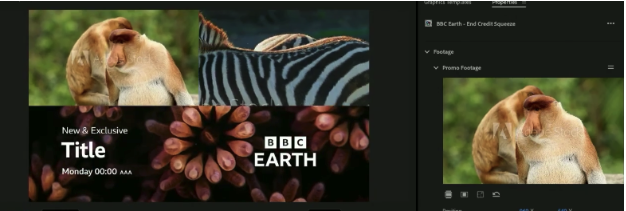
The shift went beyond tools and settings and into how the work itself was understood. A Motion Graphic template created in After Effects was no longer treated as just another file, but as a shared structure that quietly held the brand together across teams and regions. Inside After Effects, designers built that structure using the Essential Graphics panel, expressions, and rigging. Only a small set of controls were exposed, such as text fields, media replacement, and approved dropdowns. Everything else remained locked.
Once the template was used inside Premiere, editors no longer needed to open timelines or navigate compositions because all of their interaction lived in the Properties panel, where text could be updated, media replaced, and approved options selected from predefined menus without breaking the underlying structure.
Everything else stayed intact. That single decision removed a significant amount of risk from the workflow.
Designing for How Editors Actually Work
One of the most important insights behind this system is also one of the simplest. Editors are not motion designers. They should not need to understand expressions, parenting, or layout logic to produce consistent work. The Motion Graphics template was responsible for absorbing that complexity.
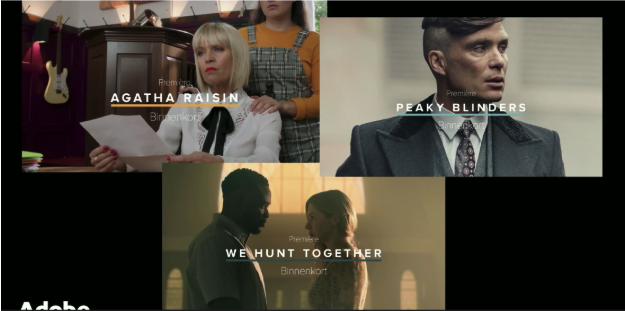
Text that needed resizing did so automatically. Underlines adjusted to headline length. Subheads repositioned themselves when titles wrapped. These behaviors were scripted once and reused everywhere. Editors no longer had to think about design integrity. The system handled it quietly in the background.
Rig Once, Let the System Do the Rest
There was a level of complexity in the system that is commonly used with advanced motion designers. Efficiency gains did not come from shortcuts but from rigging. Single dropdowns controlled entire groups of elements such as logo variations, regional branding, background treatments, and animation styles. Null objects worked behind the scenes, coordinating the work, helping layers stay aligned and behave the way everyone expected without editors needing to think about it.
When a design change was required, it happened once. The update flowed everywhere without retraining editors or rebuilding assets. The system took on the heavy lifting, which meant the people using it could finally focus on the work instead of holding everything together themselves.
From Waiting on Renders to Editing in Real Time
The impact of using Motion Graphics templates for brand consistency was immediate. Load times improved by several hundred percent. Editors stopped duplicating After Effects projects just to create variations. Rendering returned to its proper role as the final step, rather than the bottleneck.
Just as important, the emotional strain eased for editors. They no longer felt like they had to brace for something to go wrong at every step. They could trust the system to hold the brand together and put their attention back on timing and delivery.
At scale, the minutes the editors and designers saved on each asset added up to reclaimed days.
Why This Matters for In-House Teams Everywhere
These challenges are not unique to broadcast. Any in-house team producing repeated formats faces similar pressures. Product launches, regional campaigns, and social media variations all need the same sort of attention. When speed is required and consistency is non-negotiable, Motion Graphics templates stop being optional and start functioning as infrastructure.
See the System in Action
To see how this system was built, including the technical constraints and design tradeoffs, the full presentation by Chris Converse provides valuable context. Chris walks through how the BBC approached Motion Graphic templates as a production pipeline rather than a collection of assets. The presentation shows how templates were structured, how brand controls were enforced, and how performance challenges were addressed without compromising quality.