

Welcome to Tool Tip Tuesday for Adobe Premiere Pro on ProVideo Coalition


I’m talking about the V or A track lights on the RIGHT side of your timeline (not to be confused with the Source patch targets on the LEFT).

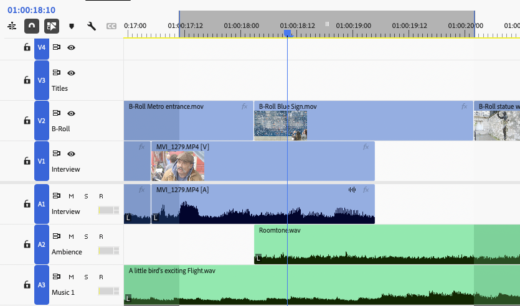
Track targets determine.
- Where the playhead stops when navigating with up/down arrows; the playhead only stops on edits within targeted tracks.
- Lift/Extraction with an In/Out point. Only the targeted tracks get affected.
- Match Frame. Premiere uses your lowest active video track.
- Q and W keys (ripple to next/previous edit) respect track targeting.
You can turn them all off/on with a Shift-click or use Command/Ctrl+9 and 0 and then turn on the tracks you want.
What if you’re working on a timeline and you only want V3 active, or you need to quickly turn off A2?
Toggle Timeline tracks allow you to use a single key to turn on/off a specific track.
Map them to your keyboard.
Open up your Keyboard Shortcuts (Command/Ctrl+Option/Alt+K) and search for “Toggle Video Target” or “Toggle Audio Target.”

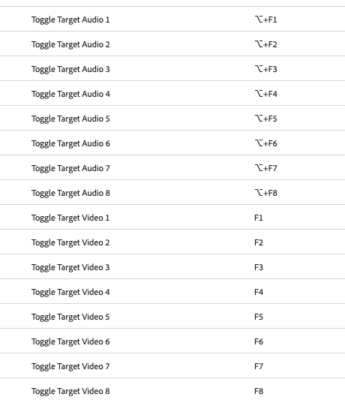
You’ll find Toggle Video Target 1, Toggle Video Target 2, all the way through Toggle Video Target 8. Same thing for audio tracks. They’re completely unmapped by default.
My mapping system
I map Toggle Video targets to F1 through F8. Then I map Toggle Audio Targets to Shift F1 through Shift F8.


Now I can toggle V3 and V2 on and off with a single keystroke.
Some examples of how I use this
I’m doing audio cleanup, and I’ve got dialogue on A1-A4, music on A5-A8. I need to check something on just A3? Hit CMD-0 and CMD-9 (turn off all video/audio tracks), then Shift+F3, and A3 is the only track lit up. My up/down navigation now stops only on A3 edits.
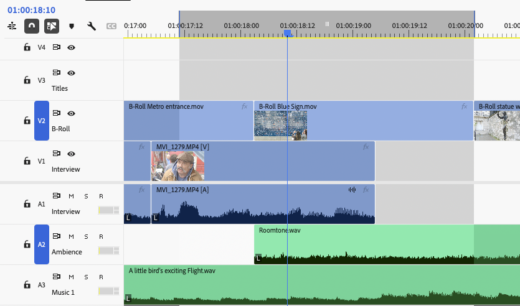
Match Frame always looks at the lowest active video track. So if you’ve got a graphic on V8 but you want to match frame to the B-roll underneath on V3, CMD-0 (turn off all video tracks), then hit F3 to turn on V3. Then F for Match Frame.
Last thoughts
99% of the time, I’m toggling one of the first 8 video or audio tracks anyway, because that’s where my story is.
Whenever I hear people claim that Premiere is mostly mouse-driven (I’m looking at you /r/editors), I show them a function like this.
This series is courtesy of Adobe.