


Despite being born, raised and continuing to live in the United States, for many decades, I have been an avid user and promoter of Spanish keyboards, be they internal keyboards inside laptops (including Apple MacBooks, Chromebooks and ThinkPads) or external devices. I have even convinced at least one English-only speaking attorney in the United States that he would be much better off with a Spanish keyboard than with a standard US keyboard, for all of its advantages without a single disadvantage. He is eternally grateful for the suggestion. Sadly, both manufacturers and end-users are often guilty of generalizing them as being all the same «Spanish» keyboards, when in reality there are three different layouts sold and used in 2025, each with different advantages and disadvantages. These are the Spanish ISO, the Spanish ANSI and the Latin American keyboard layouts. A good friend was even deceived by Lenovo, since Lenovo sold him a new ThinkPad laptop advertised on the Lenovo US website as having a «Spanish» keyboard which turned out to be a Latin American one, which is absolutely not the one he wanted. Ahead, I’ll detail the different pros and cons of each.
First, the differences between ISO and ANSI keyboard layouts
ANSI (American National Standards Institute) and ISO (International Organization for Standardization) are two different keyboard layout standards, as designed generally, before actual symbols are assigned to keys per the country or region. The main differences are in the Return key shape and size, the left Shift key size, which indirectly affect the total number of available keys. ANSI, commonly used with the US keyboard and a small number of others, has a rectangular Return key and a larger left Shift. ISO, popular in Europe, features an L-shaped Enter key and a smaller left Shift, with the backslash key typically located to the left of the Enter key.
ANSI keyboards usually have 104 keys (excluding additional ones), while ISO layouts typically have 105 (excluding additional ones).
I personally prefer Spanish ISO over Spanish ANSI, since the Spanish ISO one offers direct access to one additional key, which allows direct access to two characters I tend to type fairly often, but not everyone does. That’s why (only for Tony and others like him) I would recommend the Spanish ANSI version, at least when choosing and purchasing an external keyboard. (More details ahead about skins.) For anyone else, I prefer and recommend the Spanish ISO layout.
Examples of Spanish ISO keyboards


Above, backlit external Spanish ISO keyboard with USB for Mac, currently under US$25.


Above, backlit external Spanish ISO keyboard with USB for Windows. Chromebook or Linux, currently under US$21.


Above, the backlit internal Spanish ISO keyboard in MacBook Pro M4. If you customize one on Apple.com in the US, be sure to choose Spanish, not Latin American (for reasons covered ahead). It will indeed be Spanish ISO, even though Apple stopped specifying that detail a few years ago in its sales pages.


Above, the backlit internal Spanish ISO internal keyboard in my most recent ThinkPad X1 Carbon from Lenovo. (I purchased a brand-new Spanish ISO internal keyboard for this model on eBay and installed it inside.)
Examples of Spanish ANSI keyboards
I only recommend Spanish ANSI keyboards for Tony Palomo and potentially others who are ultra-sensitive to the size of those two keys.


Above, Spanish ANSI keyboard with numeric pad, currently under US$23.
Spanish ANSI skin for US laptop keyboard
Ever since Apple switched to its unibody design several years ago, it is no longer cost-effective to transplant a Spanish ISO keyboard into a MacBook. since it would require replacing the entire top case. Enter the Spanish ANSI skins for US laptop keyboards to save the day! Even though they are Spanish ANSI instead of Spanish ISO (due to the physical limitations of the US keyboard, which is ANSI), it is still light-years better than the Latin American layout, as explained ahead.


Above, Spanish ANSI skin for newer MacBooks with US keyboards, currently under US$16. Check compatibility with your exact MacBook model.
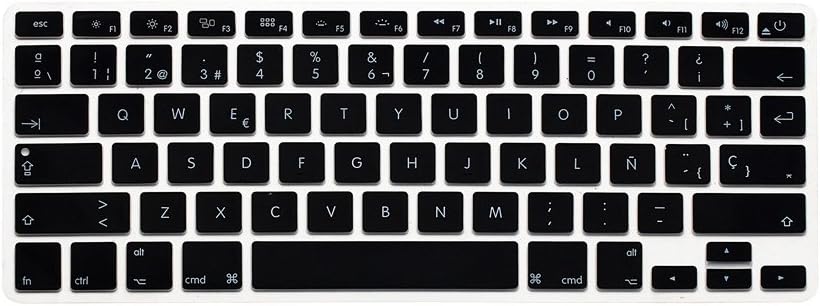
Above, Spanish ANSI skin for older MacBooks with US keyboards, currently under US$7. Check compatibility with your exact MacBook model.
Latin American keyboard layout and its multiple disadvantages
I am not a Spaniard nor a Latin American. I am a bilingual (nearly trilingual) and a certified translator from the United States who has formed this opinion based upon irrefutable practical reasons. The Latin American keyboard is factually inferior for the following reasons:
- Unlike the superior Spanish ISO or even the Spanish ANSI layout, the Latin American keyboard promotes tunnel carpal syndrome or a similar discomfort by locating the accent mark used in Castilian in the upper row, causing stress on the pinky, since it must ascend much too often. Fortunately, both Spanish layouts have it ergonomically located in the center row, just to the right of the Ñ key.
- Unlike the Spanish ISO keyboard (which offers both the feminine and masculine superscript symbols for ordinal numbers, like 1ª, 2ª, 3ª, 1º, 2º, 3º and the abbreviation of the name María in compound names, including Mª Camila, Mª Milagros and Mª Teresa (who are three people I know), the Latin American keyboard is machista since it lacks the feminine version.
- Unlike both Spanish keyboard layouts, which logically locate the @ symbol on the number 2 key (just as the US keyboard does), the Latin American keyboard layout places it on the Q key, which is a torture for people who must frequently alternate with US keyboards.
- Unlike the two Spanish keyboard layouts which offer both the € (euro symbol) and the $ (a symbol used for both dollars and pesos), the Latin American keyboard lacks the € symbol, making it weak for international communication.
- Unlike both Spanish keyboard layouts, the Latin American keyboard layout sadly lacks the Ç/ç for use in Albanian, Azerbaijani, Kazakh, Kurdish, Manx, Tatar, Turkish, Turkmen and Romance alphabets for Catalán, French, Occitan and Portuguese, the Latin American keyboard sadly lacks both of those.


Above, example of Latin American keyboard layout.
Intentionally, there are no Latin American keyboards listed in my TuTeclado.com website.
Lee este artículo en buen castellano
Teclado español: ¿cuál de las tres distribuciones?
(Re-)Subscribe for upcoming articles, reviews, radio shows, books and seminars/webinars
Stand by for upcoming articles, reviews, books and courses by subscribing to my bulletins.
In English:
- Email bulletins, bulletins.AllanTepper.com
- In Telegram, t.me/TecnoTurBulletins
- Twitter (bilingual), AllanLTepper
En castellano:
- Boletines por correo electrónico, boletines.AllanTepper.com
- En Telegram, t.me/boletinesdeAllan
- Twitter (bilingüe), AllanLTepper
Most of my current books are at books.AllanTepper.com, and also visit AllanTepper.com and radio.AllanTepper.com.
FTC disclosure
None of the manufacturers listed has paid for this article. Some of the manufacturers listed above have contracted Tépper and/or TecnoTur.LLC to carry out consulting and/or translations/localizations/transcreations. So far, none of the manufacturers listed above is/are sponsors of the TecnoTur, BeyondPodcasting, CapicúaFM or TuSaludSecreta programs, although they are welcome to do so, and some are, may be (or may have been) sponsors of ProVideo Coalition magazine. Some links to third parties listed in this article and/or on this web page may indirectly benefit TecnoTur.LLC via affiliate programs. Allan Tépper’s opinions are his own. Allan Tépper is not liable for misuse or misunderstanding of information he shares.