


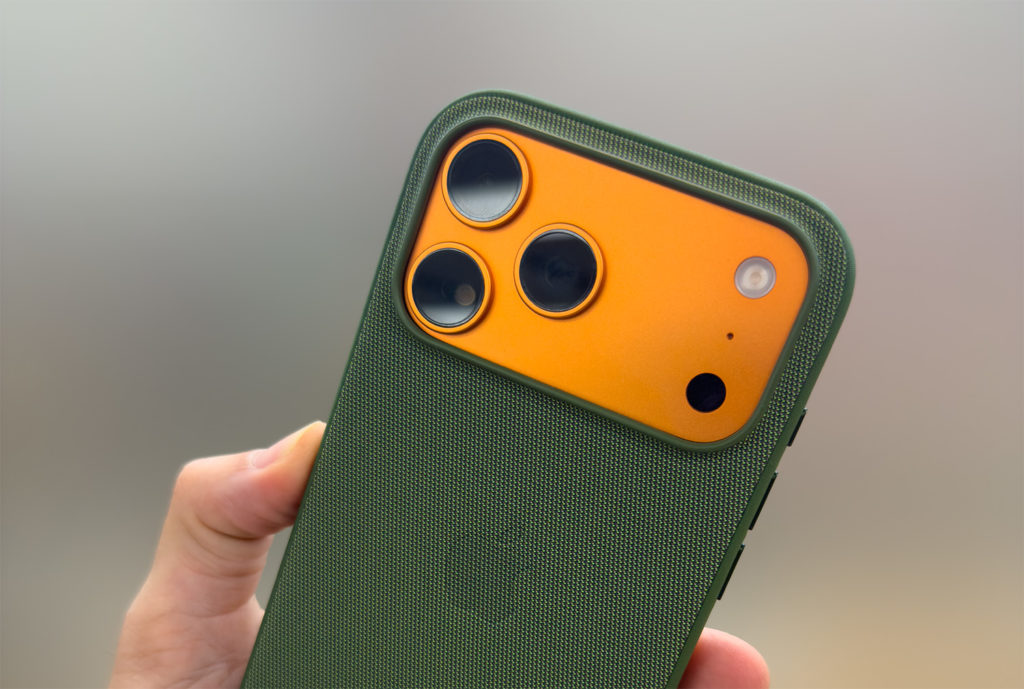
If you’re a video professional considering upgrading to the newest iPhone, here’s the headline: it’s orange. To help you decide if you want to upgrade, I’ve looked a little deeper, watched all the early reviews, and picked up my own personal iPhone 17 Pro Max at the earliest possible time. Due to the magic of timezones and ordering at the right time, I picked mine up at 8am here in Brisbane, on Australia’s east coast. It’s still yesterday in the US.

As usual, if you want to use a phone to shoot videos and photos, you’ll probably want to go for the Pro or Pro Max models. These chunky, heavier top-spec models have three bigger camera sensors (including a 4x telephoto), faster USB access, and more serious video recording capabilities.
If you’re not using your phone to capture images, feel free to consider one of the other models, but I won’t be reviewing them here.

The headlines?
- The regular iPhone 17 has a 0.5x and 1x lens but no telephoto.
- iPhone Air is very light and thin, but you get only one lens, one speaker, and less battery life.
- The iPhone 17 Pro has a smaller screen and battery life than the iPhone 17 Pro Max, but the same lenses.
Let’s tackle the iPhone 17 Pro Max — in orange, of course — in a few ways.
A big battery and bright screen
Compared to last year’s 16 Pro Max, the 17 Pro Max battery is larger and gives a longer running time. It’s too early to have run down my battery even once, but Apple’s claims have moved video playback life from 33 to 39 hours — or 37 if your iPhone still has a SIM tray, which it does in fewer countries than last year.
The space that the SIM tray would occupy is now filled with more battery in the US, Canada, and other countries where eSIM is the only option. (Notably, mmWave support is still US-only, and only US phones have an antenna cutout for it at the top of the phone.)

While the screen is the same size as last year, and has the same 1-120Hz refresh rate, this year’s Pro models up the max brightness to 3000nits outdoors, though the difference from last year’s 2000nits is not always going to be apparent.
Honestly, though — the orange model is very orange indeed. It’s shiny, so different environments will reveal different shades, and a bit of brightness is long overdue for the Pro iPhones. If you’re a fan of black, though — you’ll want to go for blue, or add a skin or a case.
A square selfie sensor
The front camera sensor is now square, higher resolution, and larger than before, giving more detailed, lower noise 18MP images, up from 12MP. However, the key innovation a square sensor brings is the ability to capture stills or videos in portrait or landscape without compromise. In all previous iPhones, using the selfie camera meant a drop in image quality, but no longer.
Using the same Center Stage technology that iPad front cameras and Mac webcams have used for a while now, the selfie camera here can (optionally) reframe to suit the number of people in a shot.

While this is a convenience for casual users, I suspect most solo pro photo and video shooters will turn this off and frame shots themselves. Happily, this reworked camera is also a little wider than before, and there’s more of a difference between the wider and cropped framing options.
With the tendency of humans to look at images of themselves, shooting in widescreen also used to bring the risk of eyelines wandering sideways, but that’s less of an issue with the camera above the screen.
A better, shorter telephoto
The telephoto lens moves from 12MP to 48MP to match the others — no need to sacrifice resolution or detail when zooming in. That top zoom has come down slightly, from 5x on the 16 Pro Max to 4x here, but the increased resolution and improved detail more than make up for it. The 2x and 8x lengths are a crop of the focal length before, and though they do use an optimized image pipeline to make them better than a straight crop in post, will only be 12MP rather than the 24 or 48MP (your choice) of a regular shot.

Natural bokeh on the new telephoto sensor means you can achieve decent subject separation if you have room to move back from your subject, and you won’t need to move as far away as you did with the 5x. [UPDATE: Make sure your subject is located beyond the minimum focus distance of ~120cm, or your shot will only be 12MP, presumably a crop from the 1x lens.]

Open Gate and ProRes RAW
Blackmagic Camera 3.1, updated today, can record in ProRes RAW — [UPDATE] and Final Cut Camera 2.0, now released, can do this trick too. More on Blackmagic Camera below, but here’s the info for Final Cut Camera:

Using the whole sensor gives you 4224x3024px in a 4:3 aspect ratio, which is more useful than 3:2 if you’re planning to reframe for portrait delivery. A wrinkle is that an external SSD is required for this to work, stabilisation isn’t supported, and no other codecs can be used for open gate recording. It’s also not (yet?) possible to record that nice new square front sensor in ProRes RAW, and you can’t record 1:1 open gate from it either.

Still, if you’re planning to shoot with an iPhone alongside a mirrorless, and you have enough storage space to cope with the data rate, you’ll have all the white balance control that you could want, with no over-sharpening and a clean image.
Though more casual shooters will probably be happy shooting in Log with the HEVC codec, it’s great that higher-end shoots are catered for too. Open Gate, ProRes RAW and also genlock… on a phone? A new Apple Log 2 brings a new wider gamut color space too, though you’ll need the latest Resolve 20.2 or the upcoming [UPDATE] now available Final Cut Pro (for Mac) 11.2 or Final Cut Pro (for iPad) 2.3 for full control, with new custom Demosaic controls available for ProRes RAW shot on iOS.

Updates to FCP, Motion and Compressor are on the App Store. Compressor also sees a new RAW Processing Inspector for third-party RAW video Media Extensions — great to see RAW format compatibility spreading further. Back up your existing apps before updating.
While I’d love to try out the Blackmagic Dock, I don’t have one to test just yet — hopefully a ProVideo Coalition writer will have one in hand soon.
Other recent updates
On Monday, macOS, iOS, iPadOS, visionOS and watchOS 26 all went live, and most users will focus on the new Liquid Glass UI. Video and photo users should enjoy the simplified Camera app interface, hiding modes other than Video and Photo by default. All the older options are still here, hidden by a swipe, and it works well on old and new phones. Camera Control has seen a slight rejig, and on an iPhone with this hybrid swipe-button, you can now remove unwanted camera settings from the menu that appears when you press lightly.

Spatial Scenes are a magic jump into 3D, letting you look around a photo in any direction. Depth is computed through the image segmentation, missing background areas are filled in, and as you tilt your phone around, objects shift around as if they’re inside an invisible box. This works on iOS, iPadOS and visionOS, and while it’s best in 3D in the Apple Vision Pro, it works amazingly well on the lock screen of handheld devices too.

I’ve been shooting a lot of stereo 3D content recently, and I’m torn, because while I’m really happy to see 3D done well on so many more devices, I now feel less need to shoot stereoscopic stills. Sadly, the iPhone 17 didn’t bring any changes to Spatial Video shooting, which is still stuck at 1080p30.
iOS added dual (front and back) camera recording, but the implementation isn’t as flexible as most pros would prefer. You can move your selfie image around while recording, and it’s all locked in: you only get a single combined video with a picture-in-picture overlay. For more options in the edit, use an app that allows dual recording and combine the clips yourself. (If you’ll excuse the plug, perhaps with help from a plug-in like my own PiP Kit?)
Even if you don’t have a new iPhone, grab the Blackmagic Camera update, as it now allows you to control other phones running the same app and sync both clips back to one phone, and also to use an iPad as a remote monitor.

Conclusion
I’ve only had the thing for a few hours, but so far, it’s an easy recommendation. Just like every year, it’s the best iPhone yet, but if you’re happy with your current iPhone and there’s no deserving family member to hand it down to, there’s probably no need for most people to upgrade every year.
Two out of the four sensors changing is a pretty big year in iPhone updates, and it’ll be a solid update for video and photo pros who shoot on iPhone. The new vapor chamber cooling system promises more reliability in longer shoots, and open gate, something I’ve enjoyed in my Lumix cameras for years now, offers a ton of flexibility.
And if you want it to be, it’s also orange.