


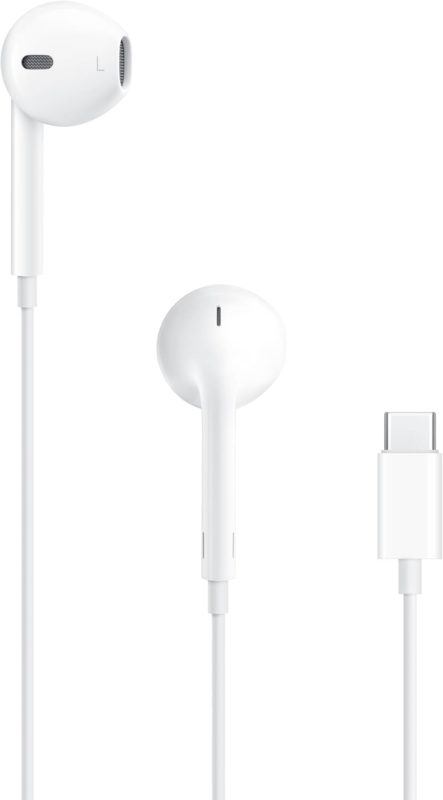

This article is not about the popular recent trend for many wireless AirPods users to return to wired, either for increased reliability, health (reduced radiation) or a new fashion statement. This article is to review the US$19 (or €19) Apple wired USB-C EarPods for remote audio guests, when combined with Descript’s Studio Sound, especially when there is not a «budget» for a higher-end solution for your remote guests. When I say «budget», I am not just talking about the financial investment in a microphone, windscreen or pop-filter, shockmount, boom/stand, potential audio interface and headphones. I am also talking about the complexity (for certain remote audio guests) to receive and configure all of the above, versus the simplicity of this solution. When we combine the high-quality microphone and 48-kHz/24-bit ADC (analog→digital converter) and DAC (digital→analog converter) built into the US$19 Apple wired USB-C EarPods, together with its foolproof mic technique, my suggested settings + best practices (see ahead) and Descript Studio Sound in post-production, the US$19 Apple wired USB-C EarPods can be ideal for those cases. Listen to my test recording ahead.
Mic technique
Even if you had the budget and were to send your remote guest a microphone, windscreen or pop filter, shockmount, boom or stand, cables and potentially an audio interface, you will still need to teach her/him regarding best distance and angle. Even if you are successful teaching your remote guest to have a perfect mic technique at the beginning, s/he might change positions during the recording, which would make it inconsistent. On the other hand, with the Apple wired USB-C EarPods, the only mic technique you’ll ever have to tell her/him is:
«Don’t touch the mic or cable during the entire recording!»
The distance will be consistent and ideal, as well as the angle.
Other best practices
Deactivate echo cancellation
Have your remote guest respond that s/he is using headphones if asked by your chosen service, whether you are using Cleanfeed, Descript Rooms, Ecamm Pro, StreamYard, or SquadCastFM (now part of Descript and included with Descript plans) so it will deactivate the echo cancellation. With some of these services, you can control this setting remotely for your guest.
48 kHz sampling
If your remote guest is using any modern Android, Chromebook, iOS (iPhone), iPadOS (iPad) or most Linux distributions, it will fortunately default to our standard 48 kHz sampling frequency with the US$19 Apple wired USB-C EarPods, whether you are using Cleanfeed, Descript Rooms (doesn’t currently support guests using mobile devices) StreamYard, or SquadCastFM (now part of Descript).
If your remote guest is using macOS or Windows, you should guide her/him to set it to 48 kHz in the system settings. With macOS, that’s in the Audio MIDI Setup. With Windows, it’s in the Sound Control Panel under the Advanced tab of your headset properties. In either case, set both the microphone from the EarPods and the EarPods itself to 48 kHz/24-bit, since they will appear as separate devices, each with its own setting. This is true whether you are using Cleanfeed, Descript Rooms, StreamYard, or SquadCastFM (now part of Descript).
Monitoring volume level for your remote guest to hear you


Have your remote guest set the monitoring volume (using the inline remote control of the Apple wired USB-C EarPods) to the lowest volume where s/he can hear you well (not too high), to avoid potential crosstalk. Have your guest do this adjustment only before the recording, not during the recording.
Test recording
The below audio file is published as uncompressed mono WAV 48 kHz, normalized at -23 LUFS.
The above recording was processed with Descript «Studio Sound» set to 77%, which goes beyond simple equalization, by:
- Reducing or eliminating background noise
- Reducing or eliminating reverberation
- Improving, reconstructing and even creating missing frequencies.
Precautions
- Even though Cleanfeed, Ecamm Pro, StreamYard and SquadCastFM (now part of Descript) support guests using modern Android, Chromebook iOS (iPhone), iPadOS (iPad) and most Linux distributions, Descript Rooms does not officially support guests using mobile operating systems like Android, iOS (iPhone), iPadOS (iPad). I hope they will add that capability to Descript Rooms, even if for audio-only.
- When using the Apple wired USB-C EarPods, your guest will not hear any sidetone, meaning that s/he won’t hear herself through the EarPods. Your guest will only hear you, other participants or any other audio source you may play to your guests. This is something some guests prefer, while others like to hear themselves via sidetone as they speak.
Conclusions
I do not recommend the US$19 (or €19) Apple wired USB-C EarPods for serious creators who have the knowledge, budget and discipline to use a studio microphone, windscreen or pop-filter, shockmount, boom/stand, potential audio interface, isolating headphones and maintain ideal distance throughout a recording. I do recommend the US$19 (or €19) Apple wired USB-C EarPods for certain remote audio guests, as explained above, but only by following the instructions and best practices as indicated in this article.
Lee este artículo en buen castellano
(Re-)Subscribe for upcoming articles, reviews, radio shows, books and seminars/webinars
Stand by for upcoming articles, reviews, books and courses by subscribing to my bulletins.
In English:
- Email bulletins, bulletins.AllanTepper.com
- In Telegram, t.me/TecnoTurBulletins
- Twitter (bilingual), AllanLTepper
En castellano:
- Boletines por correo electrónico, boletines.AllanTepper.com
- En Telegram, t.me/boletinesdeAllan
- Twitter (bilingüe), AllanLTepper
Most of my current books are at books.AllanTepper.com, and also visit AllanTepper.com and radio.AllanTepper.com.
FTC disclosure
None of the listed individuals or companies mentioned above has paid for this article. Allan Tépper paid US$19 + tax for the EarBuds reviewed in the review from his own funds. Allan Tépper pays the official rates for Descript. So far, he has not received any special discount or NFR. Some of the manufacturers listed above have contracted Tépper and/or TecnoTur LLC to carry out consulting and/or translations/localizations/transcreations. So far, none of the manufacturers listed above is/are sponsors of the TecnoTur, BeyondPodcasting, CapicúaFM or TuSaludSecreta programs, although they are welcome to do so, and some are, may be (or may have been) sponsors of ProVideo Coalition magazine. Some links to third parties listed in this article and/or on this web page may indirectly benefit TecnoTur LLC via affiliate programs. Allan Tépper’s opinions are his own. Allan Tépper is not liable for misuse or misunderstanding of information he shares.