



WordPress and other CMS (Content Management Systems) facilitate putting words in italics, bold or even underlined (with a keyboard shortcut) in the body of an article. However, WordPress, Linkedin and X.com don’t make it so easy to do this in the Title of an article. This is important, because the standard style (in many languages) indicates that names of books, magazines, movies, newspapers, theatrical plays, radio/podcast & TV shows within a sentence or phrase should be written in italics, as I recently had to do when I published the article New York Times refines best seller lists to accommodate audiobook growth. Although for many years, I have know how to put italics in a WordPress title using HTML code (refresher ahead), I didn’t know until very recently how to achieve italics in particular word(s) in places like Linkedin and X.com. Ahead, I’ll explain how to do both.
How to put particular words in italics in a WordPress title
To put particular words in italics in a WordPress title, like CapicúaFM or The New York Times, type one of two possible codes just before the words desired to be in italics:
<em>
or
<i>
Then, type the ending version after the last word to be in italics:
</em>
or
</i>
So, in the case of The New York Times surrounded by other words, you would type the title as:
A publication called <em>The New York Times</em>
So it will appear in the front end (to the public) as:
A publication called The New York Times.
How to achieve this in Linkedin or X.com

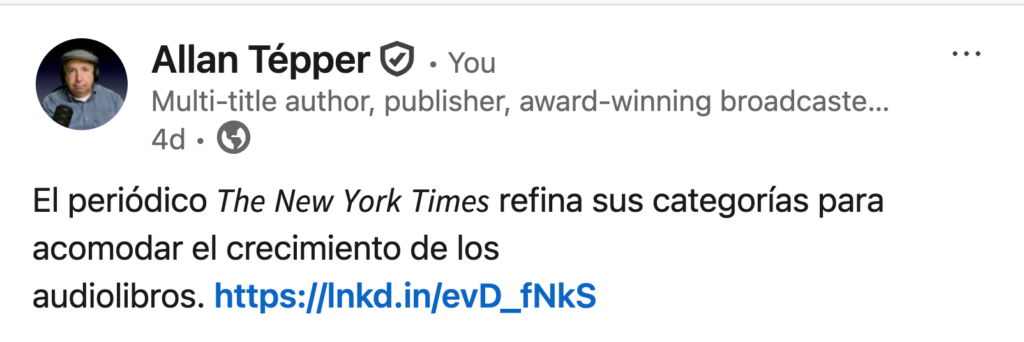
So far, the only way I know to do this with Linkedin or X.com is as follows:
- Visit the free web page from AirCarousels.com: aicarousels.com/free-tools/how-to-bold-text-on-x (which is not mine).
- Type the text as you would like.
- Select the words you would like to have in italics.
- Click on the letter I (a capital i in italics) in the toolbar.
- Click on the purple button below that says Copy to Clipboard.
- Paste it into Linkedin or X.com
This italics is a free service from AiCarousels and also gives the option of bold, underline, strikeout and lists.
Lee este artículo en buen castellano
Cómo utilizar itálicas en los títulos de WordPress, Linkedin y X.com
(Re-)Subscribe for upcoming articles, reviews, radio shows, books and seminars/webinars
Stand by for upcoming articles, reviews, books and courses by subscribing to my bulletins.
In English:
- Email bulletins, bulletins.AllanTepper.com
- In Telegram, t.me/TecnoTurBulletins
- Twitter (bilingual), AllanLTepper
En castellano:
- Boletines por correo electrónico, boletines.AllanTepper.com
- En Telegram, t.me/boletinesdeAllan
- Twitter (bilingüe), AllanLTepper
Most of my current books are at books.AllanTepper.com, and also visit AllanTepper.com and radio.AllanTepper.com.
FTC disclosure
None of the listed individuals or companies mentioned above has paid for this article. Some of the manufacturers listed above have contracted Tépper and/or TecnoTur LLC to carry out consulting and/or translations/localizations/transcreations. So far, none of the manufacturers listed above is/are sponsors of the TecnoTur, BeyondPodcasting, CapicúaFM or TuSaludSecreta programs, although they are welcome to do so, and some are, may be (or may have been) sponsors of ProVideo Coalition magazine. Some links to third parties listed in this article and/or on this web page may indirectly benefit TecnoTur LLC via affiliate programs. Allan Tépper’s opinions are his own. Allan Tépper is not liable for misuse or misunderstanding of information he shares.