


Has it really been two and a half years since we were given iZotope RX 11?! Well it’s been a long wait for the RX addicts amongst us, but finally RX 12 is here! It’s also been a slightly worrying time recently when we heard that Native Instruments, who absorbed iZotope back in 2023, had filed for insolvency and put themselves up for sale. Most people I speak to think it’s all going to be ok, and that insolvency is a normal path towards getting a new buyer, so I am not going to let that put me off.
As an editor, I sometimes dabble in sound and do like to keep up to date, particularly on noise reduction and dialogue reconstruction. It’s something that has advanced amazingly in recent years, due to the machine learning side of AI – the process of training models and neural nets on thousands of hours of material so that these tools can cleverly remove noise without affecting the voice.
In my previous tests (here, here and here) you can hear various competitors go head to head with RX, like Waves Clarity Vx, Accentize dxRevive and Supertone Clear who all do a fantastic job. Here I will compare the Dialogue Isolate module in RX 12 to RX 11, to see how far it has come, as well as Adobe’s Enhance Speech, as that is what I hear talked about most often by other editors. Adobe staff have mentioned in forums that the online version has a more powerful model, so I will test RX 12 against both that and the version built-in to Premiere (in the Essential Sound panel) which a lot of people will be using. I will also look at the new Scene Rebalance module for stem splitting.
Costs
In terms of costs, you can use the Adobe version online for free, kind of – you get audio-only (no video), one file at a time with no bulk processing, no strength adjustment slider, a 30-minute max file duration, 500MB per file, and 1 hour max per day. With Premium (included with Creative Cloud or Express Premium) you can upload video files, have batch uploads, use the strength slider which is a biggie, and have longer files. Premiere Pro costs $20 to $35 per month depending on your plan. RX Elements has a handful of modules, like De-Clip and Voice Denoise and is $100. RX Standard, which has a lot of the modules, including Dialogue Isolate (but only the lower quality mode), is $400, though cheaper if you’re upgrading. RX Advanced brings amongst other things the new Scene Rebalance (see below), the excellent Ambience Match and Spectral Recovery, as well as a higher quality offline mode of Dialogue Isolate and is $1400. Not cheap for sure, but it is commonly owned by audio post people as it’s been trusted for many years. (Prices to the nearest $5 as always and you can compare versions here).
What’s new in RX 12?
The headline addition in RX 12 Advanced for us lot is Scene Rebalance, which brings the separation of dialogue, music and effects layers where most software, including RX11, have focused on separating audio into musical layers like drums, bass etc. It’s specifically designed for film and TV work, separating a finished stereo mix into dialogue, music and effects layers – without needing the original stems. Of course stems should always be made, but I know I came across this situation recently where they hadn’t been and when using a past video you don’t want the music getting in the way and the ability to extract dialogue and effects at high quality is great.
Stems View is new across Standard and Advanced and ties into this stem-based approach – it lets you isolate an element using Scene Rebalance, Music Rebalance or Dialogue Isolate, then apply any of RX’s other tools to that isolated stem before recombining. De-bleed has been rebuilt from scratch and no longer needs a reference track to work, and is now also available as a real-time plugin. Music Rebalance and Dialogue Isolate both have updated neural nets and new plugin versions too (though I would only plan on using the offline high quality version).
A few others worth noting: Breath Control has been rebuilt with much-improved ML detection, and there’s a new Trim Silence module that auto-detects and removes silences – a genuine time-saver for long dialogue or podcast editing, though this is already is most every other software out there!
The question for me, as always, is whether the core noise reduction and dialogue isolation has actually improved in a meaningful way. Let’s see.
Others’ thoughts on RX 12
Here are a couple of videos worth watching before we get to my own tests. First, iZotope’s own introduction:

And this one from A Joe-Blog Composer:

The general consensus seems to be that RX 12 is a genuine improvement, particularly the Dialogue Isolate quality, but that the jump from RX 11 is incremental rather than transformative for most modules – with the exception of Scene Rebalance, which is a genuinely new capability.
Testing methodology
As with my previous tests, I’m running a head to head on some different scenes, with Dialogue Isolate in RX 12 against RX 11 with the same settings and against Enhance Speech – both online and within Premiere Pro.
As usual I am pushing the tools fairly hard to try to hear where the differences actually lie, but I encourage you to do your own tests on the free trial on the types on problems you often encounter.
Test 1: Dialogue Isolate – Steady background noise

What I’m hearing here:
- On my studio headphones, I hear a noticeable improvement in RX 12 over RX 11. The voice is clearer with less artifacting, but granted it’s not massive.
- Enhance Speech online is MILES better than the version in Premiere here.
- Enhance Speech sounds great, but it has changed the voice a bit. RX is truer to the original.
Winner: iZotope RX 12
Test 2: Dialogue Isolate – Poor phone recording with room reverb
With this test, it’s more about the de-reverb, but with plenty of noise reduction as well.

What I’m hearing here:
- This time there is not that much improvement if any in RX 12 over RX 11.
- Enhance Speech online is again a lot better than the version in Premiere here.
- Enhance Speech sounds better to my ear here – it is less like the original, but in a way it just sounds like it was recorded on a better mic.
Winner: Adobe Enhance Speech (online)
Test 3: Dialogue Isolate – Heavy traffic
This is the hardest test of the three, with a nightmare amount of background traffic which is far from steady state noise.

What I’m hearing here:
- RX 12 has significantly less artifacting here compared to RX 11 on the voice and yet it has the occasional booming reverb artificact ringing through. Now it may be that with a less difficult scenario you wouldn’t hear this, so I’ll call it an improvement.
- Enhance Speech online is again I think a bit better sounding and doesn’t have any artifacts, but there are plenty of situations in the professional world where being truer to the original is what you need.
- The Premiere Enhance Speech did much better this time, strangely on the hardest test. I mean it’s not as good, but it did do quite well.
Winner: Adobe Enhance Speech (online)
Test 4: Scene Rebalance – Stem Split
iZotope are a bit late to the party with this one, but it will be very useful to have inside RX and is a great addition. And looks great too!

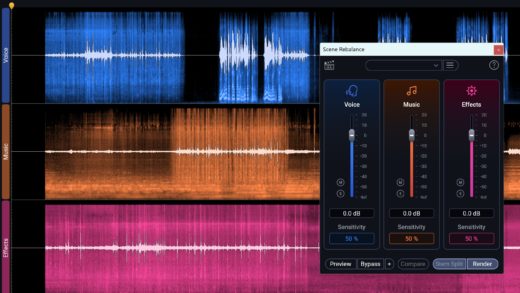
Until this version of RX, my go to for stem splitting has been the Bandit model inside the beta version of UVR (Ultimate Vocal Remover) so I’ll test both. (If you’re interested, find the Roformer Beta install or patch here and then go to download centre > MDX-Net > download Bandit Plus)

What I’m hearing here:
- RX 12 has done a much better job of clean vocal separation than UVR – no artifacts at all, where UVR definitely has some.
- RX 12 hasn’t done everything right – it does have some SFX on the dialogue track when there is no speaking, which UVR did not do.
- But in terms of usage, which for me would often be just to get the music out (meaning I don’t mind a little SFX bleed onto the voice), RX 12 has done a banger of a job here.
Winner: iZotope RX 12
Conclusion
RX 12 represents a subtle but important step forward for iZotope, and after what felt like a long two-and-a-half years, it’s good to see them push things on. The improved neural nets they have claimed in Dialogue Isolate (and other places) do seem to be there. And any noticeable improvement makes a difference to those who have spent years training their ears.
Scene Rebalance has really impressed me with how well it did on my test clip. A lot of separation tools want to spit out instruments, so it’s great that this is designed from the ground up for dialogue, music and effects.
Is it a must-have upgrade from RX 11? For audio post professionals using Advanced, the combination of Scene Rebalance, the improved Dialogue Isolate and a rebuilt De-bleed that no longer needs a reference track makes it a fairly compelling case. For editors using Standard mainly for Dialogue Isolate and basic noise reduction, the upgrade is more of a judgement call depending on how often you’re in the weeds with problem audio.
As for Adobe Enhance Speech within Premiere – it remains very patchy compared to the online version and I was reminded of that doing these tests. But if you do take the time to upload to the web version of Enhance Speech, it is remarkable – as long as you don’t mind the possibility of the voice changing slightly.
iZotope RX (this version as each version before it) remains a very impressive tool with so many modules to play with (50 in Advanced). It really is the massive Swiss Army knife of the audio world.
As always with this space, no single tool wins every test – build your toolkit accordingly.