


I’ll be the first to admit that I am not yet digging too incredibly deeply into the world of generative AI video. Certainly nowhere near the level of Jeff Foster and all that he is doing. But I do know that I do like the idea of AI-generated animations. There are many times in a video edit where we need a simple illustration or animation, and we just don’t have the budget to hire an animator. I’m certainly no animator, but I was working on a little documentary project recently where the voice-over said this:
… in Ohio, Texas, Illinois, Indiana, and elsewhere
We didn’t have a ton of coverage for this 7-minute piece, and we certainly didn’t have the budget to animate all of it. We’d already spent money on two separate pieces of animation, but I thought this could be a good place where short animation could help illustrate what the voice-over was saying. This was a historical film, so a historical look was what we were going for. I personally don’t subscribe to a bunch of generative AI services, but knowing that Google’s Veo3 model was recently added to Adobe FireFly as an Adobe subscriber, FireFly was where I went.
This was my first prompt using the Firefly video model:
An old United States map that animates to highlight the states of Ohio, Texas, Illinois, Indiana, in that order
And this is the result:

Okay, not what I wanted. The jibberish text is not acceptable. Since I’m not an expert prompt writer it was worth revising the prompt:
An old United States map that doesn’t contain any text but the map slowly animates to highlight only the states of Ohio, Texas, Illinois, Indiana, in that order
While I did like the style of the map I didn’t love it so I jump right to the Veo3 model in Firefly for my second attempt of the prompt above. This is the result:

That’s a little bit better. I really like the style of that map, but again, it produced gibberish text on the map and didn’t highlight the states that I mentioned.
I got even more specific on the prompt:
An old United States map that that is only the outline of the country and the states and that map doesn’t contain any text at all. After a second certain states on the map slowly become highlighted in this order: Ohio, Texas, Illinois, Indiana. Only those states are highlighted when the animation on the map ends. Nothing else at all. None of the states are named and there is zero text or letters on the map.
Still using Veo 3, this was the result:

That at least got me closer without the gibberish text on the map, but I feel like the style isn’t quite as good as the one above. But the animation and the state highlights are all off.
Next, I thought, “You know what, perhaps the model is off.” Since Firefly also supports the older Veo 2, I thought I would give it a try with the same prompt via Veo 2. I mean … perhaps an older LLM is better for a certain task, right? 🤷♂️ This was the result:

That generation felt like it was regressing backwards as the animation style is worse and I’ve got text back on the map.
And since I’ve gone this far, why not jump back to the Adobe’s own Firefly video model and try my much more detailed prompt and see what results that gave me:

At this point, I felt like the AI was just trolling me. I gave up and found some other B-roll to cover the line of narration in the film. What did I get for my time? The use of nearly 5000 credits in Firefly. No, I wasn’t out much as that’s just part of the package I have. But imagine if this was a mission-critical video that I had to get just right. I could have easily run out of credits. I haven’t used a lot of the generative video tools, but they all need some way to generate a very quick, very low-res draft preview before spending big time credits on getting a usable piece. Perhaps some of them have just that. As one who doesn’t do a ton of generative video, and I thought this was an interesting exercise in the process.
Fast forward a couple of weeks
I drafted this article and then didn’t publish it for a couple of weeks. Since AI advances happen quickly, I thought I would give it a try once again coming back a couple weeks later.
Here is the Firefly result:

Adobe Firefly has a prompt enhancement feature, so I allowed it to enhance the last prompt from above. This is what it enhanced the prompt to:
A static, detailed outline of the United States map with no text or labels. The camera focuses on the map, which remains unchanged for a second. Then, the animation begins, gradually highlighting the outlines of Ohio, Texas, Illinois, and Indiana in a soft, glowing effect. The rest of the map remains unaltered, maintaining its clean, minimalist design. The video ends with these four states highlighted, creating a clear visual focus without any additional text or elements. The overall style is clean and modern, emphasizing the geometric shapes and borders of the states in the style of Vector Art.
I like that and I can see that getting a better result, but this was the enhanced prompt result:

One thing I do like about FireFly is I’m constantly reminded of how many credits a generation costs.
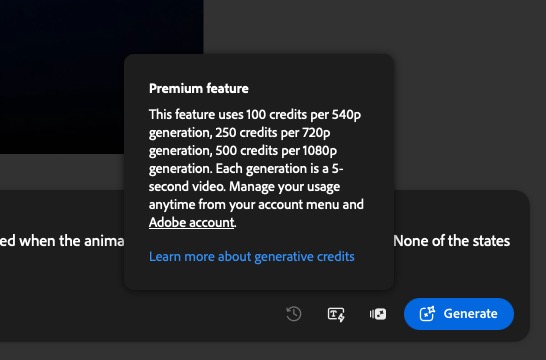

This little button in the corner is a handy reminder. It can often take so many generations to get a useful result so you will use your credits. I like that a low-res generation is relatively cheap in the form of credits. You can enhance your prompt at 540 resolution and then generate the final version at a higher resolution costing more credits. That’s at least something when it comes to how to spend your credits. Other generative video systems and LLMs may operate differently as far as the cost and credit function. But at this point, I don’t spend extra money per month on another system as I just don’t have the need … yet.
And how did the Veo3 model do with that “enhanced” prompt a couple of weeks later?

I asked a friend who is deep into AI, generative AI, why I couldn’t get a desirable result. His response makes sense:
You can’t just prompt it with a specific graphic animation, because AI works by diffusing hundreds of videos that are doing the same thing. There’s not gonna be animations of maps with states being highlighted for it to diffuse. Like if you have a girl and you say “woman dancing” it looks for videos of women dancing, diffuses them into noise. And from the latent point cloud of noise it renders the densest areas of the point cloud as motion. But it’s taking hundreds to thousands of videos of women dancing to do that. The less reference it has the more it hallucinates. If you ask it to animate a map of the United States it’s gonna be looking for videos of maps of the United States to diffuse. But if you say highlights specific states, it’s not gonna know what that is unless there are videos of that labelled as such in its library. When you ask for something rare that it doesn’t have a lot of reference for it just finds the closest thing and diffuses it. And that’s why you get weird stuff when you get too creative. There might be videos of maps and it might know how to animate them as if the camera is moving. But it probably won’t know how to highlight states. Generative AI is a diffusion model mixed with a large language model, but all the large language model does is look for videos with the tokens in your prompt. A token is like a meta tag. So if you say map, it just looks at videos with maps. Generative AI is still pretty stupid.
That makes a lot of sense considering how specific of an animation I was asking it to make. On the one hand, it kind of disappoints me because this is a place where generative AI could be so useful. But on the other hand, I like keeping animators and motion graphics artists employed. I just wish we always had the budget to employ them.