


With AI tools integrated directly into elevate.io, generation happens seamlessly in the cloud “so that you can keep editing smoothly without any interruptions”, the company claims, adding that the powerful AI features like auto captions, AI text to speech, and AI image generation supercharge your editing while allowing elevate.io to run smoothly in your browser, without any download or installation required.
Now the company announces new features to elevate the workflow experience, that perform like you’re working on a high powered desktop system, but in reality, the company says, “work beautifully” on low-end modern systems as basic as a Chromebook or MacBook Neo! Here’s a summary of the new features you’ll find in elevate.io:
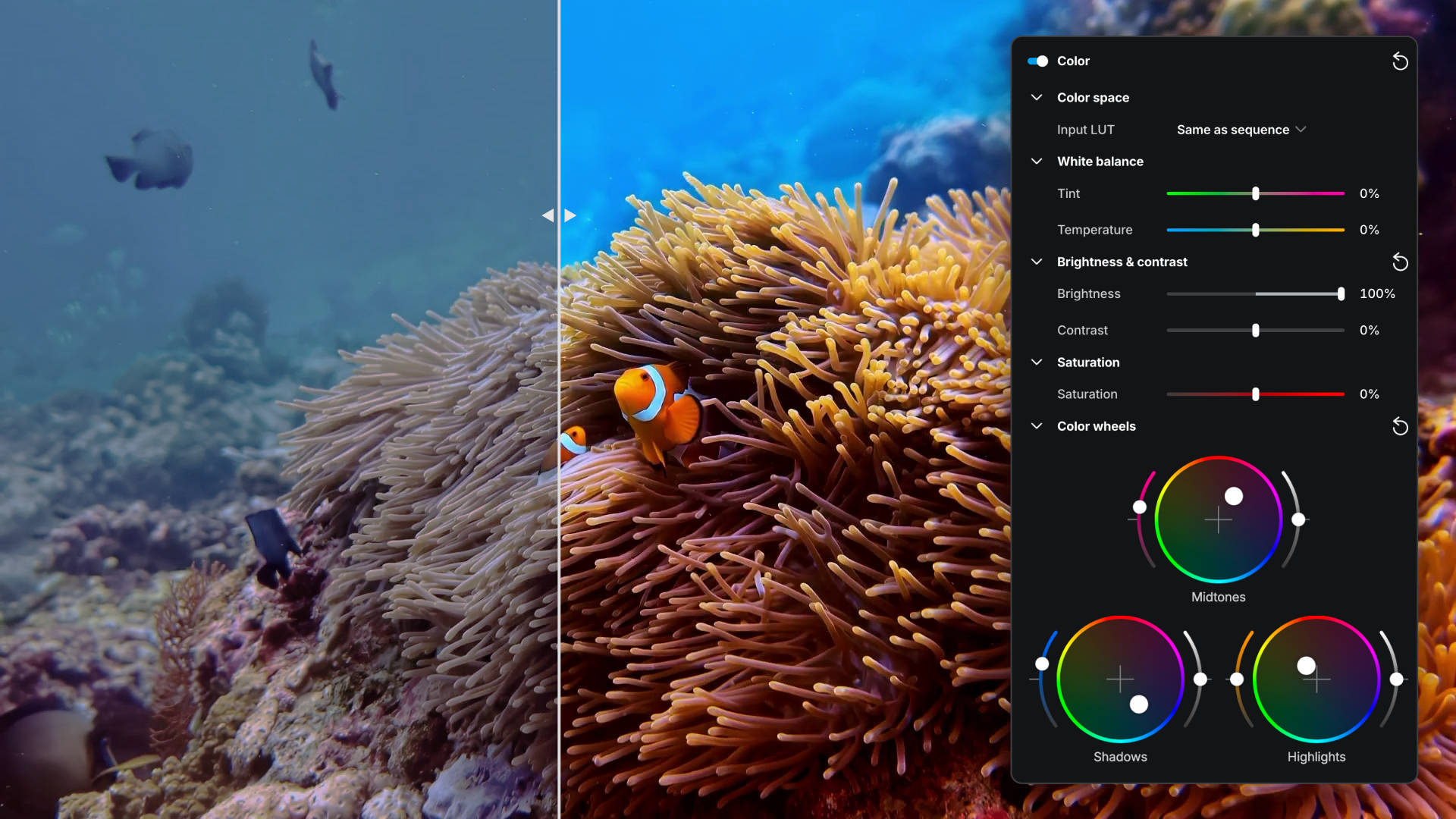

We’re adding Color Wheels for more advanced, intuitive colour correction and grading. These controls allow you to independently adjust the colour balance of the shadows, midtones and highlights, helping you shape the look and feel of an image with far greater precision.
Color Wheels are ideal for correcting unwanted colour casts, warming or cooling specific tonal ranges, adding subtle cinematic stylisation, or matching shots captured under different lighting conditions. For example, you might cool the shadows while keeping skin tones natural in the midtones, or gently warm the highlights to create a softer, more polished feel.
Together with existing brightness, contrast, saturation and white balance tools, Color Wheels will give editors significantly more control over the final image, without needing to leave elevate.io.

elevate.io will support Input LUTs that correctly interpret footage captured in common camera log formats and convert it into Rec.709 for editing and viewing.
Many modern cameras record in flatter, lower-contrast formats such as Canon C-Log, Sony S-Log, Panasonic V-Log and others. This preserves more image information for grading, but the footage can initially appear washed out and lifeless. Input LUTs provide a fast and accurate starting point, transforming that footage into a more natural-looking image before further creative adjustments are made.
For users working with professional or prosumer camera footage, this means a more streamlined colour workflow, more reliable previews, and less manual correction just to get footage looking “normal” before the real grade begins.
In & Out Points
You’ll soon be able to define In and Out points directly on the timeline, giving you precise control over the section of your edit that gets exported. Rather than exporting an entire project every time, you’ll be able to quickly mark a specific range and render only that portion.
This is especially useful when reviewing a work-in-progress, sharing a short section for feedback, testing a particular sequence, or creating multiple cutdowns from a longer edit. In and Out points already exist when working with source footage in the preview window; this update brings the same familiar workflow to the timeline itself.
Quick Animations
Quick Animations will make it easy to bring clips, text, graphics and logos to life without building keyframes manually. You’ll be able to apply animations at the beginning or end of a clip, as well as animations that continue throughout its duration.
They’re perfect for common motion design tasks: flying text onto the screen, having a video drop away as it ends, fading or sliding elements into place, or giving a logo a subtle pulsing motion in the corner of a composition. Animations will be quick to add, easy to configure, and include adjustable easing options so movement can feel smooth, snappy or more natural depending on the effect you want.
This gives creators a much faster way to add polish, energy and visual emphasis to their edits, particularly for social content, branded videos, explainers and marketing material.
Discover the platform elevate.io following the link. You can start for free to see if the solution fits your needs and workflow.