


There are few questions that stir up the film and TV community like this one – is my work being used to train AI? It was part of what drove Hollywood’s 2023 strikes, and it’s still at the center of union negotiations. In 2026, the Writers Guild and Directors Guild both pushed for more openness about how companies use their members’ work to train AI. Editors, like myself, have been uneasy too, with many worried about what AI could mean for their jobs, especially for assistants. At the same time, editors aren’t rejecting AI outright. Most say they want tools that help them work, not tools that replace their judgement. That’s the backdrop for Avid’s newest AI tools, built with Google. They promise to take on the dull prep work, but they also have to look at your footage to do it. This article explains what Avid Ready to Edit does, how it differs from Ready to Play, and what really happens to your footage and data once AI gets involved.
Ready to Edit is a new AI “assistant” inside Avid Media Composer. You tell it what you want in plain English, and it does the prep work before an edit: syncing, transcribing and sorting footage into bins. It’s built with Google, and it’s part of a much bigger push by Avid to put AI all through the editing process.
The question most people ask is “Is Google training its AI on my footage?” Under business accounts, the answer is no, by default. But that’s not the whole story. The bigger questions are what copies and summaries of your footage get made, where they’re kept, and whether the account being used is a proper business account or someone’s personal one.
Ready to Edit vs. Ready to Play: not the same thing
Avid has two AI tools with almost the same name, and it’s easy to mix them up. This article is mainly about Ready to Edit, but Ready to Play comes up too, so here’s the difference:
| Ready to Play | Ready to Edit | |
|---|---|---|
|
Is it out? |
Yes, released November 10, 2026 |
No, only shown in demos so far (IBC, September 2026) |
|
What it’s for |
Making and changing footage, and describing what’s in it |
Prepping a project before the edit |
|
What it does |
Creates video clips from a text description or a still; changes existing shots (like removing a boom mic); writes descriptions of footage into clip notes |
Syncs picture and sound; transcribes dialogue; sorts footage into bins |
|
How you use it |
Pick a tool and give it a request |
Type a plain-English request and it works through the steps itself |
|
Who can use it |
Media Composer Ultimate and Enterprise, with a Google Cloud business account |
Not yet announced |
The simple way to remember it: Ready to Play makes and changes footage. Ready to Edit gets your project organized. Both are built with Google, and the privacy questions apply to both.

What is Ready to Edit?
Avid first showed Ready to Edit at the IBC trade show in Amsterdam in September 2026, alongside the Media Composer 2026.8 update. It sits in a panel inside Media Composer. Avid says it’s meant to speed up prep “without compromising the creative process.”
What makes it different is that it can handle a whole job with several steps on its own, rather than one small task at a time. Most AI tools in editing so far have done one thing: transcribe a clip, make a shot, describe some footage. Ready to Edit is meant to take a request like “get today’s footage ready” and work through all the steps itself, using Media Composer’s own tools. Right now it has only been shown in demos. As of this article (Nov 2026), there’s no release date, price or full list of features.

What it does
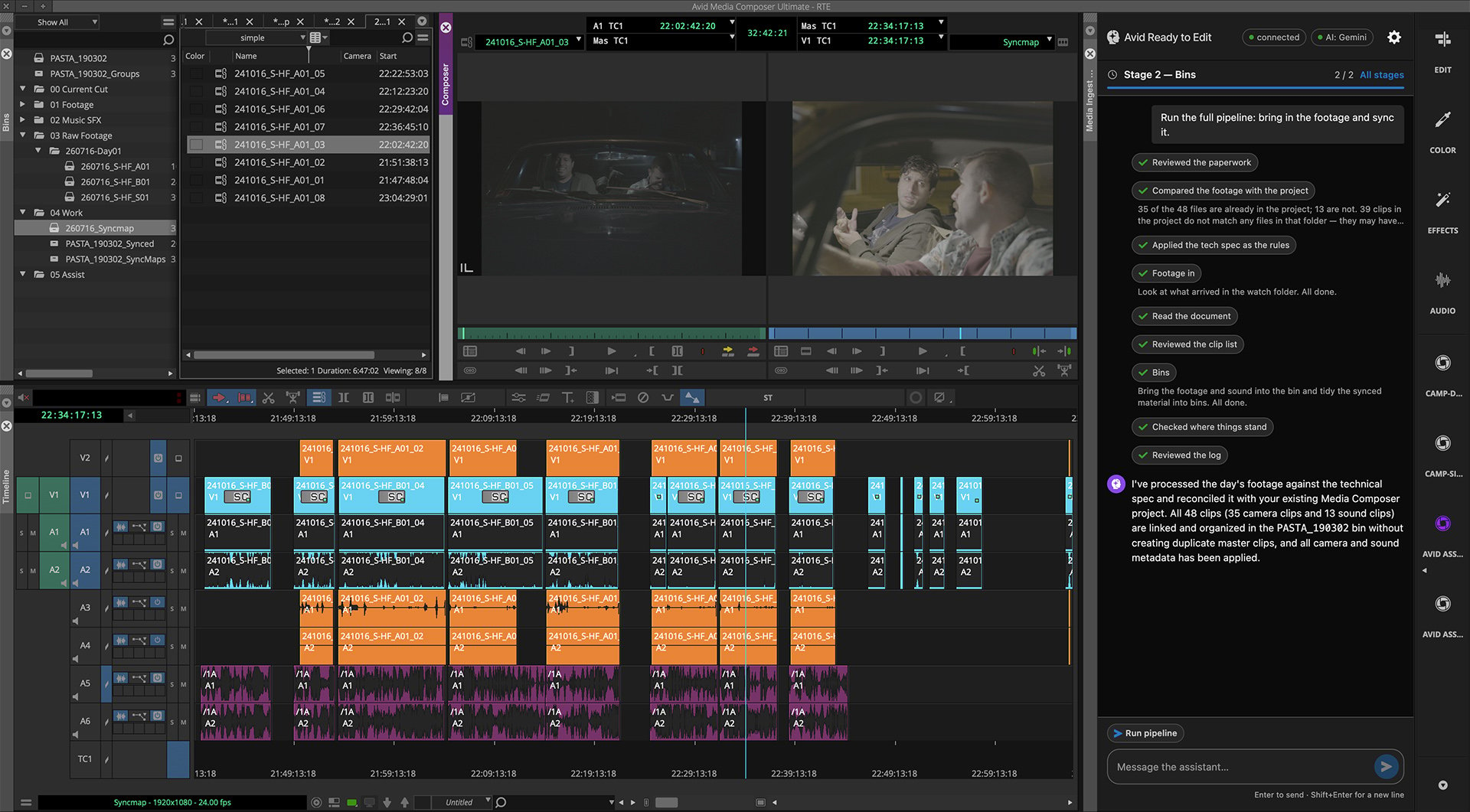
According to Google’s announcement in September 2026, editors can type plain-English requests to have Ready to Edit:
- Sync media, lining up picture and sound
- Transcribe dialogue, creating time-coded transcripts linked to each clip
- Organize bins, sorting footage so it’s ready to cut.
In other words, it’s the work an assistant editor usually does between wrap and the start of cutting. Instead of doing each step by hand, an editor could type something like “sync today’s cards and organize the bins by scene.” Ready to Edit is one piece of a bigger set of AI tools Avid is building:
- PhraseFindAI Multicam Auto Cut is already out in version 2026.8. It picks the camera angle based on who’s talking and cuts at natural breaks in speech. It’s the first AI in Media Composer that actually makes editing decisions.
- Ready to Play came out on November 10, 2026. It can generate video clips, change existing footage (like removing a boom mic), and describe what’s in your footage. It uses Google’s Gemini and Veo AI.
- A Gemini panel inside Media Composer can make B-roll, find stock footage, and tag, log or translate media. It signs in with people’s existing Gemini accounts.
- Avid Content Core is Avid’s online system for storing and managing footage. It automatically transcribes and describes footage as it comes in, so you can search it by typing what you’re looking for.
- Avid Assist is a control system for keeping all these AI tools in check. It was shown as a preview at IBC.
Put it all together and you get a system where footage is analyzed as soon as it comes in, sorted by AI, searchable by description, partly cut by AI, and filled out with AI-made shots.
Where your footage goes
To sync, transcribe and organize your project, the AI has to look at your project: the sound, the picture, the clip names, the bins and the notes. That’s where the privacy question starts.
Google’s announcement says your high-quality footage can stay in your company’s own Google Cloud account. But the processing, the analysis and the AI work are run centrally by Avid’s system. The announcement doesn’t say what gets kept in that central system (transcripts, descriptions, logs of what the AI did) or for how long.
So far, none of Avid’s announcements explains how its AI tools handle your data. They say the tools are “secure,” but they don’t say how long data is kept, whether it’s used to train AI, or where it’s processed.
Is your footage training the AI
This is the question most editors ask first. The answer depends on what kind of account is being used.
With a Google Cloud business account, the default answer is no. Google’s business terms say it won’t use your data to teach or improve its AI without your permission. Google says this is on automatically for business customers, so you don’t need to opt out. Ready to Play needs a Google Cloud business account, so it likely works under these rules. We don’t yet know how Ready to Edit will be billed.
“Not used for training” doesn’t mean “not kept.” Even with a business account, Google can hold on to your data for a while:
- Short-term memory: Google’s AI keeps recent requests in memory to respond faster. Google says this is never used for training, and it can be switched off.
- Abuse checks: If Google’s automatic filters flag something as suspicious, Google can keep the request for up to 30 days to check whether its rules were broken. Companies can apply to be exempt.
- Google Search: If the AI uses Google Search to look things up, Google keeps a record of those searches for up to three days.
Google says it’s possible to have none of your data kept at all, but the company has to set that up itself. A production that never changes its settings may be keeping more than it thinks.
How Gemini compares with Claude and ChatGPT
Editors use other AI tools too, like Anthropic’s Claude and OpenAI’s ChatGPT, sometimes on the same project. The three companies’ rules are more alike than different. What really matters is the kind of account: each company has one set of rules for businesses and another for personal users.
Business accounts: none of the three trains on your data by default.
- Google: No training without permission, and that’s on automatically. Data can still be kept for a short time, as explained above, unless the company sets things up so nothing is kept.
- Anthropic (Claude): Its business products don’t use your data for training by default. Anthropic has said business requests are deleted within 30 days unless agreed otherwise.
- OpenAI (ChatGPT): Business data hasn’t been used for training since March 2023 unless the customer opts in. Records are kept for up to 30 days to check for abuse. Having nothing kept at all needs OpenAI’s approval.
Personal accounts: this is where they’re different.
- Gemini on a personal Google account: The “Keep Activity” setting is on automatically for adults. Real people, including outside contractors, read some chats to help improve Google’s AI. Chats they’ve read are stored separately and kept for up to three years, even if you delete your history. Even with the setting off, Google keeps chats for 72 hours. And turning off Gemini’s setting doesn’t change your other Google settings, so a personal Gemini account is tied into everything else Google knows about you.
- Claude on a personal account: Since August 2025, users choose whether their chats can be used to train the AI. If you say yes, your data is kept for five years. If you say no, it’s kept for 30 days. Deleted chats aren’t used for future training.
- ChatGPT on a personal account: Depending on your settings, OpenAI may use your chats, images and files to improve its AI. “Temporary” chats aren’t used for training, but OpenAI may keep a copy for up to 30 days for safety.
| Google Gemini | Anthropic Claude | OpenAI ChatGPT | |
|---|---|---|---|
|
Business account: trains on your data by default? |
No |
No |
No |
| Business account: how long data is kept | Short-term, up to 30 days for abuse checks, unless set to keep nothing |
Up to 30 days unless agreed otherwise |
Up to 30 days for abuse checks; keeping nothing needs approval |
|
Personal account: used for training by default? |
Yes (setting is on for adults) |
Your choice, asked at signup |
Can be, depending on your settings |
|
Personal account: do people read chats? |
Yes; chats they read are kept up to 3 years |
Not spelled out the same way; feedback is separated from your name before it’s used |
Authorized staff can see content; OpenAI tells users not to share anything they wouldn’t want read |
What the AI actually sees is different, too. Gemini and Veo can take in video and sound directly. So when they’re built into Media Composer, the AI is looking at your actual footage and hearing your actual dialogue. Claude and ChatGPT are mostly used with text, documents and still images. If you paste a transcript or script into them, they see the words, not the picture. A built-in assistant like Ready to Edit sees the most: the whole project, including clip names, bins, notes and the footage itself, because it needs all of that to do its job.
The takeaway is the same whichever company you use: use business accounts under a contract the studio has signed, not editors’ personal logins. That’s why the Gemini panel is the specific worry. Google says it works with people’s existing Gemini accounts. A studio’s business contract doesn’t cover footage an editor sends through a personal Google account, which comes with Google’s personal-account settings: activity on, people reading chats, and reviewed chats kept for years. Productions should check which account the panel is signed into.
What the AI learns anyways
Even if Google never trains its AI on your footage, a lot still gets “learned” about your project. That’s useful, but it comes with risks.
Your footage gets turned into searchable text. Every transcript, description and tag is a lasting record of what’s in your footage: who said what, what’s on screen, where it was shot. That’s what makes it searchable. But it also means the plot of an unreleased show, a documentary interview or a confidential legal recording now exists as easy-to-search text, not just video files. If that leaked, it could be worse than leaking the raw footage, because it’s already summarized and searchable.
Your work becomes business data. Avid’s Content Core Insights (again, by Google, is a new Avid tool that gives higher ups, outside of the core editorial team, visibility into production activity and its costs, so executives can see what each piece of content costs to make and how staff and equipment are being used), lets executives ask plain-English questions about staffing, costs and how content performs. That turns editing work into numbers: how editors work, how long tasks take and what footage gets used can all be tracked in ways editing teams haven’t dealt with before.
Your company’s AI gets to know your footage. Google says some of its services build a custom version of the AI for each customer, used only for that customer and not to improve Google’s main AI. So your company’s AI may get better at understanding your material over time. That’s useful, but it raises questions: Who owns it? Can you take it with you? Can it be deleted when the project ends?
Avid may be learning too. Avid hasn’t said what information it collects about how people use Ready to Edit, like what editors ask for, or which AI suggestions they accept or reject. That kind of information is exactly what makes AI assistants better. Google’s no-training promise covers Google. It doesn’t say anything about what Avid collects.
What should we ask before using it?
- Which account does each feature use: the production’s own Google Cloud business account, Avid’s, or an editor’s personal Gemini account?
- What transcripts, descriptions and records of what the AI did does Avid keep, where, and for how long?
- Has the Google Cloud account been set up to keep as little data as possible: short-term memory off, exemption from abuse checks requested, and Google Search turned off?
- Does Avid collect information on how editors use its AI to improve its own products, and can that be turned off?
- Can all the AI-made notes and search data be completely deleted when the project ends, and taken elsewhere if the production switches companies?
- Do the studio’s security rules and any union or guild agreements allow this footage to be processed by online AI at all?
I think its safe to say that Ready to Edit takes on the least controversial part of AI in editing: the prep work nobody enjoys. Syncing and sorting footage aren’t creative decisions, and handing them off could free up real time for editors and assistants. But it’s the first step into a much bigger system, one designed to understand everything in your footage and make it searchable and trackable across a whole company.
On the narrow question of whether your footage trains Google’s AI, the default answer for business accounts is reassuring. The bigger issues are elsewhere: which account each tool uses, what summaries of your footage get made and kept, what Avid learns from how you work, and who controls all of it when the project wraps. Avid and Google haven’t answered those questions publicly yet. Until they do, productions should treat them as open.